Hey all
I need a little help understanding fan speeds with regards to the cpu, 1st of i understand that the hotter the cpu the faster and louder it will become, now if i can explain a little or at least try
some year ago or more i built my system, specs can bee seen in my profile,
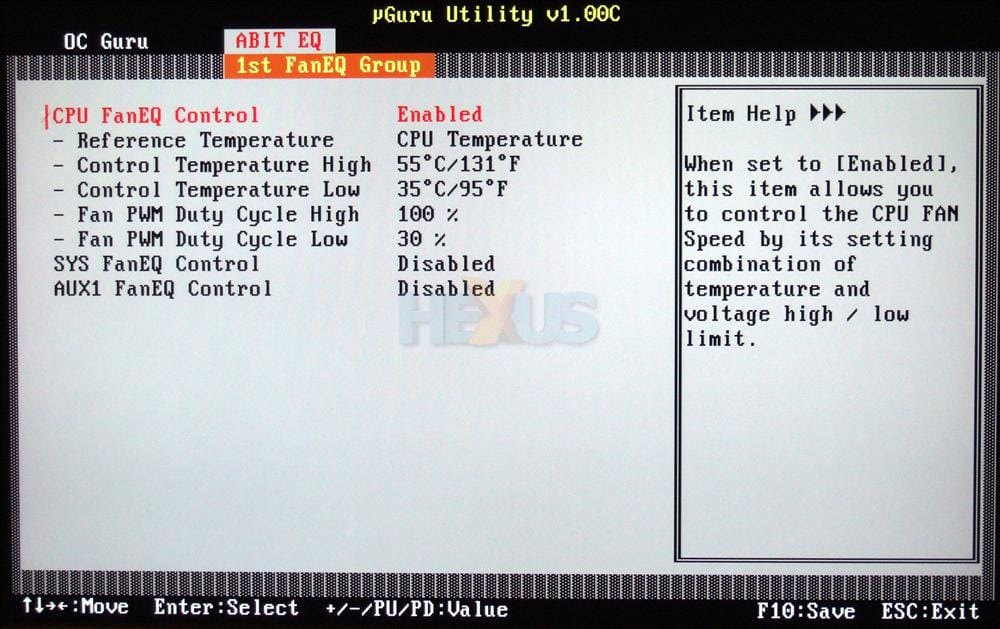
I have not been 1 for using the over clocking software that came with my mobo (U_GURU), well not so long ago but since before the hot weather i noticed that my CPU fan was running rather loud well enough to annoy me anyway, I have always had the U-GURU software installed but like i say never really used it, it just was there.
ok so with the rather loud fan noise i decided to take a look and noted that the fan was running 3,600 RPM under idle and load with temps of around 30-40 oC(is this normal?) i also tried to enable cool and quiet but i got Overclocking failed from the U-guru util, well i wasn't asking it to Overclock just to turn on the damn cool and quiet option.....so WTF? well it activated and i left it but only for the system to freeze/crash some hour or 2 later, well anyway i thought maybe i need to unclog all the dust so pulled the side of ect but no dust build up in the heat sink but still blasted it with the airline regardless to still find that the fan was running quite noisy, well i asked around in some repair shops ect and got the usual rubbish about faulty ram ect (ROFLMAO) anyway i though ok ill remove the ram ect and see if out of chance they maybe rite, nope nothing changed.
i ran also pc check from Eurosoft UK Ltd. :: Diagnostics and Test Management Solutions for all scales of business and again that didn't bring up any faults
now thinking the stock CPU fan from my Q6600 was maybe failing or the bearings had had it i ordered a new one, i got an OCZ vanquisher new updated edition, cleaned up the cpu of the old thermal pad cleaned the heat sink pad for luck and applied some Arctic silver 5...... ok so ive done all that and booted up and though hmm still just as noisy WTF? so looking in the U-GURU util again and waited for everything to heat up to a good idle temp, so now my cpu with the new heat sink
and thermal past my temps are between 26 and 31oC (go A.s and ocz) but yet the fan RPM is still rather fas and noisy, again WTF? 2,760 RPM???? the fan speed is only supposed to be 1,000 - 2,300 so how can i get an extra 460RPM? and why is it running at such a fast speed? surely it should only be running at low speed on idle even without cool and quiet enabled.
I have cycled threw all bios updates factory to latest ect still with no difference to be made heard or seen
now before someone says its OS related, pleas be sure this is true since i have sat in bios and monitored the temps and speed from there with exactly the same results
I will point out however just before this happened i did download and attempt to install a game that my Avast and Adaware went ballistic on, but i ignored all warnings and disabled both to install the game and on next reboot i got some error message that i didn't quite catch since i didn't expect it but was something along the lines of rebuilding or repairing boot sequence or something similar and all this only days after a fresh install......... would this suggest that something has attacked my bios chip? i have seen replacement chips for only a few £
sould i replace the bios chip? would it make any difference? can a bios chip be infected? or would updating the bios correct any fault/virus/worm/corruption inside the chip?..... im just random guessing here...... maybe a faulty speed controller on the mobo if one should exist
fact is right now i have no job and cant afford to replace the MOBO for a new one and have no1 that can loan me a board for testing so im trying for all the cheap alternative like fans coolers bios ect that are only costing a few £ here and there
I do hope some1 can come up with some sensible ideas and or a possible fault that i can fix on the cheap
I need a little help understanding fan speeds with regards to the cpu, 1st of i understand that the hotter the cpu the faster and louder it will become, now if i can explain a little or at least try
some year ago or more i built my system, specs can bee seen in my profile,
I have not been 1 for using the over clocking software that came with my mobo (U_GURU), well not so long ago but since before the hot weather i noticed that my CPU fan was running rather loud well enough to annoy me anyway, I have always had the U-GURU software installed but like i say never really used it, it just was there.
ok so with the rather loud fan noise i decided to take a look and noted that the fan was running 3,600 RPM under idle and load with temps of around 30-40 oC(is this normal?) i also tried to enable cool and quiet but i got Overclocking failed from the U-guru util, well i wasn't asking it to Overclock just to turn on the damn cool and quiet option.....so WTF? well it activated and i left it but only for the system to freeze/crash some hour or 2 later, well anyway i thought maybe i need to unclog all the dust so pulled the side of ect but no dust build up in the heat sink but still blasted it with the airline regardless to still find that the fan was running quite noisy, well i asked around in some repair shops ect and got the usual rubbish about faulty ram ect (ROFLMAO) anyway i though ok ill remove the ram ect and see if out of chance they maybe rite, nope nothing changed.
i ran also pc check from Eurosoft UK Ltd. :: Diagnostics and Test Management Solutions for all scales of business and again that didn't bring up any faults
now thinking the stock CPU fan from my Q6600 was maybe failing or the bearings had had it i ordered a new one, i got an OCZ vanquisher new updated edition, cleaned up the cpu of the old thermal pad cleaned the heat sink pad for luck and applied some Arctic silver 5...... ok so ive done all that and booted up and though hmm still just as noisy WTF? so looking in the U-GURU util again and waited for everything to heat up to a good idle temp, so now my cpu with the new heat sink
and thermal past my temps are between 26 and 31oC (go A.s and ocz) but yet the fan RPM is still rather fas and noisy, again WTF? 2,760 RPM???? the fan speed is only supposed to be 1,000 - 2,300 so how can i get an extra 460RPM? and why is it running at such a fast speed? surely it should only be running at low speed on idle even without cool and quiet enabled.
I have cycled threw all bios updates factory to latest ect still with no difference to be made heard or seen
now before someone says its OS related, pleas be sure this is true since i have sat in bios and monitored the temps and speed from there with exactly the same results
I will point out however just before this happened i did download and attempt to install a game that my Avast and Adaware went ballistic on, but i ignored all warnings and disabled both to install the game and on next reboot i got some error message that i didn't quite catch since i didn't expect it but was something along the lines of rebuilding or repairing boot sequence or something similar and all this only days after a fresh install......... would this suggest that something has attacked my bios chip? i have seen replacement chips for only a few £
sould i replace the bios chip? would it make any difference? can a bios chip be infected? or would updating the bios correct any fault/virus/worm/corruption inside the chip?..... im just random guessing here...... maybe a faulty speed controller on the mobo if one should exist
fact is right now i have no job and cant afford to replace the MOBO for a new one and have no1 that can loan me a board for testing so im trying for all the cheap alternative like fans coolers bios ect that are only costing a few £ here and there
I do hope some1 can come up with some sensible ideas and or a possible fault that i can fix on the cheap
My Computer
System One
-
- Manufacturer/Model
- Me :P
- CPU
- Core 2 Quad Q6600
- Motherboard
- Abit IN9 32X MAX
- Memory
- 8 GB OCZ PC2-6400 nVIDIA SLI-Ready Edition (4X2GB)
- Graphics Card(s)
- AMP! GeForce GTX 260² 896MB 448-bit GDDR3 (650MHz/2100MHz
- Sound Card
- Realtek 7.1 CH HD Audio
- Monitor(s) Displays
- 17" Fujitsu siemens TFT + 32" LG HD LCD TV
- Screen Resolution
- 1280x1024 + 1360x768
- Hard Drives
- 150GB Raptor HDD
500GB Caviar HDD
- PSU
- Thermaltake W0133RB 1200W PSU
- Case
- Antec 900
- Cooling
- Stock + Antec 900 case fans
- Keyboard
- Logitech G15 (full layout)
- Mouse
- Logitech MX Revolution


 i might have to look at that one myself