![]() |
![]() | ![]() | ![]() | ![]() | ![]() | ![]() | ![]() |
| Welcome to Windows Vista Forums. Our forum is dedicated to helping you find solutions with any problems, errors or issues you are experiencing with Windows Vista. The Vista forum also covers news and updates and has an extensive Windows Vista tutorial section that covers a wide range of tips and tricks. |
| |||||||
![]() |
| |
| | #1 (permalink) |
| Windows 7 Ultimate 64bit | TemperatureS 5 questions Which Temperature is normal for memory ram? Which Temperature is normal for Motherboard? Which Temperature is normal for CPU? Which Temperature is normal for hard disk? Is there any good hardware temperature viewing/watching program? Last edited by panais; 08-19-2009 at 07:53 AM.. |
My System Specs![]() |
| | #2 (permalink) |
| Windows 7 x64 (7229) | I think it all depends on the type of hardware you have. RAM - not sure Motherboard - there are so many components on the board, I don't know how you would measure the temp. Where would you measure it? The air around it? The northbridge? Some other component? CPU - it depends on your CPU. Mine is a Quad core intel and the HIGH is 71.4C but there are two sensors inside it. Here's a great guide on this. Sticky: Core i7 and Core 2 Temperature Guide Hard disk - not sure. My "normal" one (not SSD) is 35C(95F) right now and it's not even being used so hotter than that. Good programs are....Real temp, CPUID H/W monitor, everest, SIW. |
My System Specs![]() |
| | #3 (permalink) |
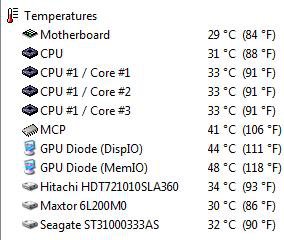
| Vista Ultimate X64, Windows 7 X64, XP Pro X64, Vista Home Premium X86 | Re: TemperatureS you forgot about speedfan, and everest. here are my temps under normal idle load. mine only go up about 10 degrees F when i am really pushing the computer. |
My System Specs![]() |
| | #4 (permalink) |
| Windows 7 Ultimate 64bit | Re: TemperatureS |
My System Specs![]() |
| | #6 (permalink) |
| Vista Ultimate X64, Windows 7 X64, XP Pro X64, Vista Home Premium X86 | Re: TemperatureS |
My System Specs![]() |
| | #7 (permalink) |
| Vista Ultimate x64 sp2, Solaris x64 | Re: TemperatureS When you are playing with the HWMonitor, just be sure to change the default CPU_0_TJMAX=100.0 value to the right one that your CPU uses in the HWMonitor.ini file. to get the right temperature readings. For example, if you are using the CPU with the different max. thermal specification like the E8500 processor which thermal specs =72.4C or the T9600 one that has 105.0C max temperature. Just my 2 cents. |
My System Specs![]() |
| | #8 (permalink) |
| ultimate 64 SP1 | Re: TemperatureS thats not the right question to ask really panais..... ![]() as stated above, real time temps will ALWAYS be related to surrounding ambient's & cooling setups.. all you need to be concerned about is your temps remaining in a certain window & you'll be fine..... for instance an E8500 that idles @ 25c & loads @ 55c will function no better than an E8500 that idles @ 35c & loads @ 65c, it will become a problem shortly after this but as long as your ''cores'' are between 20c - 70c your chip will operate well. your mobo should float around 30 - 40c above this & there's a problem, below this & you have excellent cooling. there is no sensor for RAM temps, but my 8GB of DDR2 1066 has an aftermarket temp sensor which i have slid in between the RAM heat sinks, & my sticks never go above 40c, but when the system is idle, they sit @ 34c maintaining a good airflow is just as important as the cooling H/W you use, you could have the best cooling equipment money can buy but if the air is not all flowing in one direction, or your case is filled with wires....your temps will suffer greatly. your HDD's should never get that hot anyway....... ive been through hundreds of HDD's & none have died, so again i wouldn't be concerned about it unless your seeing 50c post up your temps with one of the provided apps if you think they're a concern... |
My System Specs![]() |
| | #9 (permalink) |
| 32bit vista ultimate | Re: TemperatureS Toshiba satellite A200-1BW GPU 35C HDO 32C Core 0, 64C Core 1, 64C Core temps look very high, also flame symbol next to them in speedfan, This is Idle with window open. The clock section of speed fan, Is that where you can overclock?,Also I do have notepad on a couple of fans are they helping or making things worse?. Upgrading ram tomorrow 2-4GB was thinking about overclocking too, should I?. Thankyou. |
My System Specs![]() |
| | #10 (permalink) |
| Vista Home Premium 64bit SP2 | Re: TemperatureS Toshiba satellite A200-1BW GPU 35C HDO 32C Core 0, 64C Core 1, 64C Core temps look very high, also flame symbol next to them in speedfan, This is Idle with window open. The clock section of speed fan, Is that where you can overclock?,Also I do have notepad on a couple of fans are they helping or making things worse?. Upgrading ram tomorrow 2-4GB was thinking about overclocking too, should I?. Thankyou. ![]() and no absolutely do not try to overclock a laptop your cpu wont last five minutes , besides that there is very little to no headroom in a mobile chip. |
My System Specs![]() |
![]() |
| Thread Tools | |
| |
Similar Threads | ||||
| Thread | Forum | |||
| CPU temperatures | Overclocking & Cooling | |||
| High temperatures due to OCing | Overclocking & Cooling | |||
| Fresh windows vista ultimate x64 install <CPU and GPU temperatures screwed> | General Discussion | |||
| Vista; Failure to read S.M.A.R.T. temperatures | Vista General | |||
| Where Linux Beats Vista : CPU Temperatures - ACPI Thermal Zones | Vista General | |||