Windows Vista Forums
Vista Forums Home Join Vista Forums Windows 7 Forum Vista Tutorials Tags
Welcome to Windows Vista Forums. Our forum is dedicated to helping you find solutions with any problems, errors or issues you are experiencing with Windows Vista. The Vista forum also covers news and updates and has an extensive Windows Vista tutorial section that covers a wide range of tips and tricks.

Go Back   Vista Forums > Vista Forums > Overclocking & Cooling

Vista - SpeedFan

Reply
 
Old 08-14-2009   #1 (permalink)


Vista Ultimate x64 SP2


SpeedFan

Hello, yesterday I got a new GPU ( GTX 275 FTW ) and I got everything working etc.
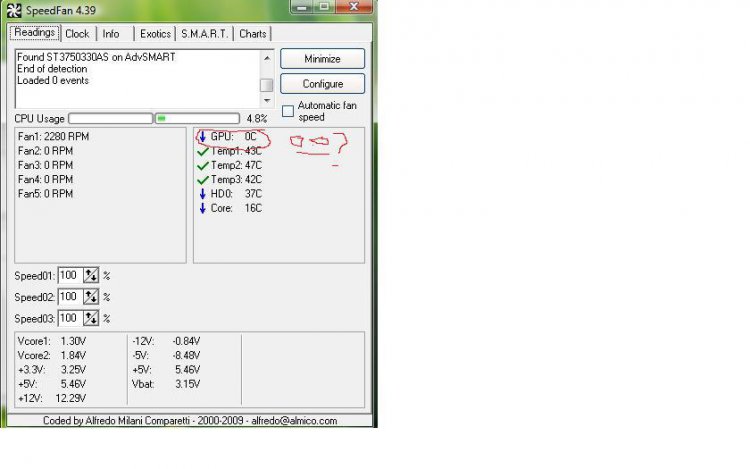
But today, I booted vista and ran speedfan and It says my GPU temp is 0 degrees celsius. I thought, that can't be right, and I ran GPUZ and it says it is at 38 degrees. Is there a way I can get speedfan to say the actual temp? Because I would like to use speedfan lol.

Sorry if this isn't in the right place. I wasn't sure where to put it .

My System SpecsSystem Spec
Old 08-14-2009   #2 (permalink)


Vista Ultimate x64, SP2


Re: SpeedFan

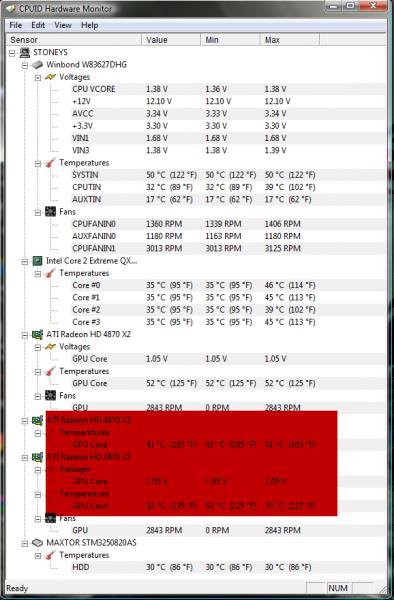
I'm not sure if SpeedFan is the best monitor, i know you want to use SpeedFan, but take a look at this, it's the HWMonitor. I think it is more comprehensive.
You could re-install SpeedFan, see if that fixes it, but it seems a common occurrence.
Hope this helps, good luck and post your results.

CPUID
My System SpecsSystem Spec
Old 08-14-2009   #3 (permalink)


Vista Ultimate x64 SP2


Re: SpeedFan

Ok, I tried reinstalling speedfan, but that didn't work. On HWMonitor where does it say gpu temp?
My System SpecsSystem Spec
Old 08-14-2009   #4 (permalink)


Vista Ultimate x64, SP2


Re: SpeedFan

Sorry it's not a very clear picture, but you can see the area it's in.

Name:  Cpu ID.jpg
Views: 239
Size:  43.5 KB
My System SpecsSystem Spec
Old 08-14-2009   #5 (permalink)


ultimate 64 SP1


Re: SpeedFan

unfortunately ''speedfan'' can be a very flaky app, i also love it..

but if it wont detect the sensors im afraid there's no way to force it..


you are running it as ''administrator''..??
My System SpecsSystem Spec
Old 08-14-2009   #6 (permalink)


Vista Ultimate x64 SP2


Re: SpeedFan

Quote  Quote: Originally Posted by stoneys-nutz View Post
Sorry it's not a very clear picture, but you can see the area it's in.

Attachment 14951
Quote  Quote: Originally Posted by skunksmash View Post
unfortunately ''speedfan'' can be a very flaky app, i also love it..

but if it wont detect the sensors im afraid there's no way to force it..


you are running it as ''administrator''..??
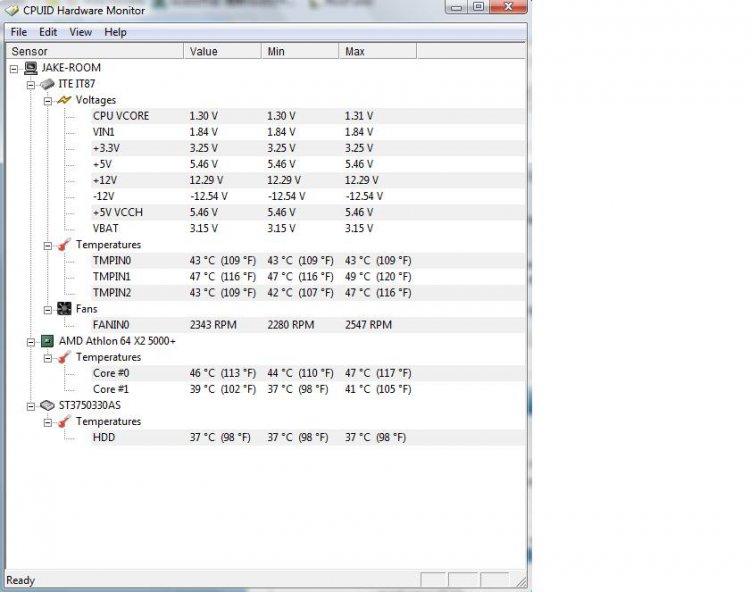
Mine doesn't seem to show my video card on HWMonitor.

And I ran as admin on speedfan and still the same problem.
Attached Thumbnails
hwmonitor.jpg   speedfan.jpg  
My System SpecsSystem Spec
Reply

Thread Tools


Similar Threads
Thread Forum
SpeedFan messed up fan Software
SpeedFan 4.38 Released Software
Speedfan Overclocking & Cooling


Vista Forums is an independent web site and has not been authorized,
sponsored, or otherwise approved by Microsoft Corporation.
"Windows Vista", the Start Orb, and related materials are trademarks of Microsoft Corp.
© Designer Media Ltd

1 2 3 4 5 6 7 8 9 10 11 12 13 14 15 16 17 18 19 20 21 22 23 24 25 26 27 28 29 30 31 32 33 34 35 36 37 38 39 40 41 42 43 44 45 46