

By default, the NVIDIA drivers support OpenGL 2.1 and GLSL version 1.20. To enable developers to start coding to OpenGL 3.0, beta support for the OpenGL 3.0 and GLSL 1.30 feature set can be enabled with nvemulate.
NVemulate allows you to emulate the functionality of various GPUs (very slowly) in software. In addition, you can use it to control GLSL Support and Open GL 3.0 Support.
The OpenGL 3.0 and GLSL 1.30 feature set is only available on G80 and later hardware. This means the following GPUs:
Desktop: GeForce 8000 series or higher; GeForce GTX 260, 280; Quadro FX 370, 570, 1700, 3700, 4600, 4700x2, 5600
Notebook: GeForce 8000 series or higher; Quadro FX 360M, 370M, 570M, 770M, 1600M, 1700M, 2700M, 3600M, 3700M
To enable the enhanced GLSL functionality, select the “G80(GeForce 8800 GTS, Quadro FX)” option from the GLSL compiler device support drop box and press the “Apply” button. No changes to NVemulate settings take effect until the “Apply” button is pressed. Pressing the “Restore” button reverts the display settings to the driver’s current applied state.
As noted earlier, some graphics cards are not capable of GLSL or enhanced GLSL in hardware, so this may require enabling a higher hardware emulation level. (A minimum of NV30 for GLSL and a minimum of G80 for the enhancements)
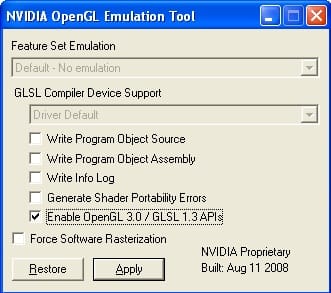
If you do not see the WGL_ARB_create_context extension advertised, make sure of the following:
NVemulate allows you to emulate the functionality of various GPUs (very slowly) in software. In addition, you can use it to control GLSL Support and Open GL 3.0 Support.
The OpenGL 3.0 and GLSL 1.30 feature set is only available on G80 and later hardware. This means the following GPUs:
Desktop: GeForce 8000 series or higher; GeForce GTX 260, 280; Quadro FX 370, 570, 1700, 3700, 4600, 4700x2, 5600
Notebook: GeForce 8000 series or higher; Quadro FX 360M, 370M, 570M, 770M, 1600M, 1700M, 2700M, 3600M, 3700M
To enable the enhanced GLSL functionality, select the “G80(GeForce 8800 GTS, Quadro FX)” option from the GLSL compiler device support drop box and press the “Apply” button. No changes to NVemulate settings take effect until the “Apply” button is pressed. Pressing the “Restore” button reverts the display settings to the driver’s current applied state.
As noted earlier, some graphics cards are not capable of GLSL or enhanced GLSL in hardware, so this may require enabling a higher hardware emulation level. (A minimum of NV30 for GLSL and a minimum of G80 for the enhancements)
If you do not see the WGL_ARB_create_context extension advertised, make sure of the following:
- You are using a Release 177 driver, version 177.89 or Later
- Check this by going to the NVIDIA Control Panel, selecting "Help", then "System Information". In the "Details" panel, the "Driver Version" should be 177.89 or better.
- You can also check this by making sure the version string returned by glGetString(GL_VERSION) is 3.0.0 or better.
- You are using a Quadro or GeForce card based on G80 or later.
- If you installed a new NVIDIA graphics driver, all nvemulate settings are reset to their defaults (no OpenGL 3.0 / GLSL 1.30 support) so you must enable that again with NVemulate.