

Hi all.....
i have my first ever problem with my rig!! :eek:
my dad gave me this cam b/c he could not get it to run on his XP rig, so i brought it home & installed it...
everything was fine, it worked perfectly for 2 days.
i then installed a new HDD & tried to transfer the program to the new drive :F, i couldn't... there was obviously some registry entrys that wouldn't migrate, so i left it on :C
then i tried to run it & it failed, i receive a Microsoft error stating.....''the application has stopped working''
so i though ok ...i have obviously corrupted the program files in some way, so i uninstalled it & tried again this time leaving it on the default :C drive, it installed, vista recognizes the cam & the drivers allow me to see the cam working at the end of the installation, but as soon as i close the setup it states the same error message...??
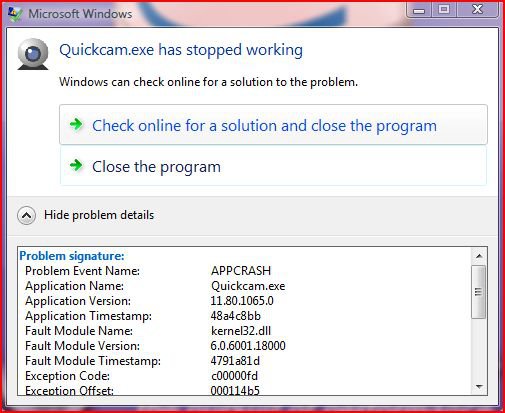
its quite perplexing, its fully installed & the device manager shows it as fully functional, yet it wont run.
i uninstalled it again & this time i hunted down any files pertaining to the cam & wiped them, then reinstalled....same thing WHY!!! i know the cam works
it must have something to do with the new HDD, having to chuck this spanking new cam in the bin is really gonna annoy me
any help is much apprieciated..
 SK
SK
i have my first ever problem with my rig!! :eek:
my dad gave me this cam b/c he could not get it to run on his XP rig, so i brought it home & installed it...
everything was fine, it worked perfectly for 2 days.
i then installed a new HDD & tried to transfer the program to the new drive :F, i couldn't... there was obviously some registry entrys that wouldn't migrate, so i left it on :C
then i tried to run it & it failed, i receive a Microsoft error stating.....''the application has stopped working''
so i though ok ...i have obviously corrupted the program files in some way, so i uninstalled it & tried again this time leaving it on the default :C drive, it installed, vista recognizes the cam & the drivers allow me to see the cam working at the end of the installation, but as soon as i close the setup it states the same error message...??
its quite perplexing, its fully installed & the device manager shows it as fully functional, yet it wont run.
i uninstalled it again & this time i hunted down any files pertaining to the cam & wiped them, then reinstalled....same thing
WHY!!! i know the cam worksit must have something to do with the new HDD, having to chuck this spanking new cam in the bin is really gonna annoy me
any help is much apprieciated..
SKMy Computer
System One
-
- Manufacturer/Model
- ME.....
- CPU
- Q9450 @ 3.6ghz
- Motherboard
- P5K PREMIUM
- Memory
- 8GB 1066mhz buffalo firestix
- Graphics card(s)
- HD 5970
- Monitor(s) Displays
- 20'' syncmaster
- Screen Resolution
- 1680x1050
- Hard Drives
- 160GB 7200RPM SEAGATE BARRACUDA IDE 160GB 7200RPM SEAGATE BARRACUDA SATA 2
- PSU
- XCILIO 850w
- Case
- unknown ATX
- Cooling
- Arctic cooler pro 775
- Mouse
- logitech cordless optical
- Keyboard
- logitech EX110
- Internet Speed
- 2mb

