![]() |
![]() | ![]() | ![]() | ![]() | ![]() | ![]() | ![]() |
| Welcome to Windows Vista Forums. Our forum is dedicated to helping you find solutions with any problems, errors or issues you are experiencing with Windows Vista. The Vista forum also covers news and updates and has an extensive Windows Vista tutorial section that covers a wide range of tips and tricks. |
| |||||||
![]() |
| |
| | #1 (permalink) |
| Vista Home Premium 64bit | Compatibity Patch For Running 16-Bit Software I have two questions. First: Is there a patch for running 16 Bit Software on a windows vista 64 OS. The error message I am getting states: "The version of this files is not compatible wiith the version of windows you're running." My second question: How do you check your system information to see whether you need an x86 (32-bit) or X64 (64-bit) version of the program? jtwest777 Last edited by jtwest777; 11-17-2008 at 09:09 PM.. Reason: typo |
My System Specs![]() |
| | #2 (permalink) |
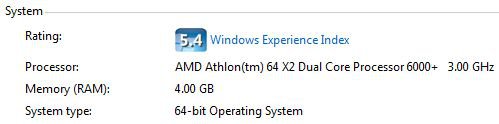
| Vista Home Premium 32-bit & Vista Ultimate 64-bit both Service Pack 2 W7 Pro RTM 7600 32 & 64 | Re: Compatibity Patch For Running 16-Bit Software Hi jtwest777 and welcome to Vista Forums ![]() There is no patch for running 16-bit software on a 64-bit version of Vista as that version of the OS doesn't support 16-bit applications. However, there might be a workaround, although it is one that I haven't tried. You could try installing 'Virtual PC2007', install a 32-bit OS in that environment and then see if you can run the software in question from there. Download details: Virtual PC 2007 Download details: VPC 2007 SP1 Your second question is easy to answer, and there are a number of ways of doing so, including the 'Welcome Center' and 'System Information'. For the 'Welcome Center', if this doesn't automatically run when you start your system: Click on the start orb and type 'Welcome Center' into the search box and press enter/return. Click 'View computer details'. On the middle of this page, under 'System', you will see the information you require. ![]() For 'System Information': Click on the start orb and type 'System Information' into the search box and press enter/return. With 'System Summary' highlighted in the left hand panel, look on the right hand panel and notice what is shown next to 'System Type'. For a 64-bit system, it will be shown as below, however for a 32-bit system this will be shown as 'x86' as opposed to 'x64'. |
My System Specs![]() |
| | #3 (permalink) |
| Vista Home Premium 64bit | Re: Compatibity Patch For Running 16-Bit Software Hi Dwaft, Thanks for the help. I have one more question: Will the Virtual PC 2007 interfer with the operation of the windows vista OS or will they both work together simultaneously? By installing Virtual PC 2007 will I be uninstalling the Windows Vista Home Premium 64 Bit OS? Jesse |
My System Specs![]() |
| | #4 (permalink) |
| Vista Home Premium 32-bit & Vista Ultimate 64-bit both Service Pack 2 W7 Pro RTM 7600 32 & 64 | Re: Compatibity Patch For Running 16-Bit Software Hi Jesse, VPC2007 will not interfere with Vista in any way. VPC2007 itself is installed and run in Vista. When it is running, it provides a shell or environment into which other OSes can be installed. You can then install programs in these OSes and, with certain limitations, run them as normal. See the following link for more information: http://www.microsoft.com/windows/pro.../overview.mspx |
My System Specs![]() |
| | #5 (permalink) |
| Vista Home Premium 64bit | Re: Compatibity Patch For Running 16-Bit Software Hi Dwaf, This seem like what I am looking for. But give me your opinion. When I look at the list of Windows Vista OS that Microsoft mentions that Visual PC 2007 supports I don't see Windows Vista Home Premium in the mix. What is your opinion or knowledge in this regard. Jesse Last edited by jtwest777; 11-18-2008 at 10:02 AM.. Reason: typo |
My System Specs![]() |
| | #6 (permalink) |
| Vista Home Premium 32-bit & Vista Ultimate 64-bit both Service Pack 2 W7 Pro RTM 7600 32 & 64 | Re: Compatibity Patch For Running 16-Bit Software Hi Jesse, Don't worry. Although the support pages don't list Vista Home Premium in the list of host OSes for VPC2007, it does run in that environment. Indeed, I have had it running under that OS (the 32-bit version) prior to me upgrading to Vista Ultimate. More information can be found here: http://www.vistax64.com/virtual-pc/ |
My System Specs![]() |
| | #7 (permalink) |
| Vista Home Premium 64bit | Re: Compatibity Patch For Running 16-Bit Software Hi Dwarf, Thanks a lot. I sincerely appreciate your help. I've got to run. I'll get back with you later to let you know it goes. Jesse |
My System Specs![]() |
![]() |
| Thread Tools | |
| |
Similar Threads | ||||
| Thread | Forum | |||
| Running software as an Administrator | Vista General | |||
| Running Software at Start Up | Vista General | |||
| software running in the backround | Vista General | |||
| Compatibity Issues | Vista General | |||
| Problems Running Software | Vista General | |||