Windows Vista Forums
Vista Forums Home Join Vista Forums Windows 7 Forum Vista Tutorials Tags
Welcome to Windows Vista Forums. Our forum is dedicated to helping you find solutions with any problems, errors or issues you are experiencing with Windows Vista. The Vista forum also covers news and updates and has an extensive Windows Vista tutorial section that covers a wide range of tips and tricks.

Go Back   Vista Forums > Vista Forums > Software

Vista - Norton Ghost 14 & Vista Home Premium 64bit

Reply
 
Old 11-27-2008   #1 (permalink)


Vista Home Premium 64bit SP1


Norton Ghost 14 & Vista Home Premium 64bit

Hi to all,
I am wondering if anyone can help me to install the Norton Ghost 14 program to my computer?

As I bought the product today and when I put the disk in the drive and ran the installer, it all seemed to go well and I then rebooted the computer with the disk still in the drive.
On the reboot the computer hung up and stayed on a Black screen, I then did a Reset of my computer and when it rebooted I got a Blue screen with an error message - System_Service_Exception.
The computer rebooted and I removed the disk, and then I got another Blue screen about Bad_Pool_Header.
Finally I had to restart my computer with my Vista disk in place, so that I could un-install Norton Ghost 14. I managed to do this and I then did a System Restore to get my computer back to a decent state so I could use it.

I have had a search around on the Symantec website, and I cannot find anything to help me with this problem. And how I can install Norton Ghost 14 on my computer, and if I have to disable anything for the installation?

Thanks. Gary

Kudos! Thanks!

My System SpecsSystem Spec
Old 11-27-2008   #2 (permalink)


Vista Business/Home Premium/Ultimate x64/Server 2008 X64


Re: Norton Ghost 14 & Vista Home Premium 64bit

Sorry johkaz. But Norton software is really bad. You already opened the softare so getting a refund is now between you and symantec.

But really, in the future buying anything made by symantec is really a bad idea. Everything they make is pure trash(as you can already see).

Get good, working imagining software from Acronis. Google the name and you'll find it fast.

Alas...another unfortunate symantec victim.

Whatever you do, don't try to put that back on your system. Its norton, its crap!
My System SpecsSystem Spec
Old 11-27-2008   #3 (permalink)


Vista Ult 64bit Windows 7 64 bit Server 2008 RC2


Re: Norton Ghost 14 & Vista Home Premium 64bit

Have you tried right clicking on the installer and clicking on 'run as administrator'? This usually works for me.

Gary
My System SpecsSystem Spec
Old 11-27-2008   #4 (permalink)


Vista Ultimate x64 SP1


Re: Norton Ghost 14 & Vista Home Premium 64bit

Quote  Quote: Originally Posted by joel406 View Post
Sorry johkaz. But Norton software is really bad. You already opened the softare so getting a refund is now between you and symantec.

But really, in the future buying anything made by symantec is really a bad idea. Everything they make is pure trash(as you can already see).

Get good, working imagining software from Acronis. Google the name and you'll find it fast.

Alas...another unfortunate symantec victim.

Whatever you do, don't try to put that back on your system. Its norton, its crap!
While I won't go that far in bashing Norton, I will say they do a poor job of supporting Vista64, and unfortunately the consumer doesn't find out till they get the item installed their 64bit OS. I had to switch from Norton Anti-Virus 2008 to Kaspersky Anti-Virus once I moved to Vista64 because Norton wasn't "fully functional" under the OS.

As for a 32bit OS systems, I've never had a problem, even under Vista, so its a matter of opinion.

I do agree on getting Acronis' True Image software. Good backup + imaging program, although i'm not really sure it "fully" supports Vista 64 either. Notice the supported OS'

Windows® Vista;
Windows® XP Professional x64 Edition;
Windows® XP SP 2;

You can check it out here: Acronis True Image 2009 Home.

As for a refund on Norton Ghost, call Symantic's customer service.
My System SpecsSystem Spec
Old 11-27-2008   #5 (permalink)


Vista Ult 64bit Windows 7 64 bit Server 2008 RC2


Re: Norton Ghost 14 & Vista Home Premium 64bit

I haven't seen where anyone has had problems running Acronis on 64 bit. Most (not all) programs that run on 32 bit will also run on 64 bit although they run as 32 bit.

Gary
My System SpecsSystem Spec
Old 11-27-2008   #6 (permalink)


Vista Ultimate x64 SP1


Re: Norton Ghost 14 & Vista Home Premium 64bit

Quote  Quote: Originally Posted by garysgold View Post
I haven't seen where anyone has had problems running Acronis on 64 bit. Most (not all) programs that run on 32 bit will also run on 64 bit although they run as 32 bit.

Gary

As I stated earlier, Norton Anti-Virus ran with limited functionality under Vista 64, but I understand what you're saying.

Incidentally, I did contact Acronis via chat and was told that:

Quote:
Vista 64bit is also supported by Acronis True Image Home 2009, don't worry about that
Looks like I’ll have to get the new version. For some odd reason version 10 had problems doing scheduled backups under 64.
My System SpecsSystem Spec
Old 11-28-2008   #7 (permalink)


Vista Business/Home Premium/Ultimate x64/Server 2008 X64


Re: Norton Ghost 14 & Vista Home Premium 64bit

I used ATI 11 with zero issues under Vista x64. I am now useing 2009.

Zero issues.

As for Norton. IMO and millions of others opinion they should just dhut down and get their crap off retail shelves ASAFP!

Hardly a day goes by I dont have to remove it from some poor souls system in order to get him working again.

Their day is done. Time for symantec to call it a life.
My System SpecsSystem Spec
Old 11-28-2008   #8 (permalink)


VISTA HOME PREMIUM X64/ 7 x64 / 7x86


Re: Norton Ghost 14 & Vista Home Premium 64bit

Hi,

Amazingly, Norton now do a little program that works great.
I have been using it for awhile on x64 with no problems, even though it's beta.

Norton Labs | UAC Tool

Quote:
The Norton UAC tool allows an application to run with silently-elevated privileges only in a specific context, one previously approved by the user with the "don't ask again" check box selected. This means that there is a difference between regedit.exe launched from the start->run box, regedit.exe originating from a shortcut double-click, and regedit.exe launched from a double click on a .reg file (and the context actually changes with each .reg file), and regedit.exe launched by an application (malicious or not). Given the contextual awareness of Norton UAC tool's automatic responses, the Norton UAC tool provides a usability improvement over Vista's default UAC prompts, while maintaining obvious security improvements in the Vista kernel (such as isolation, file/registry virtualization, and user interface privilege isolation) that are all disabled when UAC is disabled.
If you want to try, it is available in 32 or 64 bit versions. If you do not wish to send info. back to Norton , uncheck the box that says something about Submissions during the installation.

Still can't bring myself to risk one of their security suites, though.

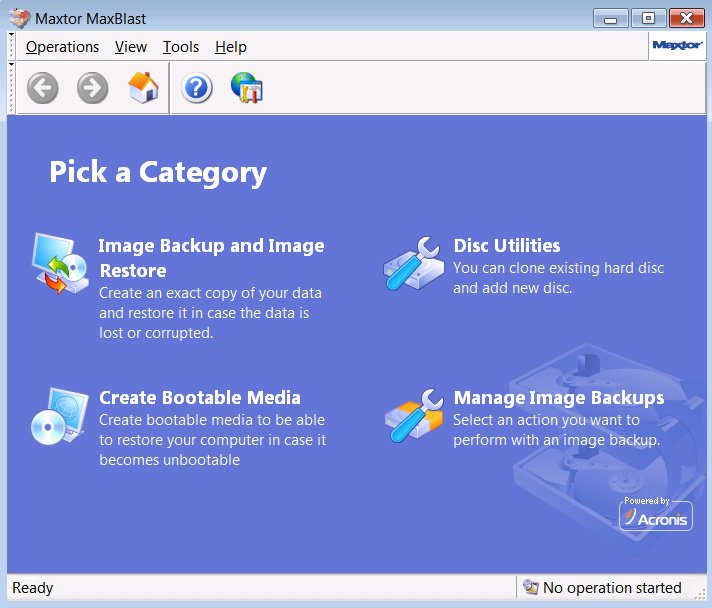
I have just installed Maxblast, which is an Acronis true Image product, being given out free by Seagate. Had no problems installing it on Vista x64, or in creating an image of my disk - haven't tried to restore it yet, but working perfectly so far.

maxblast2008-11-28_063000.jpg

It's ostensibly to help you to add/change hard drives , but in fact is pretty identical to any disk image app.

Seagate Technology - MaxBlast 5

Just click English - in blue , halfway down the page on the left, accept the agreement , and download.

Hope it helps

SIW2
My System SpecsSystem Spec
Old 11-28-2008   #9 (permalink)


Vista Home Premium 64bit SP1


Re: Norton Ghost 14 & Vista Home Premium 64bit

Hi,

Many thanks for the replies, and to say i am angry with Symatec at the moment is an understatement.
As i went online with one of their 'Technicians', and he got the program installed ok.
But in the process my £1,000 3 day old computer is now useless....

As he must have changed some settings, and he has destroyed the Log on screen.
So now i cannot even log on in Normal or Safe Mode, and my Vista system is f*****d

Thanks again for the help.

Gary
My System SpecsSystem Spec
Old 11-28-2008   #10 (permalink)


Vista Ult 64bit Windows 7 64 bit Server 2008 RC2


Re: Norton Ghost 14 & Vista Home Premium 64bit

Do you have disks? Most manufactures have a recovery partition on the hard drive that can be accessed via the boot options menu. See you owners manual for how to get there. If this is true, then you should be able to restore the computer to factory spec.

Also method 2 here might be of help. System Restore - How to

Please keep us posted.

Gary
My System SpecsSystem Spec
Reply

Thread Tools


Similar Threads
Thread Forum
Upgrade from Home Premium 64bit to Ultimate 64bit - No 64bit Media Vista installation & setup
XP Pro 32-bit to Vista Home Premium 64Bit Vista installation & setup
transfer data from old xp hard drive to new computer containing Vista Home Premium--Norton Ghost Vista General
Norton Internet Security and Vista Home Premium Vista General
Which Firewall - new HP Pavilion+Vista Home Premium+Norton. Vista performance & maintenance


Vista Forums is an independent web site and has not been authorized,
sponsored, or otherwise approved by Microsoft Corporation.
"Windows Vista", the Start Orb, and related materials are trademarks of Microsoft Corp.
© Designer Media Ltd

1 2 3 4 5 6 7 8 9 10 11 12 13 14 15 16 17 18 19 20 21 22 23 24 25 26 27 28 29 30 31 32 33 34 35 36 37 38 39 40 41 42 43 44 45 46