How do I customise the Firefox 3 Browser to open each time as per Screenshot 3?
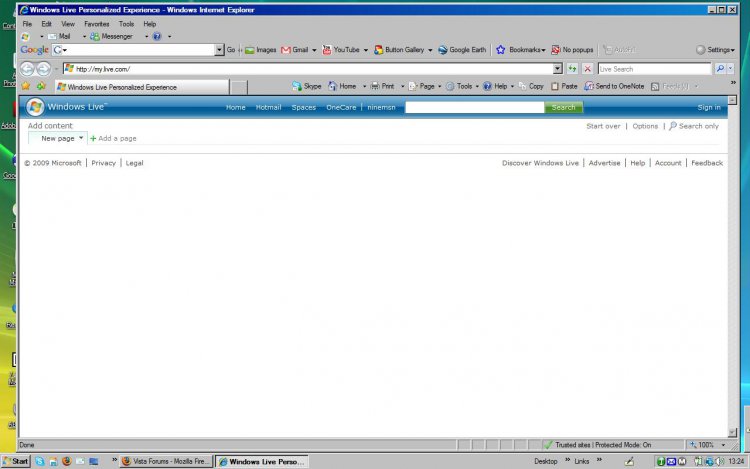
At Screenshot 1:
When I was using Internet Explorer 7 as my main Browser, I was able to customise the opening page so that it was 'clean' of all the 'flotsam and jetsam' rubbish that I had no interest in. My Customised Page in IE7 looked like this;
Screenshot 1:
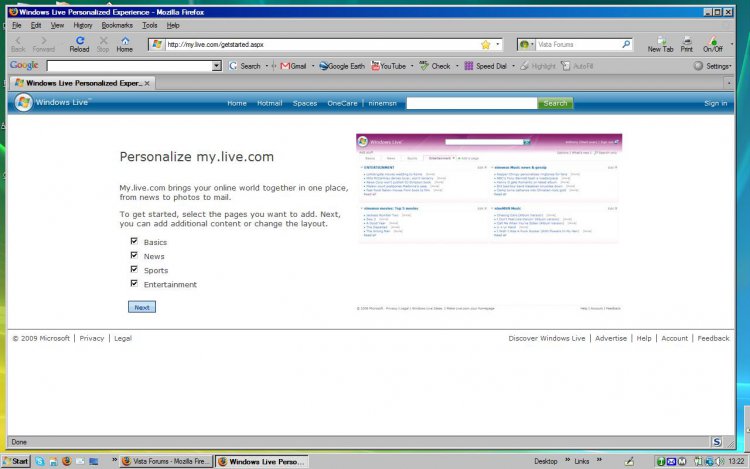
At Screenshot 2:
Now when I open Firefox 3, this is what I get........a page of 'stuff' that I neither need. nor want;
Screenshot 2:
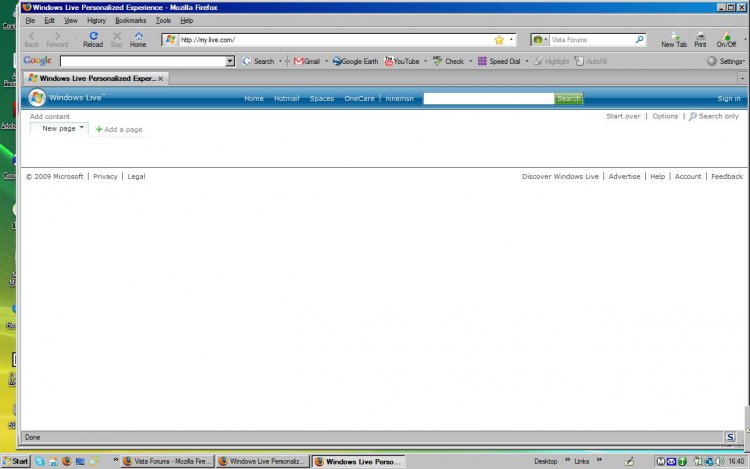
At Screenshot 3:
I have managed to customise and clean up the FF3 page as at Screen-shot 3 below,and it remains like this each time I open the Browser while I stay in session, however, if I log off or close and shut-down, it reverts to display like Screenshot 2, the next time I open up the FF3 Browser.
Screenshot 3:
To keep my FF3 Browser opening page 'clean' as in the above Screenshot, what settings should I apply, to make it appear this way each time I open the Browser.
Notebook - Samsung HM320JI 320GB HD installed 07 August 2009.
External HDs [4];Maxtor One Touch4 - 500GB External HD [Drive M:\].Western Digital WDXMS1200TA - 120GB External HD [Drive G:\ - Windows Defender Backup Files only]. Two x LaCie 320GB Mobi
Mouse
Logitech Wireless V320 for Notebooks - Model M/N: M-RCD125
Internet Speed
Down 20000kb/sec / Up 1000kb/sec [Bigpond-Aus]
Other Info
Brother MFC-465CN; PC to Fax/Scan/Copy/Photo MFC. Epson Perfection V300 Photo Scanner. Siemens Speedstream 6520 Router. Wacom 'Bamboo Fun' CTE-650 PC Tablet, Stylus and Mouse. UAC - On;Activated. Browsers; [1] FireFox v3.6[2] IE8. Honorary R.S.M. to the 4th [Assault Pioneer] Troop Pune Sepoys , and 3rd Troop Jodhpur Bengali Lancers.
How do I customise the Firefox 3 Browser to open each time as per Screenshot 3?
At Screenshot 1:
When I was using Internet Explorer 7 as my main Browser, I was able to customise the opening page so that it was 'clean' of all the 'flotsam and jetsam' rubbish that I had no interest in. My Customised Page in IE7 looked like this;
Now when I open Firefox 3, this is what I get........a page of 'stuff' that I neither need. nor want;
Screenshot 2: View attachment 9664
At Screenshot 3:
I have managed to customise and clean up the FF3 page as at Screen-shot 3 below,and it remains like this each time I open the Browser while I stay in session, however, if I log off or close and shut-down, it reverts to display like Screenshot 2, the next time I open up the FF3 Browser.
To keep my FF3 Browser opening page 'clean' as in the above Screenshot, what settings should I apply, to make it appear this way each time I open the Browser.
Notebook - Samsung HM320JI 320GB HD installed 07 August 2009.
External HDs [4];Maxtor One Touch4 - 500GB External HD [Drive M:\].Western Digital WDXMS1200TA - 120GB External HD [Drive G:\ - Windows Defender Backup Files only]. Two x LaCie 320GB Mobi
Mouse
Logitech Wireless V320 for Notebooks - Model M/N: M-RCD125
Internet Speed
Down 20000kb/sec / Up 1000kb/sec [Bigpond-Aus]
Other Info
Brother MFC-465CN; PC to Fax/Scan/Copy/Photo MFC. Epson Perfection V300 Photo Scanner. Siemens Speedstream 6520 Router. Wacom 'Bamboo Fun' CTE-650 PC Tablet, Stylus and Mouse. UAC - On;Activated. Browsers; [1] FireFox v3.6[2] IE8. Honorary R.S.M. to the 4th [Assault Pioneer] Troop Pune Sepoys , and 3rd Troop Jodhpur Bengali Lancers.