![]() |
![]() | ![]() | ![]() | ![]() | ![]() | ![]() | ![]() |
| Welcome to Windows Vista Forums. Our forum is dedicated to helping you find solutions with any problems, errors or issues you are experiencing with Windows Vista. The Vista forum also covers news and updates and has an extensive Windows Vista tutorial section that covers a wide range of tips and tricks. |
| |||||||
![]() |
| |
| | #1 (permalink) |
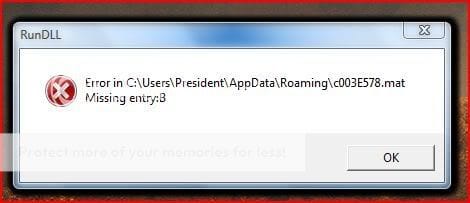
| Vista Home Premium 32bit. | RunDLL missing entry (multiple) ![]() What is weird, (I mean weird for me) is that for the first time first time I am getting more and more this kind of errors. Couple of times they were just several, but now their number has grown up to ~400 (!) They all are the same, except the digits between c00 and .mat change. I know that antiviruss sometimes deletes some files, that causes this kind of problem, but know it's just out of control. What should I do? |
My System Specs![]() |
| | #2 (permalink) |
| Vista Ultimate SP2 x64 Windows 7 Ultimate x64 TECHNET | Re: RunDLL missing entry (multiple) |
My System Specs![]() |
| | #3 (permalink) |
| VISTA HOME PREMIUM X64/ 7 x64 / 7x86 | Re: RunDLL missing entry (multiple) Hi walthenri, Try sfc, like Airbot says - you may find it easier to use this - click the Repair system files http://www.vistax64.com/software-too...heck-tool.html If that isn't able to do the job, you could do Repair install , if you have the proper dvd - (not a manufacturer "recovery" disc ) Repair Install For Vista A scan with the free MBAM is worth doing - you never know Malwarebytes.org. Hope it helps SIW2 |
My System Specs![]() |
| | #4 (permalink) |
| Vista Home Premium 32bit. | Re: RunDLL missing entry (multiple) So, nothing changed, although I tried sfc (It didn't find any problems) and MBAM (It did find 2 trojans) Maybe because I ran them in safe mode? (I have to wait like a half an hour till all of the error logs have shown. I can't really do anything, because my system is overloaded) Or perhaps repair install is the only way to gat rid of this problem? |
My System Specs![]() |
| | #5 (permalink) |
| VISTA HOME PREMIUM X64/ 7 x64 / 7x86 | Re: RunDLL missing entry (multiple) I would try the Repair install if it were me - doesn't take long. SIW2 |
My System Specs![]() |
| | #6 (permalink) |
| Vista Home Premium 32bit. | Re: RunDLL missing entry (multiple) ok, I just want to make sure I have the right DVD to do Repair install. I have a recovery DVD (Windows Vista recover media for windows vista products 32-bit), that came within a sealed packing and the text on it says: "The software included on this Recovery DVD was preinstalled on your hard drive at the factory and may only be used for backup and recovery of your ASUS computer system. I don't have any other recovery DVD that came along with my PC when I bought it. |
My System Specs![]() |
| | #7 (permalink) |
| Vista Home Premium 32bit. | Re: RunDLL missing entry (multiple) Will you or will you not tell me whether I have the right dvd or not? I have to know what to do next. |
My System Specs![]() |
| | #8 (permalink) |
| Vista Ultimate SP2 x64 Windows 7 Ultimate x64 TECHNET | Re: RunDLL missing entry (multiple) That's not the right disc to do a repair installation like the tutorial states. It will just do a clean install, wiping whatever you have on the computer and restoring it to factory condition. You can do that with that recovery disc but if you wanted to save your files/settings you'd have to have an installation disc not just a recovery disc. |
My System Specs![]() |
| | #9 (permalink) |
| VISTA HOME PREMIUM X64/ 7 x64 / 7x86 | Re: RunDLL missing entry (multiple) Hi Walt, Like I said in my earlier post, sorry to say, you can't do a Repair install with a recovery dvd. If that is all the manufacturer has provided, it will restore to the condition you received it in. All your programs and data will be gone. You would need to back up all your data and program setup files beforehand. Do the restore, then reinstall your apps. and transfer back your data. When you have done that, you may like to make your own image , including your apps and data - to restore if needed. You can make another every now and again to keep it up to date. You need to store the image till needed - another partition can be used, but it's safer to use an external HD or even split it across a couple of recordable dvd's. The free version of this program may be all you need to do that: Macrium Reflect Free Edition - Free software downloads and reviews - CNET Download.com Hope it helps SIW2 |
My System Specs![]() |
| | #10 (permalink) |
| Vista Home Premium 32bit. | Re: RunDLL missing entry (multiple) Finally I got it to work normal again. Thanks a lot for everything. You're the best! |
My System Specs![]() |
![]() |
| Thread Tools | |
| |
Similar Threads | ||||
| Thread | Forum | |||
| 127.0.0.1 localhost entry missing from hosts files | Network & Sharing | |||
| missing entry | General Discussion | |||
| Missing entry: RunDLLEntry | Vista hardware & devices | |||
| registry entry missing!!! | Vista General | |||
| RunDLL missing file | Vista file management | |||