![]() |
![]() | ![]() | ![]() | ![]() | ![]() | ![]() | ![]() |
| Welcome to Windows Vista Forums. Our forum is dedicated to helping you find solutions with any problems, errors or issues you are experiencing with Windows Vista. The Vista forum also covers news and updates and has an extensive Windows Vista tutorial section that covers a wide range of tips and tricks. |
| |||||||
![]() |
| |
| | #1 (permalink) |
| Vista Home Premium x64 | Good program to monitor temps? Is there a good program that can monitor the temps in my comp? At the very least, the CPU. I'm running Vista Home Premium SP1 x64. |
My System Specs![]() |
| | #2 (permalink) |
| Windows 7 Ultimate x64 (Vista went bye-bye on this rig) | Re: Good program to monitor temps? |
My System Specs![]() |
| | #3 (permalink) |
| Vista Ultimate x64 | Re: Good program to monitor temps? SIW is another option, SIW | System Information for Windows by Gabriel Topala It will show readings for just about anything that has a sensor. |
My System Specs![]() |
| | #4 (permalink) |
| Vista Ultimate x64 SP1 | Re: Good program to monitor temps? Another vote for Speedfan or Core Temp, though Speedfan will also read your hard drive's temp as well. |
My System Specs![]() |
| | #5 (permalink) |
| Vista Ultimatex64 Windows 7 build 7100 | Re: Good program to monitor temps? I use Everest (Pay Program) it is also a very good program that reads all sensors and system info. Pooch |
My System Specs![]() |
| | #6 (permalink) |
| Vista Ultimate x64 SP1 | Re: Good program to monitor temps? ![]() There's alway the trial version though - Lavalys - Comprehensive IT Security and ManagementP.S. just noticed the 5.0 release which I’m eligible for |
My System Specs![]() |
| | #7 (permalink) |
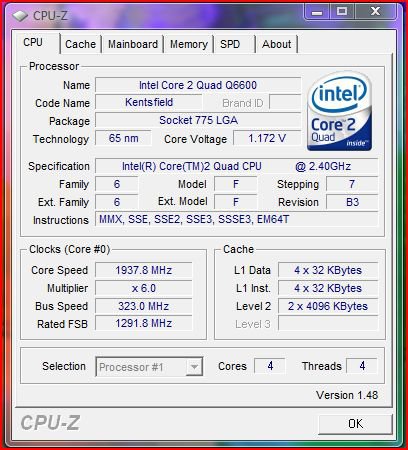
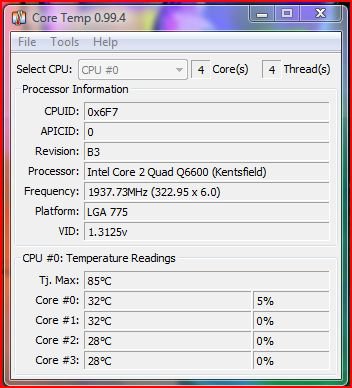
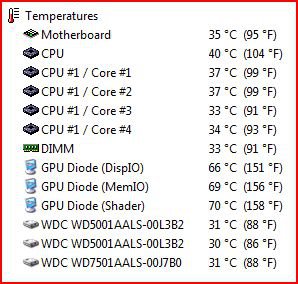
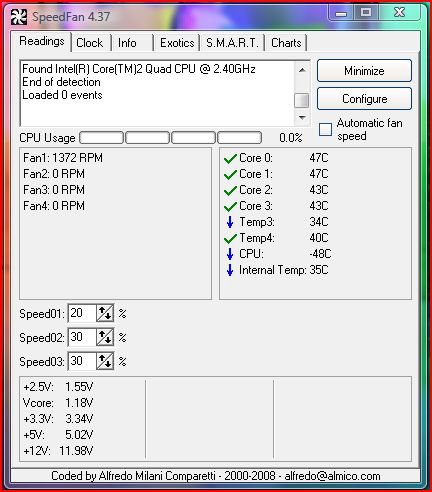
| Vista Ultimate x64 SP1 | Which one should I trust... OK, checking my CPU temps with the 3 programs reveals 3 different sets of temperature reading. So which one is more accurate??? First my CPU info as read by CPU-Z ![]() Now Core Temp temperature readings... (32, 32, 28, 28) ![]() Next, Everest Temperature Readings... (37, 37, 33, 34) ![]() Last, SpeedFans's Temperature readings... (47, 47, 43, 43) ![]() So which program would you trust??? All programs "supposedly" has Vista 64 bit support. |
My System Specs![]() |
| | #8 (permalink) |
| Vista Ultimatex64 Windows 7 build 7100 | Re: Good program to monitor temps? Good question, Normally they would give the same readings as they read from the same places Have you done all three measurements at the same time? Could this be a conflict ? My Everest temperature for the CPU matches the Bios I know that you can adjust the Speed fan temperatures if they are not showing right Pooch |
My System Specs![]() |
| | #9 (permalink) |
| Vista Ultimate x64 SP1 | Re: Good program to monitor temps? No I haven't done all three at the same time; they were done in succession, one after another. However, I think I know what's going on, and it has to do with the Temperature Junction setting used for a given CPU by the temperature reading software. Temperature Junction or Tj. Max is the maximum theoretical temperature a core can reach before shutdown. As we can see by these programs, there are various opinions as to the max T-Junction of a B3 Q6600. Now… let's use Core Temp as a baseline with TJ Max of 85 degrees for a B3 Q6600. Now if you compare Everest's TJ Max reading of 90 degrees and look at its temp readings of my Q6600, you’ll notice they are 5 degrees higher than Core Temp’s, which also corresponds to the 5 degree difference in the TJ Max readings. 85 for Core Temp, 90 For Everest. Now, again, using Core Temp as a baseline and comparing SpeedFan's readings, (here's where a little guesswork comes in, as I don't see a TJ Max reading in SpeedFan) we can see the temps are 15 degrees higher than Core Temp's reading. Using the TJ Max delta logic, I can surmise that the TJ Max used in SpeedFan is probably 100 Degrees. So…using the TJ Max readings you can see that the temp readings are the same across the board. Core Temp (Tj Max 85) – Temp reading 32, 32, 28, 28 Everest (Tj Max 90) – Temp reading 37, 37, 33, 34 SpeedFan (Tj Max 100?) – Temp reading 47, 47, 43, 43 Incidentally Core Temp and Real Temp use the same Tj Max settings and give identical temp readings. So…which one is accurate…to find that answer we need to know what the “true” t-max reading of a B3 Q6600 is (something I guess Intel is keeping secret about?). However, Intel does list the Thermal Design Power of a B3 Q6600 as 105 Degrees and the Thermal Specification as 62.2 degrees, but these are not the same as Temperature Junction. Here’s a good article at Toms Hardware on temperature readings on quad core CPU’s - Core 2 Quad and Duo Temperature Guide |

My System Specs![]() |
| | #10 (permalink) |
| Vista Ultimatex64 Windows 7 build 7100 | Re: Good program to monitor temps? Ok I'll take your word on this. Nice explanation by the way. Have you used all the latest versions as I would like to try it on my compy and see what results I get with an AMDPooch |
My System Specs![]() |
![]() |
| Thread Tools | |
| |
Similar Threads | ||||
| Thread | Forum | |||
| Good Defrag Program | Software | |||
| does anyone know of a good temp monitor? | Overclocking & Cooling | |||
| Good torrent program? | Software | |||
| I need a good program | Software | |||
| Need a good AVI joining program | Software | |||