Windows Vista Forums
Vista Forums Home Join Vista Forums Windows 7 Forum Vista Tutorials Tags
Welcome to Windows Vista Forums. Our forum is dedicated to helping you find solutions with any problems, errors or issues you are experiencing with Windows Vista. The Vista forum also covers news and updates and has an extensive Windows Vista tutorial section that covers a wide range of tips and tricks.

Go Back   Vista Forums > Vista Forums > Software

Vista - Window opens at default size, not maximized

Reply
 
Old 04-06-2009   #1 (permalink)


Vista Home Premium 32bit


Window opens at default size, not maximized

I use Vista Home Premium. I have an open source app that I want to be maximized when launched. How can I do this?

I've tried maximizing in 2 ways:

- Using the small square at the top right.
- Dragging the corners of the window to fill the screen.

In both cases, if I close and then re-open, the window has its default size.

Any advice?
.

My System SpecsSystem Spec
Old 04-06-2009   #2 (permalink)


Vista x64 Ultimate SP2, Windows 7 Ultimate x64


Re: Window opens at default size, not maximized

Hello OldGrantonian,

You might see if applying METHOD TWO in the tutorial below will allow the window to open as it was when it was last closed.

Windows Explorer Folder View settings

Hope this helps,
Shawn
My System SpecsSystem Spec
Old 04-06-2009   #3 (permalink)


Vista Home Premium 32bit


Re: Window opens at default size, not maximized

Thanks for the response.

Quote  Quote: Originally Posted by Brink View Post
You might see if applying METHOD TWO in the tutorial below will allow the window to open as it was when it was last closed.

Windows Explorer Folder View settings
Maybe my brain is not working properly, as usual. But your thread seems to apply to the folders in Windows Explorer.

My problem is with a third-party application. I carefully read the tutorial (all of which I implemented a couple of months ago to fix a different issue), but I could not see anything that applied to external applications.
.
My System SpecsSystem Spec
Old 04-06-2009   #4 (permalink)


Vista x64 Ultimate SP2, Windows 7 Ultimate x64


Re: Window opens at default size, not maximized

It will usually apply to applications windows as well. However, it is possible for the 3rd party application to override this with it's on default settings instead. It will not hurt anything to try though.

Last edited by Brink; 04-06-2009 at 07:58 AM..
My System SpecsSystem Spec
Old 04-06-2009   #5 (permalink)


Vista Home Premium 32bit


Re: Window opens at default size, not maximized

Quote  Quote: Originally Posted by Brink View Post
It will usually apply to applications windows as well.
OK. Now I understand

However, as I mentioned in my previous post, I've already done the registry tweaks for "Bags", "BagMRU", etc.

Quote  Quote: Originally Posted by Brink View Post
However, it is possible for the 3rd party application to override this with it's on default settings instead.
You're probably right. Thanks anyway
.

Last edited by Brink; 04-06-2009 at 07:57 AM..
My System SpecsSystem Spec
Old 04-06-2009   #6 (permalink)


Window 7 Ultimate 32bit


Re: Window opens at default size, not maximized

After you get the window the size you want Try holding the Ctrl button & click the X to close the window at the same time it has worked for me.
My System SpecsSystem Spec
Old 04-06-2009   #7 (permalink)


Windows 7


Re: Window opens at default size, not maximized

Quote  Quote: Originally Posted by OldGrantonian View Post
Quote  Quote: Originally Posted by Brink View Post
It will usually apply to applications windows as well.
OK. Now I understand

However, as I mentioned in my previous post, I've already done the registry tweaks for "Bags", "BagMRU", etc.

Quote  Quote: Originally Posted by Brink View Post
However, it is possible for the 3rd party application to override this with it's on default settings instead.
You're probably right. Thanks anyway
.
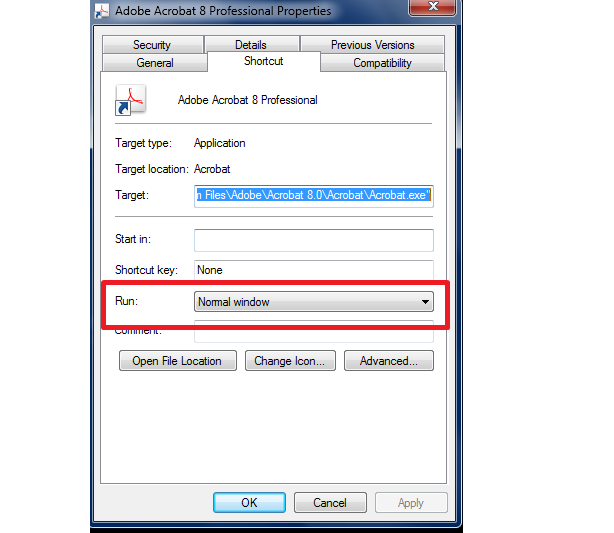
right click on the application shortcut and go to properties,

Name:  Untitled.png
Views: 177
Size:  47.2 KB

There u can find run, change the value to minimized.

Let me know the result
My System SpecsSystem Spec
Old 04-06-2009   #8 (permalink)


Vista Home Premium 32bit


Re: Window opens at default size, not maximized

Quote  Quote: Originally Posted by jryprt View Post
After you get the window the size you want Try holding the Ctrl button & click the X
I tried it just now. No luck
.
My System SpecsSystem Spec
Old 04-07-2009   #9 (permalink)


Vista Home Premium 32bit


Re: Window opens at default size, not maximized

Quote  Quote: Originally Posted by delphin View Post
right click on the application shortcut and go to properties,

Attachment 11575

There u can find run, change the value to minimized.
That works fine. Thanks.

BTW1: You probably meant "maximized"

BTW2: Sorry for the delay in replying. Your post was inserted 0.00238ms before my own post, so I didn't notice your post until now
.
My System SpecsSystem Spec
Old 04-07-2009   #10 (permalink)


Windows 7


Re: Window opens at default size, not maximized

Quote  Quote: Originally Posted by OldGrantonian View Post
Quote  Quote: Originally Posted by delphin View Post
right click on the application shortcut and go to properties,

Attachment 11575

There u can find run, change the value to minimized.
That works fine. Thanks.

BTW1: You probably meant "maximized"

BTW2: Sorry for the delay in replying. Your post was inserted 0.00238ms before my own post, so I didn't notice your post until now
.
am so happy that i helped u

why don't u give some rep power to me
My System SpecsSystem Spec
Reply

Thread Tools


Similar Threads
Thread Forum
windows explorer - default window size Vista file management
Shortcut Default Open Window Size Tutorials
Explorer Default Window Size Vista file management
New windows opens at small (default) size Vista General
New windows opens at small (default) size Vista performance & maintenance


Vista Forums is an independent web site and has not been authorized,
sponsored, or otherwise approved by Microsoft Corporation.
"Windows Vista", the Start Orb, and related materials are trademarks of Microsoft Corp.
© Designer Media Ltd

1 2 3 4 5 6 7 8 9 10 11 12 13 14 15 16 17 18 19 20 21 22 23 24 25 26 27 28 29 30 31 32 33 34 35 36 37 38 39 40 41 42 43 44 45 46