JavaScript is disabled. For a better experience, please enable JavaScript in your browser before proceeding.
You are using an out of date browser. It may not display this or other websites correctly.
You should upgrade or use an
alternative browser .
HappyGuru Lovin2Help
Vista Guru
Hi Gang,
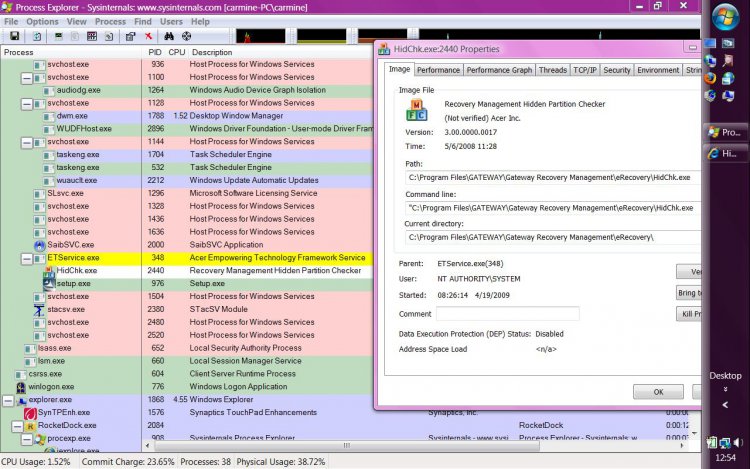
Viewing process explorer, I keep seeing a program running called:
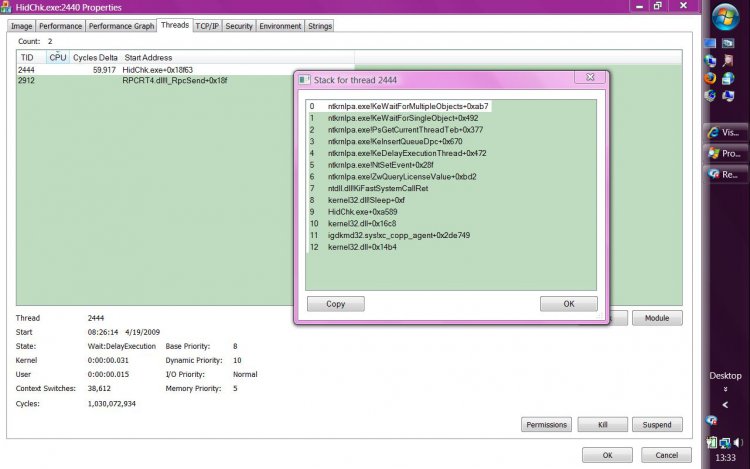
HidChk.exe ( see attached pic )
I no longer have a 10GB recovery partition. It was deleted when gateway sent me the 3 DVD's and I had to reinstall.
( ya know the answer whenever ya call support...
re-image )
I use segate clone wizard 2X/month to make an exact copy of the vista laptop and XP towers. ( takes 33mins )
the question:
Can I delete the .EXE or is it needed when I clone?
proc ex.JPG
193.7 KB
· Views: 281
proc 2.JPG
99.8 KB
· Views: 45
create new top level folder.JPG
192.5 KB
· Views: 46
Manufacturer/Model
gateway/m6881
CPU
centrino core 2 duo 2.2ghz T7500
Memory
3GB
Hard Drives
500GB WD
Mouse
logitech
Internet Speed
fios 35MB not!!!!
Hello Pacinitaly,
According to your first screenshot, the file is part of the Gateway Recovery Manager. You will need it if you want to run that program.
Hope that helps,
Shawn
Operating System
Windows 10 Pro 64-bit
Manufacturer/Model
Custom
CPU
Intel i7-8700K 5 GHz
Motherboard
ASUS ROG Maximus XI Formula Z390
Memory
64 GB (4x16GB) G.SKILL TridentZ RGB DDR4 3600 MHz (F4-3600C18D-32GTZR)
Graphics Card(s)
ASUS ROG-STRIX-GTX1080TI-O11G-GAMING
Sound Card
Integrated Digital Audio (S/PDIF)
Monitor(s) Displays
2 x Samsung Odyssey G7 27"
Screen Resolution
2560x1440
Hard Drives
1TB Samsung 990 PRO M.2,
PSU
Seasonic Prime Titanium 850W
Case
Thermaltake Core P3
Cooling
Corsair Hydro H115i
Keyboard
Logitech wireless K800
Mouse
Logitech MX Master 3
Internet Speed
1 Gb/s Download and 35 Mb/s Upload
Other Info
Logitech Z625 speaker system,
Operating System
Windows 10 Pro
Manufacturer/Model
HP Envy Y0F94AV
CPU
i7-7500U @ 2.70 GHz
Memory
16 GB DDR4-2133
Graphics card(s)
NVIDIA GeForce 940MX
Sound Card
Conexant ISST Audio
Monitor(s) Displays
17.3" UHD IPS touch
Screen Resolution
3480 x 2160
Hard Drives
512 GB M.2 SSD
HappyGuru Lovin2Help
Vista Guru
ok, I do not have a partition that has the recovery info. Or is it part of a program that does a repair of the OS.
Manufacturer/Model
gateway/m6881
CPU
centrino core 2 duo 2.2ghz T7500
Memory
3GB
Hard Drives
500GB WD
Mouse
logitech
Internet Speed
fios 35MB not!!!!
Since you have deleted the D: OEM recovery partition, then you can uninstall the Gateway Recovery Manager if you like through Programs and Features in the Control Panel.
It is used to recover Vista back to factory conditions from the recovery partition, and to create a set of OEM Vista recovery DVDs from the recovery partition with. No need to keep it without the recovery partition though.
Operating System
Windows 10 Pro 64-bit
Manufacturer/Model
Custom
CPU
Intel i7-8700K 5 GHz
Motherboard
ASUS ROG Maximus XI Formula Z390
Memory
64 GB (4x16GB) G.SKILL TridentZ RGB DDR4 3600 MHz (F4-3600C18D-32GTZR)
Graphics Card(s)
ASUS ROG-STRIX-GTX1080TI-O11G-GAMING
Sound Card
Integrated Digital Audio (S/PDIF)
Monitor(s) Displays
2 x Samsung Odyssey G7 27"
Screen Resolution
2560x1440
Hard Drives
1TB Samsung 990 PRO M.2,
PSU
Seasonic Prime Titanium 850W
Case
Thermaltake Core P3
Cooling
Corsair Hydro H115i
Keyboard
Logitech wireless K800
Mouse
Logitech MX Master 3
Internet Speed
1 Gb/s Download and 35 Mb/s Upload
Other Info
Logitech Z625 speaker system,
Operating System
Windows 10 Pro
Manufacturer/Model
HP Envy Y0F94AV
CPU
i7-7500U @ 2.70 GHz
Memory
16 GB DDR4-2133
Graphics card(s)
NVIDIA GeForce 940MX
Sound Card
Conexant ISST Audio
Monitor(s) Displays
17.3" UHD IPS touch
Screen Resolution
3480 x 2160
Hard Drives
512 GB M.2 SSD
HappyGuru Lovin2Help
Vista Guru
thank you Shawn,
Manufacturer/Model
gateway/m6881
CPU
centrino core 2 duo 2.2ghz T7500
Memory
3GB
Hard Drives
500GB WD
Mouse
logitech
Internet Speed
fios 35MB not!!!!
Operating System
Windows 10 Pro 64-bit
Manufacturer/Model
Custom
CPU
Intel i7-8700K 5 GHz
Motherboard
ASUS ROG Maximus XI Formula Z390
Memory
64 GB (4x16GB) G.SKILL TridentZ RGB DDR4 3600 MHz (F4-3600C18D-32GTZR)
Graphics Card(s)
ASUS ROG-STRIX-GTX1080TI-O11G-GAMING
Sound Card
Integrated Digital Audio (S/PDIF)
Monitor(s) Displays
2 x Samsung Odyssey G7 27"
Screen Resolution
2560x1440
Hard Drives
1TB Samsung 990 PRO M.2,
PSU
Seasonic Prime Titanium 850W
Case
Thermaltake Core P3
Cooling
Corsair Hydro H115i
Keyboard
Logitech wireless K800
Mouse
Logitech MX Master 3
Internet Speed
1 Gb/s Download and 35 Mb/s Upload
Other Info
Logitech Z625 speaker system,
Operating System
Windows 10 Pro
Manufacturer/Model
HP Envy Y0F94AV
CPU
i7-7500U @ 2.70 GHz
Memory
16 GB DDR4-2133
Graphics card(s)
NVIDIA GeForce 940MX
Sound Card
Conexant ISST Audio
Monitor(s) Displays
17.3" UHD IPS touch
Screen Resolution
3480 x 2160
Hard Drives
512 GB M.2 SSD



 )
)