Windows Vista Forums
Vista Forums Home Join Vista Forums Windows 7 Forum Vista Tutorials Tags
Welcome to Windows Vista Forums. Our forum is dedicated to helping you find solutions with any problems, errors or issues you are experiencing with Windows Vista. The Vista forum also covers news and updates and has an extensive Windows Vista tutorial section that covers a wide range of tips and tricks.

Go Back   Vista Forums > Vista Forums > Software

Vista - Start menu - How do you pin it to the wall so you can use the snipping tool?

Reply
 
Old 07-16-2009   #1 (permalink)


Xp-Vista-7


Start menu - How do you pin it to the wall so you can use the snipping tool?

Start menu - How do you pin it to the wall so you can use the snipping tool?
Thanks for your help!

My System SpecsSystem Spec
Old 07-16-2009   #2 (permalink)


Vista Home Premium 32bit [x86] - SP2


Re: Start menu - How do you pin it to the wall so you can use the snipping tool?

Quote  Quote: Originally Posted by Trax1963 View Post
Start menu - How do you pin it to the wall so you can use the snipping tool?
Thanks for your help!
G'Day Trax,

You can do it, but only by combining taking a Screenshot, with the functions of the Snip Tool;
  • Click on Start for the Menu.
  • Press the "PrtSc/SysRq" keyboard button for the Printscreen.
  • Click on and open "Paint".
  • Press keyboard buttons "Ctrl+V" will bring up the screen-shot of your desktop, with the Start Menu captured and superimposed.
  • Click and open the "Snip" tool, and use as per normal, to snip-out the Start Menu.
I do this all the time if I want to keep a filed record of any of the Drop-down etc. Menus that I may wish to refer back to. An Archive, if you wish.

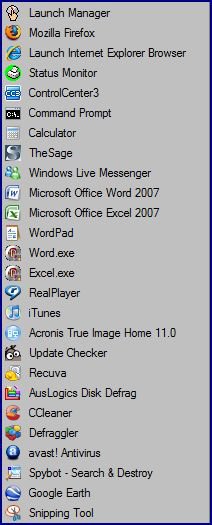
Here's an example just done of my " >> Quick launch " Menu, produced by my outlined method;

example-screenshot-snip.jpg

Hope that this works for you. However, if your Start Menu extends from the top of your Desktop, to the bottom, just do it in two overlapping sections, and if you're really keen, any good photo software will allow you to 'stitch' the two sections together.

Cheers Mate.

sassofalco
My System SpecsSystem Spec
Old 07-16-2009   #3 (permalink)


Vista home premium 32bit


Re: Start menu - How do you pin it to the wall so you can use the snipping tool?

I do it differently. I use Faststone Capture that does my screenshots and then I snip with the snipping tool (always in .png).
This is the last free version of Faststone Capture: A+ Freeware - Multimedia & Design - FastStone Capture 5.3 (last freeware version) newer versions cost $20.
My System SpecsSystem Spec
Old 07-16-2009   #4 (permalink)


Xp-Vista-7


Re: Start menu - How do you pin it to the wall so you can use the snipping tool?

Thank you both
sassofalco it works...
whs I'll give it a try...
cheers!
My System SpecsSystem Spec
Reply

Thread Tools


Similar Threads
Thread Forum
Snipping Tool/Sticky Notes Cannot Start Vista performance & maintenance
snipping tool Vista General
Snipping Tool Vista General
Snipping tool Vista General


Vista Forums is an independent web site and has not been authorized,
sponsored, or otherwise approved by Microsoft Corporation.
"Windows Vista", the Start Orb, and related materials are trademarks of Microsoft Corp.
© Designer Media Ltd

1 2 3 4 5 6 7 8 9 10 11 12 13 14 15 16 17 18 19 20 21 22 23 24 25 26 27 28 29 30 31 32 33 34 35 36 37 38 39 40 41 42 43 44 45 46