Windows Vista Forums
Vista Forums Home Join Vista Forums Windows 7 Forum Vista Tutorials Tags
Welcome to Windows Vista Forums. Our forum is dedicated to helping you find solutions with any problems, errors or issues you are experiencing with Windows Vista. The Vista forum also covers news and updates and has an extensive Windows Vista tutorial section that covers a wide range of tips and tricks.

Go Back   Vista Forums > Vista Forums > Software

Vista - New Auslogics Disk Defrag v2.1.1.30, out now.

Reply
 
Old 07-30-2009   #1 (permalink)


Vista Home Premium 32bit [x86] - SP2


New Auslogics Disk Defrag v2.1.1.30, out now.

The Updated Free Version 2.1.1.30 of Auslogics Disk Defrag was released 27 July, and is available for download through CNet Download Center here;

Auslogics Disk Defrag - Free software downloads and reviews - CNET Download.com

or through Brink's Free Software List for Vista, and the Auslogic Disk Defrag link to their website here;

Disk Defrag - Reclaim the Speed Of Your Disks

The graphics are improving all the time, and the software works like a charm.

My System SpecsSystem Spec
Old 07-30-2009   #2 (permalink)


Vista Ultimate SP2 x64 : Seven Ultimate x64


Re: New Auslogics Disk Defrag v2.1.1.30, out now.

Thanks for the heads up Tony

There's some nice improvements to this version.
My System SpecsSystem Spec
Old 07-30-2009   #3 (permalink)


Vista Home Premium 64 bit SP1


Re: New Auslogics Disk Defrag v2.1.1.30, out now.

I'm bad about starting a defrag, then remembering I have a chunk of files to delete and stopping, deleting, restarting, stopping etc.. I only had one glitch from doing that in Auslogics defrag, and a restore point fixed it. I just backed off one version until the next version was released and the problem was gone.

I'd say it's one of the safer defraggers to use.
My System SpecsSystem Spec
Old 08-24-2009   #4 (permalink)


Vista Home Premium 32bit


Is it normal for the defrag w/ Disk Defrag to take 45 secs or less to complete?
Every single time I run it, it shows 1/2 my drive being fragmented, and it takes less then 45 secs to defrag the C: partition.
It looks pretty, but is it really working? Less then 45 secs seems awfully fast, especially when I go analyze again it still shows 1/2 the drive is fragmented.
My System SpecsSystem Spec
Old 08-25-2009   #5 (permalink)


Vista Home Premium 32bit [x86] - SP2


New Auslogics Defrag v2.1.2.45 is available now.

Quote  Quote: Originally Posted by stcshindo View Post
Is it normal for the defrag w/ Disk Defrag to take 45 secs or less to complete?
Every single time I run it, it shows 1/2 my drive being fragmented, and it takes less then 45 secs to defrag the C: partition.
It looks pretty, but is it really working? Less then 45 secs seems awfully fast, especially when I go analyze again it still shows 1/2 the drive is fragmented.
Yes Mate, that can happen. And if you're uncertain about the first pass, then just repeat the process. It can't be simpler than that.

A newer Version of Auslogics Defrag v2.1.2.45 is available now through CNet Download.com , here:

Auslogics - Download Auslogics Disk Defrag

Personally, I find it very easy to use and efficient at what it does, and always note the % in increased GB that is freed up.

Hope it works well for you too. It would also help if you would finish off completing your system specs.
My System SpecsSystem Spec
Old 08-27-2009   #6 (permalink)


Vista Home Premium 64 bit SP1


Re: New Auslogics Disk Defrag v2.1.1.30, out now.

I just upgraded to .45 latest version and I'm playing around with the auto defrag. Do you happen to know what the threshold is for fragmentation? Seems like if it's only a few percent it just runs analyze so I'm curious when the auto defrag will actually go onto the defrag stage.

edit: I tried copying large files around and deleting but trial and error like that I might never hit on the number. There must be a % fragmented at which the auto defrag will run the actual defrag.
My System SpecsSystem Spec
Old 08-27-2009   #7 (permalink)


Vista Home Premium 32bit [x86] - SP2


Re: New Auslogics Disk Defrag v2.1.1.30, out now.

Quote  Quote: Originally Posted by MilesAhead View Post
I just upgraded to .45 latest version and I'm playing around with the auto defrag. Do you happen to know what the threshold is for fragmentation? Seems like if it's only a few percent it just runs analyze so I'm curious when the auto defrag will actually go onto the defrag stage.

edit: I tried copying large files around and deleting but trial and error like that I might never hit on the number. There must be a % fragmented at which the auto defrag will run the actual defrag.
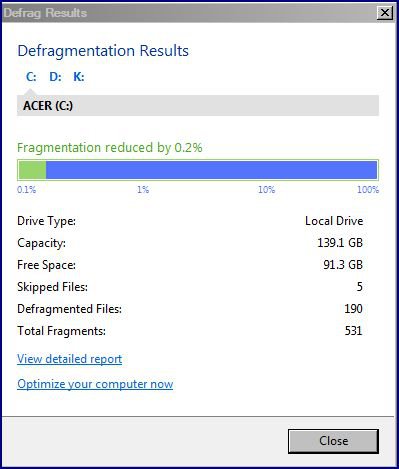
I just let it do it's own thing without changing any of the default settings, or making any custom changes. I have found that mine will go to defrag even when the end result shows that 0.5% has been gained. I've just done a defrag of my C:[Acer] Drive, and it picked up 0.2%, here;

defrag.jpg

Personally, I think that it's the number of fragmented files that is the issue, rather than the %. I say that because in a 120GB total HHD, 5% is a piffle, whereas it's a different matter in a 320GB total HHD.

I'm just happy that is seems to do it's thing quite efficiently, and without the need for any tweaks from me. Certainly keeps the various drives looking quite 'clean'.

My D;[Data] Drive needs very little defrag, but I run it all the same....over and done in a matter of seconds.
My System SpecsSystem Spec
Old 08-27-2009   #8 (permalink)


Vista Home Premium 64 bit SP1


Re: New Auslogics Disk Defrag v2.1.1.30, out now.

I dunno'. My Vista64 is sitting at 25% fragmentation and apparently it's not going to take any action. It would be nice if there was some range where the user could set the threshold. If I have to run it manually what's the good of the automation?

edit: ok, seems like it does kick in after awhile. Still, I'd prefer less nebulous control.

I sent a question on the Auslogics site. See if I get more than a boiler plate answer.

Last edited by MilesAhead; 08-27-2009 at 09:03 PM..
My System SpecsSystem Spec
Old 08-27-2009   #9 (permalink)


Vista Home Premium 32bit [x86] - SP2


Re: New Auslogics Disk Defrag v2.1.2.45, out now.

Quote  Quote: Originally Posted by MilesAhead View Post
I dunno'. My Vista64 is sitting at 25% fragmentation and apparently it's not going to take any action. It would be nice if there was some range where the user could set the threshold. If I have to run it manually what's the good of the automation?

edit: ok, seems like it does kick in after awhile. Still, I'd prefer less nebulous control.

I sent a question on the Auslogics site. See if I get more than a boiler plate answer.
.....hopefully not just a boiled plate!

Just one bit of info. I always 'Run as Administrator', don't know if that makes any difference.

Be interesting to see what Auslogics come back with.

Last edited by sassofalco; 08-31-2009 at 12:10 PM..
My System SpecsSystem Spec
Old 08-30-2009   #10 (permalink)


Vista Home Premium 64 bit SP1


Re: New Auslogics Disk Defrag v2.1.1.30, out now.

Hmmmmmmm, so far I don't see anything to discourage me from returning to manual usage. It either sits in the tray forever and does nothing, or it does an analysis. I don't think I've actually seen it defrag even at 25% fragmentation. Guess I'll run it manually until the next version. Maybe they'll tweak it a bit by then.

edit: looks like I don't get any plate, boiled, deep fried, or otherwise. No reply.
My System SpecsSystem Spec
Reply

Thread Tools


Similar Threads
Thread Forum
New Auslogics Disk Defrag v2.1.2.35, out now. Software
Auslogics Defrag Software
Auslogics Registry Defrag Software
Auslogics Disk Defrag (Vista 64 & Vista 32) Free Vista General
Auslogics Disk Defrag Vista General


Vista Forums is an independent web site and has not been authorized,
sponsored, or otherwise approved by Microsoft Corporation.
"Windows Vista", the Start Orb, and related materials are trademarks of Microsoft Corp.
© Designer Media Ltd

1 2 3 4 5 6 7 8 9 10 11 12 13 14 15 16 17 18 19 20 21 22 23 24 25 26 27 28 29 30 31 32 33 34 35 36 37 38 39 40 41 42 43 44 45 46