Windows Vista Forums
Vista Forums Home Join Vista Forums Windows 7 Forum Vista Tutorials Tags
Welcome to Windows Vista Forums. Our forum is dedicated to helping you find solutions with any problems, errors or issues you are experiencing with Windows Vista. The Vista forum also covers news and updates and has an extensive Windows Vista tutorial section that covers a wide range of tips and tricks.

Go Back   Vista Forums > Vista Forums > Sound & Audio

Vista - Headphones still don't work

Reply
 
Old 07-03-2008   #1 (permalink)


Vista Home Premium x64


Headphones still don't work

Since i didn't get too much help in this thread i decided to make a new one. I hope you won't consider it as spamming, because it isn't my intention.
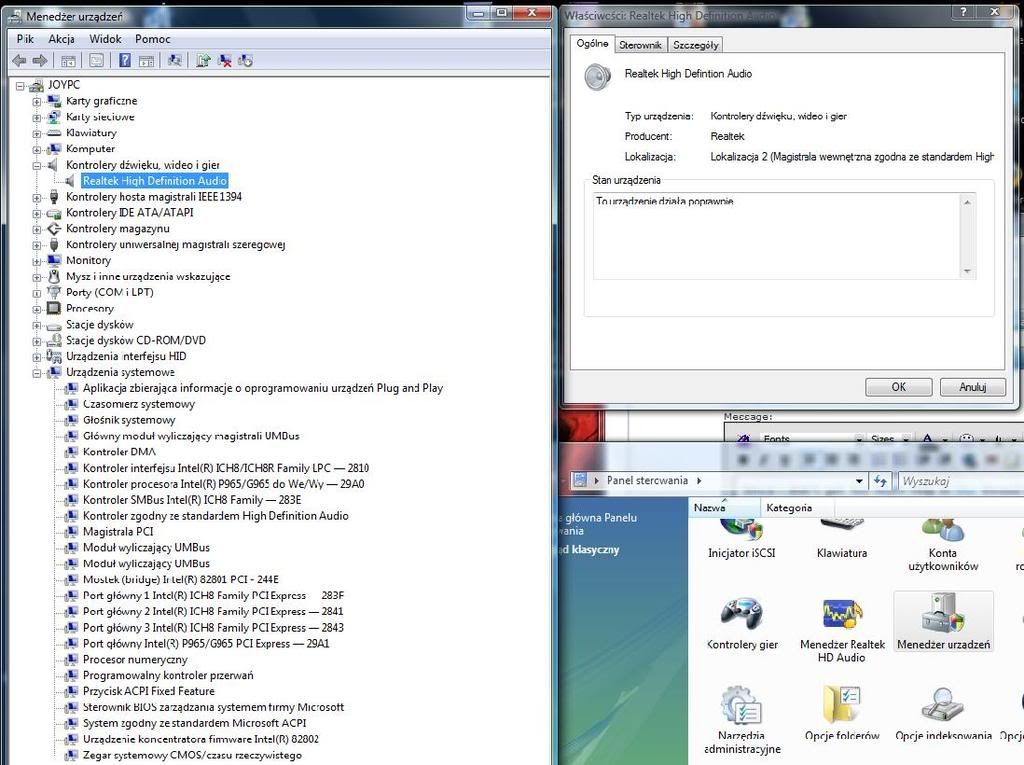
Back to topic, this is the Device manager window:


it says it's working correctly but i don't get any sound from headphones (speakers built in the monitor are OK)

in the image there's also "Kontroler zgodny ze standardem High Definition Audio" in System devices which means something like: "Controller compatible woth the High Def Audio Standard"

My System SpecsSystem Spec
Old 07-04-2008   #2 (permalink)


Vista Ultimate x64 MAK, OpenSolaris 5, Gentoo 2008.1....


Re: Headphones still don't work

Where are you plugging in your headphones at? Is that a live jack?
My System SpecsSystem Spec
Old 07-04-2008   #3 (permalink)


Vista Ultimate X64 SP2


Re: Headphones still don't work

Do you have a Realtek HD audio manager icon near clock?
When you insert headphones you should get a pop up asking what you have atached. If you do not click "headphones" It will not mute the external speakers.

Update Realtek HD audio codec driver
Realtek
My System SpecsSystem Spec
Old 07-04-2008   #4 (permalink)


Vista Home Premium x64


Re: Headphones still don't work

@ johngalt
I don't know what's a live jack but it's the most common jack - used in mp3 players etc. Located on the front on the computer.
@rive0108
I do have the Realtek HD Audio Manager icon , but when i insert headphones i don't get a popup. I'll try updating.


EDIT: Updated, Plugged headphones, nothing happens, Realtek icon is still on the bar

Last edited by i_say; 07-04-2008 at 05:27 AM..
My System SpecsSystem Spec
Old 07-04-2008   #5 (permalink)


Vista Home Premium 32-bit & Vista Ultimate 64-bit both Service Pack 2 W7 Pro RTM 7600 32 & 64


Re: Headphones still don't work

Hi i_say,

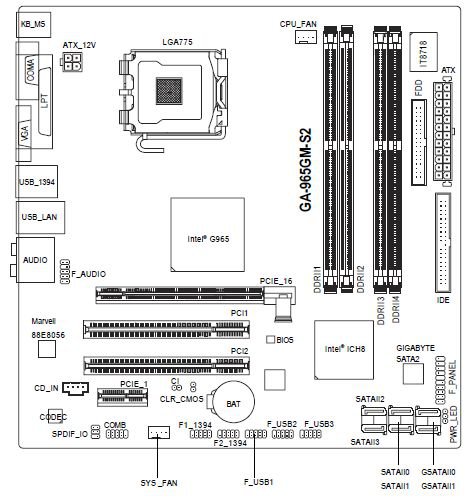
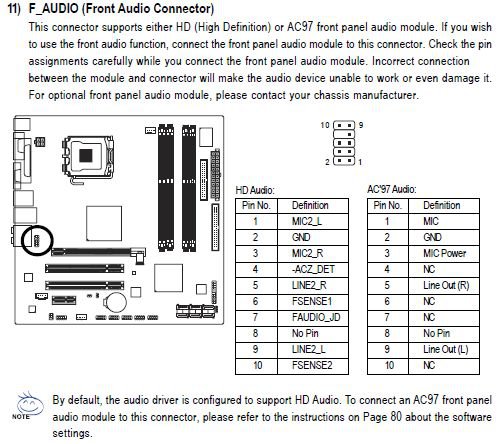
I think that this is what John means by 'is that a live jack?'. Is the jack physically connected to the relevant header, either on your motherboard or sound card? You will need to open the case of your PC to check - refer to the manual for details of the location of the audio header and its pin assignments.
Dwarf
My System SpecsSystem Spec
Old 07-04-2008   #6 (permalink)


Vista Home Premium x64


Re: Headphones still don't work

I guess i'll have to wait for my dad, because i have no idea what you are talking about

Last edited by i_say; 07-04-2008 at 08:30 AM.. Reason: spelling
My System SpecsSystem Spec
Old 07-04-2008   #7 (permalink)


Vista Ultimate x64 MAK, OpenSolaris 5, Gentoo 2008.1....


Re: Headphones still don't work

Just because there is a jack in the front of the computer doesn't mean it is actually connected to anything - that is what we are trying to say. You need to make sure that that jack actually goes somewhere and is connected *correctly*.

Also, you may have a motherboard that won't allow the use of front and rear audio at the same time (My older MSI motherboard only allowed one at a time - and even worse you had to *manually* set which one via a jumper on the motherboard).

Since this is your father's machine, let him be the one to figure out if you have a technical issue or another issue.
My System SpecsSystem Spec
Old 07-04-2008   #8 (permalink)


Vista Home Premium x64


Re: Headphones still don't work

This is my machine, but i dont' know anything about computers and he does. I don't think jack isn't connected, because before installing SP1 everything worked fine and since that time i haven't opened my computer.
My System SpecsSystem Spec
Old 07-04-2008   #9 (permalink)


Vista Home Premium 32-bit & Vista Ultimate 64-bit both Service Pack 2 W7 Pro RTM 7600 32 & 64


Re: Headphones still don't work

Hi i_say,

Since your monitor speakers still work, have you tried disconnecting them and plugging your headphones in place of them? It could be that your headphones are faulty. Do your monitor speakers work when plugged into the front panel socket?
Dwarf
My System SpecsSystem Spec
Old 07-04-2008   #10 (permalink)


Vista Home Premium x64


Re: Headphones still don't work

It seems that the problem lays in the front jack, because headphones connected to the back work and speakers connected to the front don't work
My System SpecsSystem Spec
Reply

Thread Tools


Similar Threads
Thread Forum
Headphones dont work Vista General
new headphones but they dont work Sound & Audio
speakers work but headphones don't Vista music pictures video
Headphones don't work Vista General
Headphones doesn't work Vista hardware & devices


Vista Forums is an independent web site and has not been authorized,
sponsored, or otherwise approved by Microsoft Corporation.
"Windows Vista", the Start Orb, and related materials are trademarks of Microsoft Corp.
© Designer Media Ltd

1 2 3 4 5 6 7 8 9 10 11 12 13 14 15 16 17 18 19 20 21 22 23 24 25 26 27 28 29 30 31 32 33 34 35 36 37 38 39 40 41 42 43 44 45 46