![]() |
![]() | ![]() | ![]() | ![]() | ![]() | ![]() | ![]() |
| Welcome to Windows Vista Forums. Our forum is dedicated to helping you find solutions with any problems, errors or issues you are experiencing with Windows Vista. The Vista forum also covers news and updates and has an extensive Windows Vista tutorial section that covers a wide range of tips and tricks. |
| |||||||
![]() |
| |
| | #1 (permalink) |
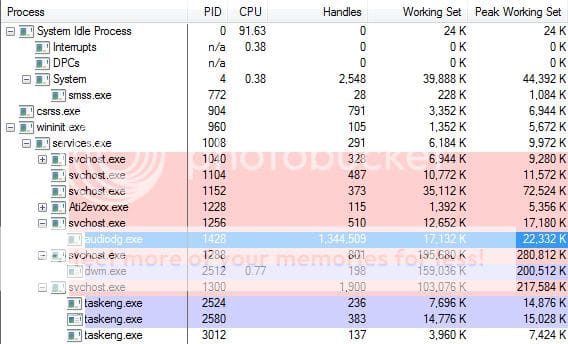
| Windows Vista x64 Ultimate | Audio Service has large number of Memory Handles I started using Process Explorer (Process Explorer) a few days ago instead of the standard Task Manager. This was so that I could determine which program is blocking access to some JPG files I recently downloaded. But thats not what I want to talk about. Take a look at the following screenshot: ![]() The AUDIODG.EXE process has an impossibly high number of handles - 1,344,509. The screenshot was taken a few minutes before writing this post. Last night, the handle count for that process was just a little over 930,000. A google for AUDIODG.EXE reveals that it is part of the Vista Audio Service. The follow is extracted from Larry Osterman's blog on MSDN: Quote: What is AUDIODG.EXE? One of the new audio components in Vista is a new process named audiodg.exe. If you look at it in taskmgr, the description shows "Windows Audio Device Graph Isolation", but that's not really particularly helpful when it comes to figuring out what it does. The short answer is that audiodg.exe hosts the audio engine for Vista. All the DSP and other audio processing is done in audiodg.exe. There are two reason it runs outside of the windows audio service. The first is that there's 3rd party code that gets loaded into audiodg.exe. Audio hardware vendors have the ability to install custom DSPs (called Audio Processing Objects or APOs) into the audio pipeline. For a number of reasons (reliability, serviceability, others) we're not allowed to load 3rd party code into svchost processes (svchost.exe is a generic host process for services that's used inside Windows). So we need to move all the code that interacts with these 3rd party APOs outside the audio service (that way if an APO crashes, it won't take out some other critical part of the system with it). The second reason for using a separate process for the audio engine is DRM. The DRM system in Vista requires that the audio samples be processed in a protected process, and (for a number of technical reasons that are too obscure to go into) it's not possible for a svchost hosted service to run in a protected process. Does anybody know why this is happening, and if there is a patch available to fix it? Updating to the newest audio drivers does not help, as AUDIODG.EXE is part of Windows and does not get updated by a new audio driver. |
My System Specs![]() |
| | #2 (permalink) |
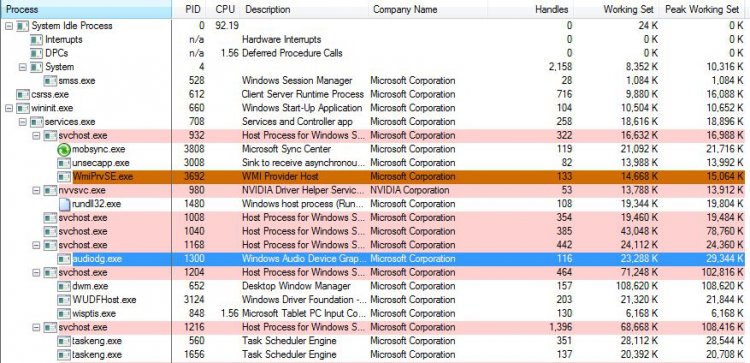
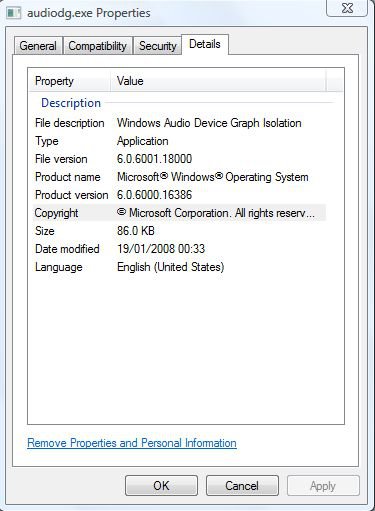
| Vista Home Premium 32-bit & Vista Ultimate 64-bit both Service Pack 2 W7 Pro RTM 7600 32 & 64 | Re: Audio Service has large number of Memory Handles Hi Peter, This is very strange. Here is my 'Process Explorer', executed with administrative credentials of the same, taken just before writing this post. As you can see, mine only has a handle count of 116, and has been fluctuating between ~110 and ~130. ![]() Check the properties/details of this file. Here is what I get: ![]() It is possible that some application which makes use of this service fails to properly relinquish its resources (quoted section highlighted in red), a bit like a memory leak. Quote: What is AUDIODG.EXE? One of the new audio components in Vista is a new process named audiodg.exe. If you look at it in taskmgr, the description shows "Windows Audio Device Graph Isolation", but that's not really particularly helpful when it comes to figuring out what it does. The short answer is that audiodg.exe hosts the audio engine for Vista. All the DSP and other audio processing is done in audiodg.exe. There are two reason it runs outside of the windows audio service. The first is that there's 3rd party code that gets loaded into audiodg.exe. Audio hardware vendors have the ability to install custom DSPs (called Audio Processing Objects or APOs) into the audio pipeline. For a number of reasons (reliability, serviceability, others) we're not allowed to load 3rd party code into svchost processes (svchost.exe is a generic host process for services that's used inside Windows). So we need to move all the code that interacts with these 3rd party APOs outside the audio service (that way if an APO crashes, it won't take out some other critical part of the system with it). The second reason for using a separate process for the audio engine is DRM. The DRM system in Vista requires that the audio samples be processed in a protected process, and (for a number of technical reasons that are too obscure to go into) it's not possible for a svchost hosted service to run in a protected process. Dwarf |
My System Specs![]() |
| | #3 (permalink) |
| Windows Vista x64 Ultimate | Re: Audio Service has large number of Memory Handles It's now up to 1,606,466 handles since my original post. Now the trick is finding out which application (if any) is causing this. Only Process Explorer goes ballistic when I turn on the lower pane to show handles and it tries to display that many. I'm gonna keep track of it after a restart, so hopefully I can find out which handles are not being released, and to which application they belong to... |
My System Specs![]() |
| | #4 (permalink) |
| Windows Vista x64 Ultimate | Re: Audio Service has large number of Memory Handles It's now up to 1,606,466 handles since my original post. Now the trick is finding out which application (if any) is causing this. Only Process Explorer goes ballistic when I turn on the lower pane to show handles and it tries to display that many. I'm gonna keep track of it after a restart, so hopefully I can find out which handles are not being released, and to which application they belong to... Whenever a sound plays, it goes up by a couple of handles, then goes down again. I have noticed the follow registry access handles get opened, but don't get closed again: Code: HKLM\SOFTWARE\SonicFocus\{0.0.0.00000000}.{233EE6CF-F077-4C5D-B268-C7A848689ACE}
Any ideas on how I can do that? |
My System Specs![]() |
| | #5 (permalink) |
| Windows Vista x64 Ultimate | Re: Audio Service has large number of Memory Handles I hopefully resolved the problem by performing the following: 1) I located the "HKLM\SOFTWARE\SonicFocus" key in the registry, and renamed it to "_SonicFocus", so that whatever was trying to read it will fail. The key didn't recreate itself, and the system is operating normally. I'll know in a few days after regular use. 2) I disabled two "Protexis Licensing" services, which I might add I have no idea which programs are using. Again, the system appears to be operating without issues. My doing the above, I seems as though I've nipped this "problem" in the bud, and the handle count has stabilized at 895. Give me a few days (hours at least) of normal operating to see if this changes. If it still gives be this excessive handle count, I'll try re-installing my audio drivers, although I don't think it'll do any good, as I've just checked the ASUS website, and I'm already using the most current WHQL drivers. |
My System Specs![]() |
| | #6 (permalink) |
| Vista Home Premium 32-bit & Vista Ultimate 64-bit both Service Pack 2 W7 Pro RTM 7600 32 & 64 | Re: Audio Service has large number of Memory Handles Hi Peter, A quick Google of 'Protexis Licensing' reveals that this software is connected with DRM. You can find information at the following website. You might also find updates to 'Sonic Focus' at their website. Dwarf Protexis sells and distributes software online for software companies and retailers Sonic Focus Inc. - Products |
My System Specs![]() |
| | #7 (permalink) |
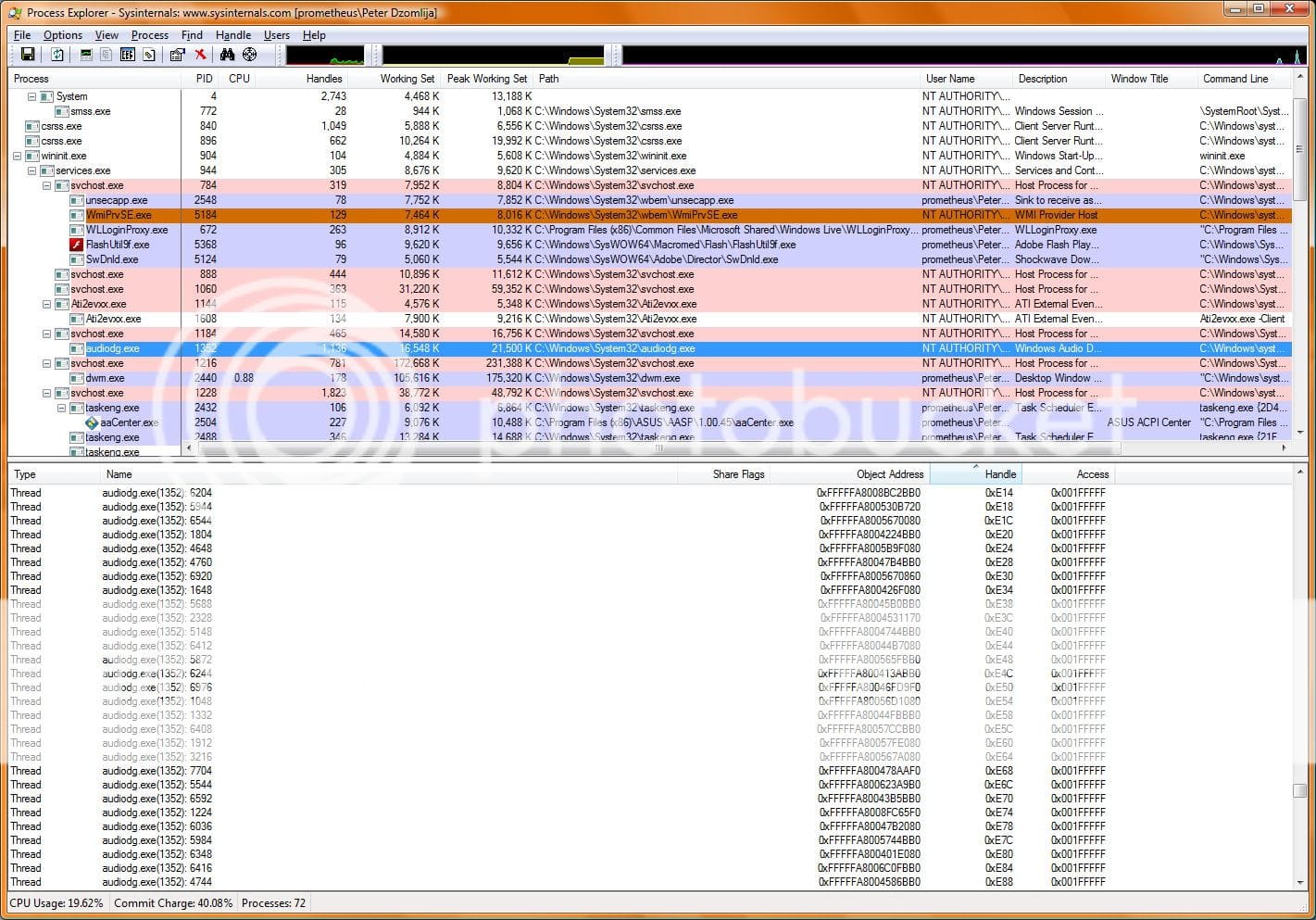
| Windows Vista x64 Ultimate | Re: Audio Service has large number of Memory Handles Hi Peter, A quick Google of 'Protexis Licensing' reveals that this software is connected with DRM. You can find information at the following website. You might also find updates to 'Sonic Focus' at their website. Dwarf Protexis sells and distributes software online for software companies and retailers Sonic Focus Inc. - Products The AudioDG problem of so many handles remains, although it is not as pronounced are before. It has now jumped from 895 to 1,134, and many of the handles listed in Process Explorer are back to AUDIODG.EXE itself: |
My System Specs![]() |
| | #8 (permalink) |
| Vista Home Premium 32-bit & Vista Ultimate 64-bit both Service Pack 2 W7 Pro RTM 7600 32 & 64 | Re: Audio Service has large number of Memory Handles Hi Peter, That many handles, although much lower than you have had (1,134 as opposed to 1,606,466) is excessive. Since you have narrowed the problem down to being possibly caused by 'Sonic Focus', try and see what happens if you prevent this application from running when you restart your PC (you might need to uninstall it). Unfortunately, this application is not compatible with my system, so I cannot check this for you. Dwarf |
My System Specs![]() |
| | #9 (permalink) |
| Vista Ultimate x64 MAK, OpenSolaris 5, Gentoo 2008.1.... | Re: Audio Service has large number of Memory Handles You also need to contact both Sonic Focus and Ptotexis about this issue - as well as Corel and jASC (if they are still the developers of PSP). They may have users who have been having errors and they cannot figure out what is going on - or they may have a patch in (one of) their respective forums fixing this issue.... |
My System Specs![]() |
| | #10 (permalink) |
| Vista Home Premium 32-bit & Vista Ultimate 64-bit both Service Pack 2 W7 Pro RTM 7600 32 & 64 | Re: Audio Service has large number of Memory Handles Hi Peter, In addition to 'Process Explorer', you might also like to try 'Process Monitor' to see if that gives you any more information. Unfortunately, I am not yet familiar with this tool, but it might be worth a try. You will probably need to run them together. Dwarf Process Monitor |
My System Specs![]() |
![]() |
| Thread Tools | |
| |
Similar Threads | ||||
| Thread | Forum | |||
| Copying or deleting a large number of files | Vista file management | |||
| Large Number Of Systems Infected With W32/Conficker | System Security | |||
| wmi fails after large number of calls | VB Script | |||
| Virtual memory too large how reduce it? | Vista installation & setup | |||
| Moving large number of files within same drive | Vista file management | |||