I have a PC with a Gigabyte GA-P35C-DS3R (rev. 1.x) mobo (GIGABYTE - Product - Motherboard - Overview - GA-P35C-DS3R (rev. 1.x)). It comes with a on board Realtek ALC889A sound chipset. I have installed the latest sound driver from Gigabyte (GIGABYTE - Support - Motherboard - Driver - GA-P35C-DS3R (rev. 1.x)) but I have a weird case... The Windows events sounds are not working... When Vista starts, when I increase the sound using slide sound systray control, when some clip plays on a youTube clip... No sound! But when I use, for example aimp2 music player, or when I do the realtek audio manager sound test... I got the sound!!! I´m not sure, but I think the problem started after the SP1 upgrade. Best regards, Luis Santos

You are using an out of date browser. It may not display this or other websites correctly.
You should upgrade or use an alternative browser.
You should upgrade or use an alternative browser.
No "Windows" sound in Vista Business 32 SP1
- Thread starter lcdsantos
- Start date

Hi, lcdsantos, and welcome to the forums.
Did you uninstall land then reinstall the sound drivers *after* installing SP1?
Did you uninstall land then reinstall the sound drivers *after* installing SP1?
My Computers
System One System Two
-
- Operating System
- Windows 10 Pro X64 Insider Preview (Skip Ahead) latest build
- Manufacturer/Model
- The Beast Model V (homebrew)
- CPU
- Intel Core i7 965 EE @ 3.6 GHz
- Motherboard
- eVGA X58 Classified 3 (141-GT-E770-A1)
- Memory
- 3 * Mushkin 998981 Redline Enhanced triple channel DDR3 4 GB CL7 DDR3 1600 MHz (PC3-12800)
- Graphics card(s)
- eVGA GeForce GTX 970 SSC ACX 2.0 (04G-P4-3979-KB)
- Sound Card
- Realtek HD Audio (onboard)
- Monitor(s) Displays
- 2 * Lenovo LT2323pwA Widescreeen
- Screen Resolution
- 2 * 1920 x 1080
- Hard Drives
- SanDisk Ultra SDSSDHII-960G-G25 960 GB SATA III SSD (System) Crucial MX100 CT256MX100SSD1 256GB SATA III SSD (User Tree) 2 * Seagate Barracuda 7200.12 ST31000528AS 1TB 7200 RPM SATA II Mech. HD Seagate ST1500DL001-9VT15L Barracuda 7200.12 1.5 TB S
- PSU
- Thermaltake Black Widow TX TR2 850W 80+ Bronze Semi-Mod ATX
- Case
- ThermalTake Level 10 GT (Black)
- Cooling
- Corsair H100 (CPU, dual 140 mm fans on radiator) + Air (2 *
- Mouse
- Logitech MX Master (shared)
- Keyboard
- Logitech G15 (gen 2)
- Internet Speed
- AT&T Lightspeed Gigabit duplex
-
- Operating System
- Sabayon Linux (current, weekly updates, 5.1.x kernel)
- Manufacturer/Model
- Lenovo ThinkPad E545
- CPU
- AMD A6-5350M APU
- Motherboard
- Lenovo
- Memory
- 8 GB
- Sound Card
- Conextant 20671 SmartAudio HD
- Monitor(s) Displays
- Lenovo 15" Matte
- Screen Resolution
- 1680 * 1050
- Hard Drives
- INTEL Cherryvill 520 Series SSDSC2CW180A 180 GB SSD
- PSU
- Lenovo
- Case
- Lenovo
- Cooling
- Lenovo
- Mouse
- Logitech MX Master (shared) | Synaptics TouchPad
- Keyboard
- Lenovo
- Internet Speed
- AT&T LightSpeed Gigabit Duplex
Hi, lcdsantos, and welcome to the forums.
Did you uninstall land then reinstall the sound drivers *after* installing SP1?
Hi John, thanks for the reply and for the welcome. Yes, I completely removed the sound driver after the SP1 install. In fact I did this after I noted the problem.
After the complete audio driver remove I reboot Vista and, in the new boot, the default Vista HD audio drivers were installed. This didn´t solve the problem. With default Vista audio driver I got the exact same problem: no sound on Windows apps the seems to address the sound requests by calling Vista procs.
Applications that seems to access directly the sound drivers works OK. I can list GOM Player (GOM software - Free, Simple, Light, It just plays! - GOM Media Player, GOM encoder) and AIMP2 (AIMP2: Home Page) as apps that sounds (literally) OK.
After this I reinstalled my mobo audio drivers (which claims to inlcude Microsoft UAA Driver), downloading the latest version from Gigabyte site. I see that Realtek drivers sucessfully replaced the default Vista HD audio driver, but without solving the problem.
It´s very weird the fact that some apps can reproduce sound and others (Vista audio effects and web browsers, IE and Firefox included) can not...
My Computer
That is a weird problem - hopefully someone can chime in on this one because you're having this with the standard Windows driver as well....
One question - what audio devices do you have plugged in?
One question - what audio devices do you have plugged in?
My Computers
System One System Two
-
- Operating System
- Windows 10 Pro X64 Insider Preview (Skip Ahead) latest build
- Manufacturer/Model
- The Beast Model V (homebrew)
- CPU
- Intel Core i7 965 EE @ 3.6 GHz
- Motherboard
- eVGA X58 Classified 3 (141-GT-E770-A1)
- Memory
- 3 * Mushkin 998981 Redline Enhanced triple channel DDR3 4 GB CL7 DDR3 1600 MHz (PC3-12800)
- Graphics card(s)
- eVGA GeForce GTX 970 SSC ACX 2.0 (04G-P4-3979-KB)
- Sound Card
- Realtek HD Audio (onboard)
- Monitor(s) Displays
- 2 * Lenovo LT2323pwA Widescreeen
- Screen Resolution
- 2 * 1920 x 1080
- Hard Drives
- SanDisk Ultra SDSSDHII-960G-G25 960 GB SATA III SSD (System) Crucial MX100 CT256MX100SSD1 256GB SATA III SSD (User Tree) 2 * Seagate Barracuda 7200.12 ST31000528AS 1TB 7200 RPM SATA II Mech. HD Seagate ST1500DL001-9VT15L Barracuda 7200.12 1.5 TB S
- PSU
- Thermaltake Black Widow TX TR2 850W 80+ Bronze Semi-Mod ATX
- Case
- ThermalTake Level 10 GT (Black)
- Cooling
- Corsair H100 (CPU, dual 140 mm fans on radiator) + Air (2 *
- Mouse
- Logitech MX Master (shared)
- Keyboard
- Logitech G15 (gen 2)
- Internet Speed
- AT&T Lightspeed Gigabit duplex
-
- Operating System
- Sabayon Linux (current, weekly updates, 5.1.x kernel)
- Manufacturer/Model
- Lenovo ThinkPad E545
- CPU
- AMD A6-5350M APU
- Motherboard
- Lenovo
- Memory
- 8 GB
- Sound Card
- Conextant 20671 SmartAudio HD
- Monitor(s) Displays
- Lenovo 15" Matte
- Screen Resolution
- 1680 * 1050
- Hard Drives
- INTEL Cherryvill 520 Series SSDSC2CW180A 180 GB SSD
- PSU
- Lenovo
- Case
- Lenovo
- Cooling
- Lenovo
- Mouse
- Logitech MX Master (shared) | Synaptics TouchPad
- Keyboard
- Lenovo
- Internet Speed
- AT&T LightSpeed Gigabit Duplex
That is a weird problem - hopefully someone can chime in on this one because you're having this with the standard Windows driver as well....
One question - what audio devices do you have plugged in?
Yeah, although I´m a newbie in the forum I´m a PC user since my first 286
 . In general I´m able to fix such problems myself, but this one is driving me crazy
  !
!I have just a 2.1 speaker set. It´s a low budget Edifier X-100 (Edifier Discontinued Speakers). The set comes with a single stereo P2 plug. The sound signal goes first to the subwoofer and then is pass-throughed to the front speaker. The subwoofer it´s not a real one, as it´s not pluged into the LFE jack output.
My Computer

echrada
Vista Guru
I take it that you have selected Windows Sounds to play? 
My Computer
System One
-
- Manufacturer/Model
- Acer Aspire 5920gmi notebook
- CPU
- Intel Core 2 Duo T7300 2.00GHz
- Memory
- 4GB
- Graphics card(s)
- NVIDIA GeForce 8600M GS
- Sound Card
- Realtek
- Screen Resolution
- 1280 x 800 x 4294967296 colors
- Internet Speed
- crawl
Hi! I have selected windows events sound to work. But none of work. As I stated no "Windows" sounds works, including the Vista startup welcome sound.
My Computer

A couple of things you could try. Right-click Computer go to Properties. Call up Device Manager at left.
Go to Sound, Video and Game controllers and uninstall your Realtek ALC889A
Reboot and let Vista reinstall it and find the drivers.
Or...
When you click the taskbar sound icon is the volume turned up as far as it will go?
Right-click that icon and open the Sounds tab. Try changing the Sound Scheme.
Go to Sound, Video and Game controllers and uninstall your Realtek ALC889A
Reboot and let Vista reinstall it and find the drivers.
Or...
When you click the taskbar sound icon is the volume turned up as far as it will go?
Right-click that icon and open the Sounds tab. Try changing the Sound Scheme.
My Computer
System One
-
- Operating System
- Win 10 Pro x64 x 2
- Manufacturer/Model
- Alienware ALX x58
- CPU
- Intel® Core™ i7-975 Extreme O/C to 4.02 GHz, 8MB Cache
- Motherboard
- Asus® P6T Deluxe V2 X58 LGA1366
- Memory
- 24GB Corsair Vengeance DDR3 SDRAM at 1600MHz - 6 x 4096MB
- Graphics card(s)
- 1792 MB NVIDIA® GeForce® GTX 295 Dual Core
- Sound Card
- Onboard Soundmax® High-Definition 7.1 Performance Audio
- Monitor(s) Displays
- Samsung XL2370 HD LED backlit 23" W/S 2ms response time
- Screen Resolution
- 1920 x 1080
- Hard Drives
- 2 x 500gb SATA II 1 x 1TB SATA II 1 external eSATA LaCie 3TB (Non-RAID)
- PSU
- Alienware® 1200 Watt Multi-GPU
- Case
- Unique
- Cooling
- 4 case fans @ CPU water cooling.
- Internet Speed
- 1gb/s up and down
...uninstall your Realtek ALC889A
Reboot and let Vista reinstall it and find the drivers.
I tried this already. Did not help. The default MS Vista drivers were installed Ok after the reboot, but the problem persisted with no change on its behaviour. After this I downloaded again and installed the latest audio driver from my mobo site. No change...

When you click the taskbar sound icon is the volume turned up as far as it will go?
Right-click that icon and open the Sounds tab. Try changing the Sound Scheme.
Yes, the sound is on. As I stated the sound works nicelly when using the the audio driver config applet test. And when using apps that looks to work "directly" with the audio drivers, as AIMP2, that uses the BASS library.
I will try it again (uninstall, reinstall, everything...) tonight. I´m currently on my job using a PC with XP and 1-core CPU and 1Gb RAM. I miss my personal PC (no pun intended) with 4-core CPU with 4Gb RAM... :D
My Computer
try a start up repair. that has fixed some odd issues for me, one of them was no sound.
Hi motarola2, thank for the info. My Vista DVD is the first isse, no SP1. My Vista instalation is SP1, upgraded from the Web.
Can I do the repair process in this scenario?
My Computer
Slipstream Windows Vista with SP1 & Create a Bootable Vista SP1 DVD
alternative instructions, mostly the same though...
vLite: Tool For Slipstreaming Windows Vista SP1 » PCMech
Slipstream Windows Vista with SP1 & Create a Bootable Vista SP1 DVD
alternative instructions, mostly the same though...
vLite: Tool For Slipstreaming Windows Vista SP1 » PCMech
Slipstream Windows Vista with SP1 & Create a Bootable Vista SP1 DVD
My Computer
System One
-
- Operating System
- Win 10 Pro x64 x 2
- Manufacturer/Model
- Alienware ALX x58
- CPU
- Intel® Core™ i7-975 Extreme O/C to 4.02 GHz, 8MB Cache
- Motherboard
- Asus® P6T Deluxe V2 X58 LGA1366
- Memory
- 24GB Corsair Vengeance DDR3 SDRAM at 1600MHz - 6 x 4096MB
- Graphics card(s)
- 1792 MB NVIDIA® GeForce® GTX 295 Dual Core
- Sound Card
- Onboard Soundmax® High-Definition 7.1 Performance Audio
- Monitor(s) Displays
- Samsung XL2370 HD LED backlit 23" W/S 2ms response time
- Screen Resolution
- 1920 x 1080
- Hard Drives
- 2 x 500gb SATA II 1 x 1TB SATA II 1 external eSATA LaCie 3TB (Non-RAID)
- PSU
- Alienware® 1200 Watt Multi-GPU
- Case
- Unique
- Cooling
- 4 case fans @ CPU water cooling.
- Internet Speed
- 1gb/s up and down
Thanks Ex_Brit, I´ll generate my Vista SP1 boot DVD and use it in the repair process.
My Computer
You're welcome. That's what I did.
My Computer
System One
-
- Operating System
- Win 10 Pro x64 x 2
- Manufacturer/Model
- Alienware ALX x58
- CPU
- Intel® Core™ i7-975 Extreme O/C to 4.02 GHz, 8MB Cache
- Motherboard
- Asus® P6T Deluxe V2 X58 LGA1366
- Memory
- 24GB Corsair Vengeance DDR3 SDRAM at 1600MHz - 6 x 4096MB
- Graphics card(s)
- 1792 MB NVIDIA® GeForce® GTX 295 Dual Core
- Sound Card
- Onboard Soundmax® High-Definition 7.1 Performance Audio
- Monitor(s) Displays
- Samsung XL2370 HD LED backlit 23" W/S 2ms response time
- Screen Resolution
- 1920 x 1080
- Hard Drives
- 2 x 500gb SATA II 1 x 1TB SATA II 1 external eSATA LaCie 3TB (Non-RAID)
- PSU
- Alienware® 1200 Watt Multi-GPU
- Case
- Unique
- Cooling
- 4 case fans @ CPU water cooling.
- Internet Speed
- 1gb/s up and down

Hi lcdsantos,
If you can hear sound that means the drivers are correctly installed and working, so thats not the problem...I guess you may have forgot to set the correct 'default' device for sound to use the correct output for other applications
Control Panel\ Sound\ Playback-Tab
Right-Click the Audio Device and click 'Set As Default'
Sometimes Windows will automatically set the device as 'Digital Output' and require you to set 'Speakers' as the default device, It might also help to use the 'test' option located there to determine the correct output device and then set that one as 'default'
Steven
If you can hear sound that means the drivers are correctly installed and working, so thats not the problem...I guess you may have forgot to set the correct 'default' device for sound to use the correct output for other applications
Control Panel\ Sound\ Playback-Tab
Right-Click the Audio Device and click 'Set As Default'
Sometimes Windows will automatically set the device as 'Digital Output' and require you to set 'Speakers' as the default device, It might also help to use the 'test' option located there to determine the correct output device and then set that one as 'default'
Steven
My Computer

Bare Foot Kid
R.I.P. August 13th 2014
Hello all.
Brink has created this excellent, all inclusive SP1 slipstream tutorial here at Vista forums.
Please, feel free to have a look at it.
http://www.vistax64.com/tutorials/151606-vista-sp1-slipstream-installation-dvd.html
Later Ted
Ted
Brink has created this excellent, all inclusive SP1 slipstream tutorial here at Vista forums.
Please, feel free to have a look at it.
http://www.vistax64.com/tutorials/151606-vista-sp1-slipstream-installation-dvd.html
Later
TedMy Computer
System One
-
- Manufacturer/Model
- * BFK Customs *
- CPU
- Intel C2Q 9550 Yorkfield
- Motherboard
- ASUS P5Q Pro
- Memory
- 8GB Dominator 8500C5D
- Graphics card(s)
- XFX ATI 1GB 4870 XXX
- Sound Card
- Realtek HD 7-1
- Monitor(s) Displays
- 1x 47" LCD HDMI & 2x 26" LCD HDMI
- Screen Resolution
- 1920x1080P & 1920x1200
- Hard Drives
- 2x 500GB 7200RPM 32MB Cache WD Caviar Black
- PSU
- Corsair 620HX
- Case
- CM Cosmos RC-1000
- Cooling
- Tuniq Tower 120, 2x 140mm and 3x 120mm case fans
- Mouse
- Razer Diamondback 3G
- Keyboard
- HP Enhansed Multimedia
- Internet Speed
- 18.6Mb/s
- Other Info
- My First Build ;)
I have a PC with a Gigabyte GA-P35C-DS3R (rev. 1.x) mobo (GIGABYTE - Product - Motherboard - Overview - GA-P35C-DS3R (rev. 1.x)). It comes with a on board Realtek ALC889A sound chipset. I have installed the latest sound driver from Gigabyte (GIGABYTE - Support - Motherboard - Driver - GA-P35C-DS3R (rev. 1.x)) but I have a weird case... The Windows events sounds are not working... When Vista starts, when I increase the sound using slide sound systray control, when some clip plays on a youTube clip... No sound! But when I use, for example aimp2 music player, or when I do the realtek audio manager sound test... I got the sound!!! I´m not sure, but I think the problem started after the SP1 upgrade. Best regards, Luis Santos
Hi lcdsantos,
If you can hear sound that means the drivers are correctly installed and working, so thats not the problem...I guess you may have forgot to set the correct 'default' device for sound to use the correct output for other applications
Control Panel\ Sound\ Playback-Tab
Right-Click the Audio Device and click 'Set As Default'
Sometimes Windows will automatically set the device as 'Digital Output' and require you to set 'Speakers' as the default device, It might also help to use the 'test' option located there to determine the correct output device and then set that one as 'default'
Steven
Hmmm - that would make sense but it still concerns me that AIMP will play music.....
My Computers
System One System Two
-
- Operating System
- Windows 10 Pro X64 Insider Preview (Skip Ahead) latest build
- Manufacturer/Model
- The Beast Model V (homebrew)
- CPU
- Intel Core i7 965 EE @ 3.6 GHz
- Motherboard
- eVGA X58 Classified 3 (141-GT-E770-A1)
- Memory
- 3 * Mushkin 998981 Redline Enhanced triple channel DDR3 4 GB CL7 DDR3 1600 MHz (PC3-12800)
- Graphics card(s)
- eVGA GeForce GTX 970 SSC ACX 2.0 (04G-P4-3979-KB)
- Sound Card
- Realtek HD Audio (onboard)
- Monitor(s) Displays
- 2 * Lenovo LT2323pwA Widescreeen
- Screen Resolution
- 2 * 1920 x 1080
- Hard Drives
- SanDisk Ultra SDSSDHII-960G-G25 960 GB SATA III SSD (System) Crucial MX100 CT256MX100SSD1 256GB SATA III SSD (User Tree) 2 * Seagate Barracuda 7200.12 ST31000528AS 1TB 7200 RPM SATA II Mech. HD Seagate ST1500DL001-9VT15L Barracuda 7200.12 1.5 TB S
- PSU
- Thermaltake Black Widow TX TR2 850W 80+ Bronze Semi-Mod ATX
- Case
- ThermalTake Level 10 GT (Black)
- Cooling
- Corsair H100 (CPU, dual 140 mm fans on radiator) + Air (2 *
- Mouse
- Logitech MX Master (shared)
- Keyboard
- Logitech G15 (gen 2)
- Internet Speed
- AT&T Lightspeed Gigabit duplex
-
- Operating System
- Sabayon Linux (current, weekly updates, 5.1.x kernel)
- Manufacturer/Model
- Lenovo ThinkPad E545
- CPU
- AMD A6-5350M APU
- Motherboard
- Lenovo
- Memory
- 8 GB
- Sound Card
- Conextant 20671 SmartAudio HD
- Monitor(s) Displays
- Lenovo 15" Matte
- Screen Resolution
- 1680 * 1050
- Hard Drives
- INTEL Cherryvill 520 Series SSDSC2CW180A 180 GB SSD
- PSU
- Lenovo
- Case
- Lenovo
- Cooling
- Lenovo
- Mouse
- Logitech MX Master (shared) | Synaptics TouchPad
- Keyboard
- Lenovo
- Internet Speed
- AT&T LightSpeed Gigabit Duplex
Hi lcdsantos,
Sometimes Windows will automatically set the device as 'Digital Output' and require you to set 'Speakers' as the default device, It might also help to use the 'test' option located there to determine the correct output device and then set that one as 'default'
Steven
Hi Steven, thanks for trying help. I have already double checked this and the default playback is already correctly setted to the analog output.

Look the dialog. It´s in brazilian portuguese, but you can easy confirm this by the icons... "Auto-falantes" means loudspeakers in portuguese.
It I right-click on auto-fal... err... loudspeakers and test them, the sound works! Look the second picture, where you can see the "vu meter" sound feedback:

Icons and GUI are really a little great invention. Thanks parc.
My Computer
Gods, I am an idiot...
Santos - if you click *once* on the sound icon in the system notification area, you get a popup with has the volume level and the word mixer underneath - if you click on mixer, you get the Sound mixer - check to see if Windows Sounds are muted or not...
Muted:
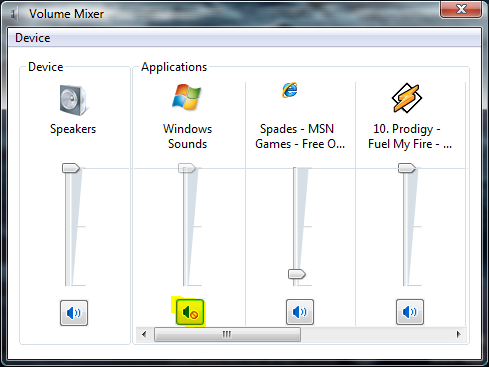
Not muted:
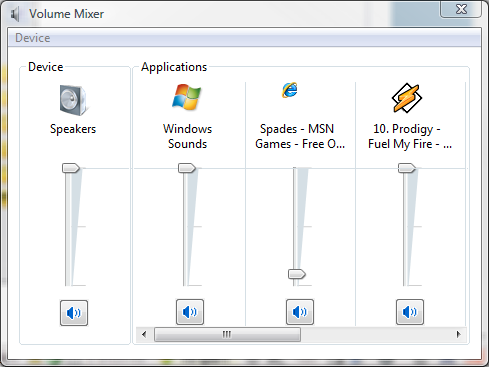
Santos - if you click *once* on the sound icon in the system notification area, you get a popup with has the volume level and the word mixer underneath - if you click on mixer, you get the Sound mixer - check to see if Windows Sounds are muted or not...
Muted:
Not muted:
My Computers
System One System Two
-
- Operating System
- Windows 10 Pro X64 Insider Preview (Skip Ahead) latest build
- Manufacturer/Model
- The Beast Model V (homebrew)
- CPU
- Intel Core i7 965 EE @ 3.6 GHz
- Motherboard
- eVGA X58 Classified 3 (141-GT-E770-A1)
- Memory
- 3 * Mushkin 998981 Redline Enhanced triple channel DDR3 4 GB CL7 DDR3 1600 MHz (PC3-12800)
- Graphics card(s)
- eVGA GeForce GTX 970 SSC ACX 2.0 (04G-P4-3979-KB)
- Sound Card
- Realtek HD Audio (onboard)
- Monitor(s) Displays
- 2 * Lenovo LT2323pwA Widescreeen
- Screen Resolution
- 2 * 1920 x 1080
- Hard Drives
- SanDisk Ultra SDSSDHII-960G-G25 960 GB SATA III SSD (System) Crucial MX100 CT256MX100SSD1 256GB SATA III SSD (User Tree) 2 * Seagate Barracuda 7200.12 ST31000528AS 1TB 7200 RPM SATA II Mech. HD Seagate ST1500DL001-9VT15L Barracuda 7200.12 1.5 TB S
- PSU
- Thermaltake Black Widow TX TR2 850W 80+ Bronze Semi-Mod ATX
- Case
- ThermalTake Level 10 GT (Black)
- Cooling
- Corsair H100 (CPU, dual 140 mm fans on radiator) + Air (2 *
- Mouse
- Logitech MX Master (shared)
- Keyboard
- Logitech G15 (gen 2)
- Internet Speed
- AT&T Lightspeed Gigabit duplex
-
- Operating System
- Sabayon Linux (current, weekly updates, 5.1.x kernel)
- Manufacturer/Model
- Lenovo ThinkPad E545
- CPU
- AMD A6-5350M APU
- Motherboard
- Lenovo
- Memory
- 8 GB
- Sound Card
- Conextant 20671 SmartAudio HD
- Monitor(s) Displays
- Lenovo 15" Matte
- Screen Resolution
- 1680 * 1050
- Hard Drives
- INTEL Cherryvill 520 Series SSDSC2CW180A 180 GB SSD
- PSU
- Lenovo
- Case
- Lenovo
- Cooling
- Lenovo
- Mouse
- Logitech MX Master (shared) | Synaptics TouchPad
- Keyboard
- Lenovo
- Internet Speed
- AT&T LightSpeed Gigabit Duplex
John you're a genius, I'd forgotten all about that mixer. I'm hoping that's the answer.
My Computer
System One
-
- Operating System
- Win 10 Pro x64 x 2
- Manufacturer/Model
- Alienware ALX x58
- CPU
- Intel® Core™ i7-975 Extreme O/C to 4.02 GHz, 8MB Cache
- Motherboard
- Asus® P6T Deluxe V2 X58 LGA1366
- Memory
- 24GB Corsair Vengeance DDR3 SDRAM at 1600MHz - 6 x 4096MB
- Graphics card(s)
- 1792 MB NVIDIA® GeForce® GTX 295 Dual Core
- Sound Card
- Onboard Soundmax® High-Definition 7.1 Performance Audio
- Monitor(s) Displays
- Samsung XL2370 HD LED backlit 23" W/S 2ms response time
- Screen Resolution
- 1920 x 1080
- Hard Drives
- 2 x 500gb SATA II 1 x 1TB SATA II 1 external eSATA LaCie 3TB (Non-RAID)
- PSU
- Alienware® 1200 Watt Multi-GPU
- Case
- Unique
- Cooling
- 4 case fans @ CPU water cooling.
- Internet Speed
- 1gb/s up and down