Windows Vista Forums

Speakers stopped working
  1. #1
    locoeng's Avatar

    Flim-Flam Man
    Join Date : Jun 2008
    Charleston SC
    Posts : 445
    Vista Ultimate 32/64 bit
    Local Time: 12:50 AM
    usa us south carolina

    Speakers stopped working

    I'm at the end of my rope here.

    The other day my speakers (Logitech X-540) stopped working all together. They pop when I shut down and reboot, but in the speaker properties they are listed as unplugged.
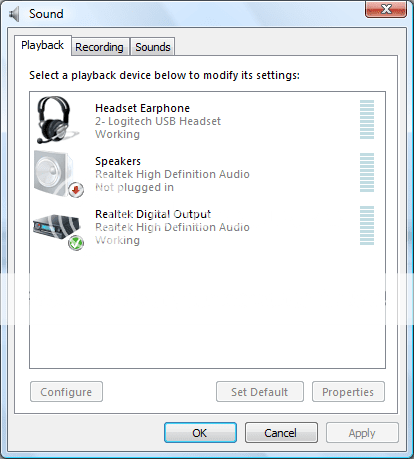


    The Realtek HD control panel gives me an error saying that I'm using Vista drivers and to download the proper ones.
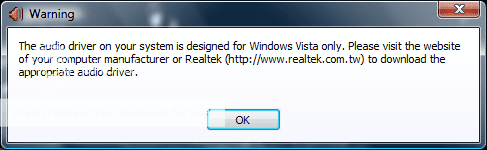


    I've downloaded the current drivers from Realtek (r2.02) and from Gigabyte and neither work. Is my next step getting a new soundcard for further troubleshooting or is there something I'm overlooking? And yes, I have checked to see that the speakers are actually connected to the PC

      My System SpecsSystem Spec

  2. #2
    Mr GRiM's Avatar

    Vista Supporter


    Join Date : Jul 2008
    Australia
    Posts : 305
    Vista Ultimate x64
    Local Time: 03:50 PM
    australia au queensland


    Re: Speakers stopped working

    Have you tried going into device manager and checked to see if all the sound drivers are there and if they are working correctly, you could also try to uninstall all your sound drivers and then let windows find the correct ones again by doing a online search.

    Also did you try to change the properties on sound manager so that you were using Realtek high definition audio as I notice that it is not set to default on your screen shot, also have you tried to see if the sound works through your headphones.

      My System SpecsSystem Spec

  3. #3
    locoeng's Avatar

    Flim-Flam Man
    Join Date : Jun 2008
    Charleston SC
    Posts : 445
    Vista Ultimate 32/64 bit
    Local Time: 12:50 AM
    usa us south carolina

      Thread Starter

    Re: Speakers stopped working

    I uninstalled the device when I first had the problem, but not since reinstalling the drivers so I'll try that again. Also when I try to set the speakers as default the button is greyed out so I only can choose between the headset and SPDI.

    Thanks for the reply.

      My System SpecsSystem Spec

  4. #4
    locoeng's Avatar

    Flim-Flam Man
    Join Date : Jun 2008
    Charleston SC
    Posts : 445
    Vista Ultimate 32/64 bit
    Local Time: 12:50 AM
    usa us south carolina

      Thread Starter

    Re: Speakers stopped working

    Still no dice.

    Uninstalled device, unistalled drivers, rebooted, reinstalled. Now at least I'm not getting the "Audio driver designed for Vista" anymore and I can pull up the Realtek HD audio control panel, but the speakers are still greyed out and cannot be selected as a playback device. I've double checked the rear of the PC and speaker terminals themselves and all is securely connected the way they should be...I get the amp hum when I plug and unplug the speakers so I'm assuming they are OK. I guess the next step would be to get a new soundcard to test.

      My System SpecsSystem Spec

  5. #5
    ripbox's Avatar

    Nerd
    Join Date : Mar 2007
    Posts : 591
    Windows 7 Home Premium x64
    Local Time: 11:50 PM
    uk


    Re: Speakers stopped working

    have a look on the back of your sub for a round plug (looks a little like a flat head screw) if its their un-screw it and out should pop a little fuse (a very small one so don't drop it or loose it) if you don't have a replacement fuse then wrap al little tin foil round it and pop it back in and test it (i have done this with mine till i get a new fuse) if that solves your problem (i hope it does) then nip down to any hardware store and get a replacement
    If that isnt your problem then you may have your jacks in the wrong ports or a faulty connection in you line out cable

    good luck

      My System SpecsSystem Spec

  6. #6
    locoeng's Avatar

    Flim-Flam Man
    Join Date : Jun 2008
    Charleston SC
    Posts : 445
    Vista Ultimate 32/64 bit
    Local Time: 12:50 AM
    usa us south carolina

      Thread Starter

    Re: Speakers stopped working

    There wasn't a fuse plug in my unit. I bought an el cheapo sound card and powered speakers from Best Buy. The speakers didn't work with the old card so I installed the new one and all is well. I'll take the new speakers back and I should contact Gigabyte to RMA my mobo as I've already replaced my NIC and now my sound card. This would be the second RMA. I'll be buying DFI, ASUS, ABIT in the future.

      My System SpecsSystem Spec

  7. #7
    ripbox's Avatar

    Nerd
    Join Date : Mar 2007
    Posts : 591
    Windows 7 Home Premium x64
    Local Time: 11:50 PM
    uk


    Re: Speakers stopped working

    sorry to here that dude

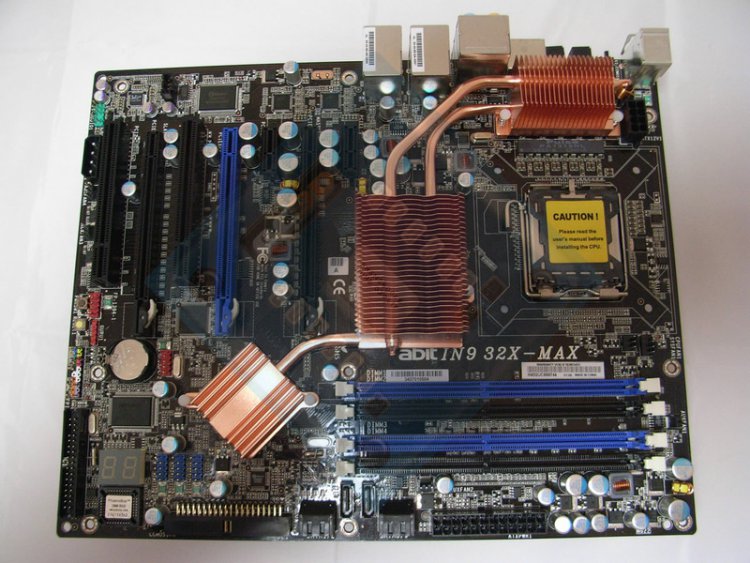
    may i recommend A-Bit over Asus.... my A-bit IN9 32X MAX board is great, it has an LCD display on the mobo that help troubleshoot any major problems

    you can see the display bottom left of the pic

      My System SpecsSystem Spec

Speakers stopped working problems?

Similar Threads
Thread Thread Starter Forum Replies Last Post
external speakers not working/pc has internal speakers jc828 Sound & Audio 3 12 Mar 2009
Speakers 5.1 not working with WMP Hugz Vista music pictures video 0 31 Jan 2008
SPEAKERS NOT WORKING Dave Vista hardware & devices 1 23 Aug 2007
Speakers not working.... jmemarie Vista hardware & devices 4 05 Apr 2007
Speakers not working =?Utf-8?B?YmVmZg==?= Vista General 2 14 Aug 2006