I just installed ultimate 64 and I cannot get my sound to work. I have an asus m2a-vm motherboard with onboard audio. At first in the sound mixer it only showed spdif audio which i do not have. Sound came out as static, a high pitched digitized static if that makes sense. I have tried several codecs and nothing. any suggestions?

You are using an out of date browser. It may not display this or other websites correctly.
You should upgrade or use an alternative browser.
You should upgrade or use an alternative browser.
Realtek HD Audio Codecs
- Thread starter Burnboy
- Start date

My Computer
System One
-
- Manufacturer/Model
- Self build
- CPU
- Phenom II x4 Black Edition 940-Arctic-Cooling Freezer Xtreme
- Motherboard
- Asus M3A32-MVP Deluxe
- Memory
- 8 gig Samsung PC800 RAM
- Graphics card(s)
- NVidia 9600gt
- Sound Card
- AD1988b
- Monitor(s) Displays
- 22" TFT-MONITOR WIDESCREEN mit VGA/DVI 17" Video7 TFT
- Screen Resolution
- 1680 : 1050 1280 : 1024
- Hard Drives
- Drive #1 - SAMSUNG HD252HJ (250 GB) Drive #2 - Hitachi HDT721010SLA360 (1000 GB) Drive #3 - SAMSUNG HD250HJ (250 GB) Drive #4 - SAMSUNG HD103UJ (1000 GB) External eSATA
- PSU
- Thermaltake Toughpower Cable Management 750W
- Case
- Enermax Chakra
- Cooling
- 2x 120mm Front and Back 1x 250mm Side
- Mouse
- Easy Line Laser Mouse
- Keyboard
- Standard
- Internet Speed
- 16000
- Other Info
- I have also used Fedora, Suse, Ubuntu Linux And all other Windows from 95 to date except ME
If this is not the answer go to Control Panel, Hardware and sound, sound and make sure that loudspeaker is the default device you may have to disable the digital device
this is done by right click and using the context menu
Pooch
this is done by right click and using the context menu
Pooch
My Computer
System One
-
- Manufacturer/Model
- Self build
- CPU
- Phenom II x4 Black Edition 940-Arctic-Cooling Freezer Xtreme
- Motherboard
- Asus M3A32-MVP Deluxe
- Memory
- 8 gig Samsung PC800 RAM
- Graphics card(s)
- NVidia 9600gt
- Sound Card
- AD1988b
- Monitor(s) Displays
- 22" TFT-MONITOR WIDESCREEN mit VGA/DVI 17" Video7 TFT
- Screen Resolution
- 1680 : 1050 1280 : 1024
- Hard Drives
- Drive #1 - SAMSUNG HD252HJ (250 GB) Drive #2 - Hitachi HDT721010SLA360 (1000 GB) Drive #3 - SAMSUNG HD250HJ (250 GB) Drive #4 - SAMSUNG HD103UJ (1000 GB) External eSATA
- PSU
- Thermaltake Toughpower Cable Management 750W
- Case
- Enermax Chakra
- Cooling
- 2x 120mm Front and Back 1x 250mm Side
- Mouse
- Easy Line Laser Mouse
- Keyboard
- Standard
- Internet Speed
- 16000
- Other Info
- I have also used Fedora, Suse, Ubuntu Linux And all other Windows from 95 to date except ME
that link just leads to datasheets but I have tried to codecs from realtek several times as well. If it helps the static is in sync with when sound should be coming out. it gets louder and quieter as a normal sound should
My Computer
Hi Burnboy,
Follow the link on the right hand side of the window under quick links is a link to the audio driver.
This is the driver I use it works very well under x64
Did you read my second post?
Follow the link on the right hand side of the window under quick links is a link to the audio driver.
This is the driver I use it works very well under x64
Did you read my second post?
My Computer
System One
-
- Manufacturer/Model
- Self build
- CPU
- Phenom II x4 Black Edition 940-Arctic-Cooling Freezer Xtreme
- Motherboard
- Asus M3A32-MVP Deluxe
- Memory
- 8 gig Samsung PC800 RAM
- Graphics card(s)
- NVidia 9600gt
- Sound Card
- AD1988b
- Monitor(s) Displays
- 22" TFT-MONITOR WIDESCREEN mit VGA/DVI 17" Video7 TFT
- Screen Resolution
- 1680 : 1050 1280 : 1024
- Hard Drives
- Drive #1 - SAMSUNG HD252HJ (250 GB) Drive #2 - Hitachi HDT721010SLA360 (1000 GB) Drive #3 - SAMSUNG HD250HJ (250 GB) Drive #4 - SAMSUNG HD103UJ (1000 GB) External eSATA
- PSU
- Thermaltake Toughpower Cable Management 750W
- Case
- Enermax Chakra
- Cooling
- 2x 120mm Front and Back 1x 250mm Side
- Mouse
- Easy Line Laser Mouse
- Keyboard
- Standard
- Internet Speed
- 16000
- Other Info
- I have also used Fedora, Suse, Ubuntu Linux And all other Windows from 95 to date except ME
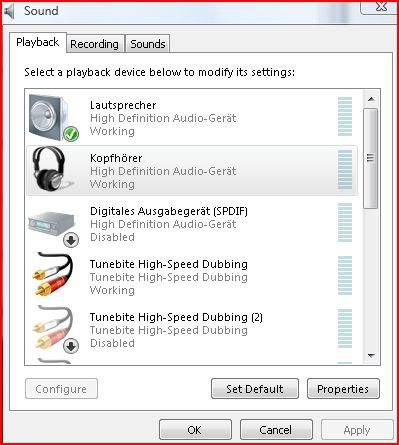
See the picture, my set up is partly in german but the icons are still the sameIf this is not the answer go to Control Panel, Hardware and sound, sound and make sure that loudspeaker is the default device you may have to disable the digital device
this is done by right click and using the context menu
Pooch
My Computer
System One
-
- Manufacturer/Model
- Self build
- CPU
- Phenom II x4 Black Edition 940-Arctic-Cooling Freezer Xtreme
- Motherboard
- Asus M3A32-MVP Deluxe
- Memory
- 8 gig Samsung PC800 RAM
- Graphics card(s)
- NVidia 9600gt
- Sound Card
- AD1988b
- Monitor(s) Displays
- 22" TFT-MONITOR WIDESCREEN mit VGA/DVI 17" Video7 TFT
- Screen Resolution
- 1680 : 1050 1280 : 1024
- Hard Drives
- Drive #1 - SAMSUNG HD252HJ (250 GB) Drive #2 - Hitachi HDT721010SLA360 (1000 GB) Drive #3 - SAMSUNG HD250HJ (250 GB) Drive #4 - SAMSUNG HD103UJ (1000 GB) External eSATA
- PSU
- Thermaltake Toughpower Cable Management 750W
- Case
- Enermax Chakra
- Cooling
- 2x 120mm Front and Back 1x 250mm Side
- Mouse
- Easy Line Laser Mouse
- Keyboard
- Standard
- Internet Speed
- 16000
- Other Info
- I have also used Fedora, Suse, Ubuntu Linux And all other Windows from 95 to date except ME
yes i tried the second post and it didnt help. I tried that download and it says no supported drivers were found when I try to install
My Computer
Ok, I do not know why that is not working for you, try here;
ASUSTeK Computer Inc.-Support-
Hopefully this will work better
ASUSTeK Computer Inc.-Support-
Hopefully this will work better
My Computer
System One
-
- Manufacturer/Model
- Self build
- CPU
- Phenom II x4 Black Edition 940-Arctic-Cooling Freezer Xtreme
- Motherboard
- Asus M3A32-MVP Deluxe
- Memory
- 8 gig Samsung PC800 RAM
- Graphics card(s)
- NVidia 9600gt
- Sound Card
- AD1988b
- Monitor(s) Displays
- 22" TFT-MONITOR WIDESCREEN mit VGA/DVI 17" Video7 TFT
- Screen Resolution
- 1680 : 1050 1280 : 1024
- Hard Drives
- Drive #1 - SAMSUNG HD252HJ (250 GB) Drive #2 - Hitachi HDT721010SLA360 (1000 GB) Drive #3 - SAMSUNG HD250HJ (250 GB) Drive #4 - SAMSUNG HD103UJ (1000 GB) External eSATA
- PSU
- Thermaltake Toughpower Cable Management 750W
- Case
- Enermax Chakra
- Cooling
- 2x 120mm Front and Back 1x 250mm Side
- Mouse
- Easy Line Laser Mouse
- Keyboard
- Standard
- Internet Speed
- 16000
- Other Info
- I have also used Fedora, Suse, Ubuntu Linux And all other Windows from 95 to date except ME
when i download the zip file there are folders in it for 32 bit 64 bit and vista. the setup exe under 64 bit says it wont run with vista when i click on it but the exe in the vista folder installs fine but i still have the same problem
My Computer
when i download the zip file there are folders in it for 32 bit 64 bit and vista. the setup exe under 64 bit says it wont run with vista when i click on it but the exe in the vista folder installs fine but i still have the same problem
I have just downloaded and tried these drivers, as with you only the driver in the Vista folder has installed, but it works fine by me.
I can configure my sound system everyway possible but in the worst case I just don't get sound. I cannot replicate this screaching.
Do you uninstall the old drivers before installing the new one? if not try it.
Are you sure that your loudspeakers work and that they are connected
properly? can you try them on a different system?
My Computer
System One
-
- Manufacturer/Model
- Self build
- CPU
- Phenom II x4 Black Edition 940-Arctic-Cooling Freezer Xtreme
- Motherboard
- Asus M3A32-MVP Deluxe
- Memory
- 8 gig Samsung PC800 RAM
- Graphics card(s)
- NVidia 9600gt
- Sound Card
- AD1988b
- Monitor(s) Displays
- 22" TFT-MONITOR WIDESCREEN mit VGA/DVI 17" Video7 TFT
- Screen Resolution
- 1680 : 1050 1280 : 1024
- Hard Drives
- Drive #1 - SAMSUNG HD252HJ (250 GB) Drive #2 - Hitachi HDT721010SLA360 (1000 GB) Drive #3 - SAMSUNG HD250HJ (250 GB) Drive #4 - SAMSUNG HD103UJ (1000 GB) External eSATA
- PSU
- Thermaltake Toughpower Cable Management 750W
- Case
- Enermax Chakra
- Cooling
- 2x 120mm Front and Back 1x 250mm Side
- Mouse
- Easy Line Laser Mouse
- Keyboard
- Standard
- Internet Speed
- 16000
- Other Info
- I have also used Fedora, Suse, Ubuntu Linux And all other Windows from 95 to date except ME
Just as an after thougt do you have a michrophone connected?
If yes try disconnecting it
If yes try disconnecting it
My Computer
System One
-
- Manufacturer/Model
- Self build
- CPU
- Phenom II x4 Black Edition 940-Arctic-Cooling Freezer Xtreme
- Motherboard
- Asus M3A32-MVP Deluxe
- Memory
- 8 gig Samsung PC800 RAM
- Graphics card(s)
- NVidia 9600gt
- Sound Card
- AD1988b
- Monitor(s) Displays
- 22" TFT-MONITOR WIDESCREEN mit VGA/DVI 17" Video7 TFT
- Screen Resolution
- 1680 : 1050 1280 : 1024
- Hard Drives
- Drive #1 - SAMSUNG HD252HJ (250 GB) Drive #2 - Hitachi HDT721010SLA360 (1000 GB) Drive #3 - SAMSUNG HD250HJ (250 GB) Drive #4 - SAMSUNG HD103UJ (1000 GB) External eSATA
- PSU
- Thermaltake Toughpower Cable Management 750W
- Case
- Enermax Chakra
- Cooling
- 2x 120mm Front and Back 1x 250mm Side
- Mouse
- Easy Line Laser Mouse
- Keyboard
- Standard
- Internet Speed
- 16000
- Other Info
- I have also used Fedora, Suse, Ubuntu Linux And all other Windows from 95 to date except ME
no mic. one anomaly i am noticing is that realtek digital output keeps popping up. I do not have a digital card. I keep disabling it and it keeps coming back no matter what i do.
My Computer
You said in your graphic card post that every thing is now working, was that also for the sound problems??
My Computer
System One
-
- Manufacturer/Model
- Self build
- CPU
- Phenom II x4 Black Edition 940-Arctic-Cooling Freezer Xtreme
- Motherboard
- Asus M3A32-MVP Deluxe
- Memory
- 8 gig Samsung PC800 RAM
- Graphics card(s)
- NVidia 9600gt
- Sound Card
- AD1988b
- Monitor(s) Displays
- 22" TFT-MONITOR WIDESCREEN mit VGA/DVI 17" Video7 TFT
- Screen Resolution
- 1680 : 1050 1280 : 1024
- Hard Drives
- Drive #1 - SAMSUNG HD252HJ (250 GB) Drive #2 - Hitachi HDT721010SLA360 (1000 GB) Drive #3 - SAMSUNG HD250HJ (250 GB) Drive #4 - SAMSUNG HD103UJ (1000 GB) External eSATA
- PSU
- Thermaltake Toughpower Cable Management 750W
- Case
- Enermax Chakra
- Cooling
- 2x 120mm Front and Back 1x 250mm Side
- Mouse
- Easy Line Laser Mouse
- Keyboard
- Standard
- Internet Speed
- 16000
- Other Info
- I have also used Fedora, Suse, Ubuntu Linux And all other Windows from 95 to date except ME