
Windows Vista Forums
Vista Forums Home Join Vista Forums Windows 7 Forum Vista Tutorials Tags
Welcome to Windows Vista Forums. Our forum is dedicated to helping you find solutions with any problems, errors or issues you are experiencing with Windows Vista. The Vista forum also covers news and updates and has an extensive Windows Vista tutorial section that covers a wide range of tips and tricks.

Go Back   Vista Forums > Vista Forums > Sound & Audio

Vista - working out how to get 5.1 in Vista

Reply
 
Old 11-29-2008   #1 (permalink)


x64bit


working out how to get 5.1 in Vista

Hey all. I'm very new to computers. I recently bought new speakers for my Vista 64bit operation system. And i can only seem to get 2.1 sound. The speakers that i have are ''Logitech x-530 speakers. I have been doing reacherch on the internet with no problem solved. The one thing i did read was i had to enable and check the 'Speaker Fill' button on Realtek Hd Audio Manager... But i can't find the Speaker Fill option. If anybody could help me achive 5.1 sound it would be greatley appreciated

Thanks you
Kal0002.

My System SpecsSystem Spec
Old 11-30-2008   #2 (permalink)


Vista Ultimatex64 Windows 7 build 7100


Re: working out how to get 5.1 in Vista

Quote  Quote: Originally Posted by kal0002 View Post
Hey all. I'm very new to computers. I recently bought new speakers for my Vista 64bit operation system. And i can only seem to get 2.1 sound. The speakers that i have are ''Logitech x-530 speakers. I have been doing reacherch on the internet with no problem solved. The one thing i did read was i had to enable and check the 'Speaker Fill' button on Realtek Hd Audio Manager... But i can't find the Speaker Fill option. If anybody could help me achive 5.1 sound it would be greatley appreciated

Thanks you
Kal0002.
Hi Kal,

With your system you recieved a small control box with controls for Volume, Power, Bass, and Matrix. Press the Matrix switch.

Pooch
My System SpecsSystem Spec
Old 11-30-2008   #3 (permalink)


Vista Ultimate x64


Re: working out how to get 5.1 in Vista

pooch it is the X540 that has the controls you are referring too, the X-530 only has a volume control knob.

kal0002 no idea where to find the option in the Realtek controls but it should be present in the Vista audio controls,

My System SpecsSystem Spec
Old 11-30-2008   #4 (permalink)


Vista Ultimatex64 Windows 7 build 7100


Re: working out how to get 5.1 in Vista

Thanks Stormy,

I missed that one. Then it is either, as Stormy shows without the RealteK software, (it might also be marked Virtual Surround). Or with the Realtek software see the Diagram.
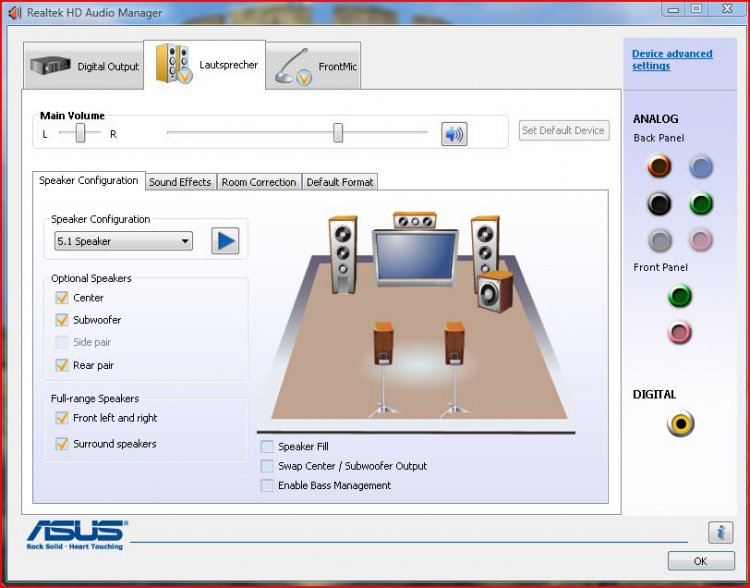
Right click on the Realtek Audio Manager symbol in the notification area select Sound Manager. Tick in box Speaker Fill
Attached Thumbnails
capture.jpg  
My System SpecsSystem Spec
Reply

Thread Tools


Similar Threads
Thread Forum
windows vista restore not working/blue screen help/safe mode not working Vista General
Working Mic Too Not working With Vista Sound & Audio
Re: Vista Internet not working, Ping by DNS is working Vista networking & sharing
Re: Right click stops working/New tabs stop working/Menu bar disappear Vista performance & maintenance
Creative Audigy 2 drivers working on Vista Working Vista hardware & devices


Vista Forums is an independent web site and has not been authorized,
sponsored, or otherwise approved by Microsoft Corporation.
"Windows Vista", the Start Orb, and related materials are trademarks of Microsoft Corp.
© Designer Media Ltd

1 2 3 4 5 6 7 8 9 10 11 12 13 14 15 16 17 18 19 20 21 22 23 24 25 26 27 28 29 30 31 32 33 34 35 36 37 38 39 40 41 42 43 44 45 46