![]() |
![]() | ![]() | ![]() | ![]() | ![]() | ![]() | ![]() |
| Welcome to Windows Vista Forums. Our forum is dedicated to helping you find solutions with any problems, errors or issues you are experiencing with Windows Vista. The Vista forum also covers news and updates and has an extensive Windows Vista tutorial section that covers a wide range of tips and tricks. |
| |||||||
![]() |
| |
| | #1 (permalink) |
| Vista Home Premium 32bit | Stereo Mix / SigmaTel Drivers Installing Problem So, I've been trying desperately for months to get Stereo Mix on my Vista Home Premium 32bit Compaq Notebook. I've been pushed in "the right direction", so I went to install SigmaTel Audio Drivers (which is for XP, but I'm using the XP service pack 2 for compatibility), and I get a little bugger of an error. "ExitError:Error=Device Object not present, restart the system and run setup again." I've done so. It's still the same thing. Please, if you could point me in the right direction of installing these drivers, and or getting stereo mix via another free method, I would be grateful. I really don't want to pay for anything to record stuff. Thanks so much. Trace. |
My System Specs![]() |
| | #2 (permalink) |
| Vista Home Premium 32bit | Re: Stereo Mix / SigmaTel Drivers Installing Problem Bump. I really need this done. >_< |
My System Specs![]() |
| | #3 (permalink) |
| Windows Vista Home Premium 64Bit | Re: Stereo Mix / SigmaTel Drivers Installing Problem Sounds like your installing the wrong driver, When you recieve that error it means the drivers your installing dont match the DeviceID on the audio controller. I just gave someone instructions a few mintues ago on another post to identify there audio controller, Im just going to copy and past. ---------------------------------------------------------------------------------- There is a program called "Everest" that can further identify your sound device. The download link is here: Download Link 1 Download Link 2 Execute the program, on the right hand side there will be a list of devices, click the "+" next to multimedia, then click PCI/PnP Audio, and in the white box to the left it should display your true audio controller name. --------------------------------------------------------------------------------- Just post the info the program gives you when your done and I'll see what I can do. |
My System Specs![]() |
| | #4 (permalink) |
| Vista Home Premium 32bit | Re: Stereo Mix / SigmaTel Drivers Installing Problem Sounds like your installing the wrong driver, When you recieve that error it means the drivers your installing dont match the DeviceID on the audio controller. I just gave someone instructions a few mintues ago on another post to identify there audio controller, Im just going to copy and past. ---------------------------------------------------------------------------------- There is a program called "Everest" that can further identify your sound device. The download link is here: Download Link 1 Download Link 2 Execute the program, on the right hand side there will be a list of devices, click the "+" next to multimedia, then click PCI/PnP Audio, and in the white box to the left it should display your true audio controller name. --------------------------------------------------------------------------------- Just post the info the program gives you when your done and I'll see what I can do. High Definition Audio Controller [NoDB] | PCI Alright...Now what? |
My System Specs![]() |
| | #5 (permalink) |
| Windows Vista Home Premium 64Bit | Re: Stereo Mix / SigmaTel Drivers Installing Problem Sounds like your installing the wrong driver, When you recieve that error it means the drivers your installing dont match the DeviceID on the audio controller. I just gave someone instructions a few mintues ago on another post to identify there audio controller, Im just going to copy and past. ---------------------------------------------------------------------------------- There is a program called "Everest" that can further identify your sound device. The download link is here: Download Link 1 Download Link 2 Execute the program, on the right hand side there will be a list of devices, click the "+" next to multimedia, then click PCI/PnP Audio, and in the white box to the left it should display your true audio controller name. --------------------------------------------------------------------------------- Just post the info the program gives you when your done and I'll see what I can do. High Definition Audio Controller [NoDB] | PCI Alright...Now what? |
My System Specs![]() |
| | #6 (permalink) |
| Vista Home Premium 32-bit & Vista Ultimate 64-bit both Service Pack 2 W7 Pro RTM 7600 32 & 64 | Re: Stereo Mix / SigmaTel Drivers Installing Problem Hi Trace, What is the model number of your Compaq notebook? These drivers can be found at the HP website, but you need to know the model number first. |
My System Specs![]() |
| | #7 (permalink) |
| Vista Home Premium 32bit | Re: Stereo Mix / SigmaTel Drivers Installing Problem Dwarf, |
My System Specs![]() |
| | #8 (permalink) |
| Vista Home Premium 32-bit & Vista Ultimate 64-bit both Service Pack 2 W7 Pro RTM 7600 32 & 64 | Re: Stereo Mix / SigmaTel Drivers Installing Problem Hi Trace, Thanks for the reply. Here is the link to the Product search results for your system: Product search results As you can see, there are a number of variants, split into 2 main series, viz CQ50-200 and CQ50-100. Click on the appropriate link for your computer and then click on Microsoft Windows Vista (64-bit). The driver you require will be found on the next page under Driver - Audio. Click on the link and follow the subsequent instructions. Note that you should always save the download to your computer first and then run it from the saved location. |
My System Specs![]() |
| | #9 (permalink) |
| Vista Home Premium 32bit | Re: Stereo Mix / SigmaTel Drivers Installing Problem Dwarf, Thank you for your reply. I successfully installed the driver, however, stereo mix is still missing. If you can think of any solutions, please, let me know. I truly need SM. |
My System Specs![]() |
| | #10 (permalink) |
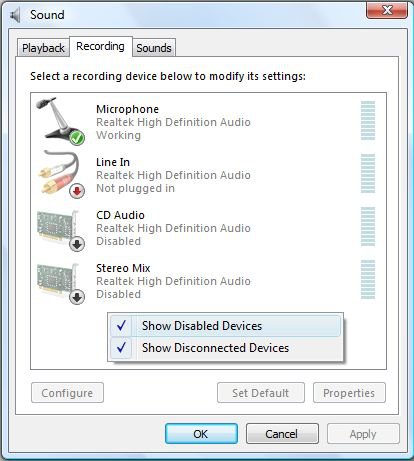
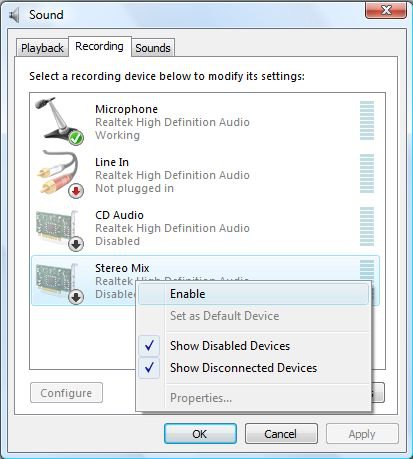
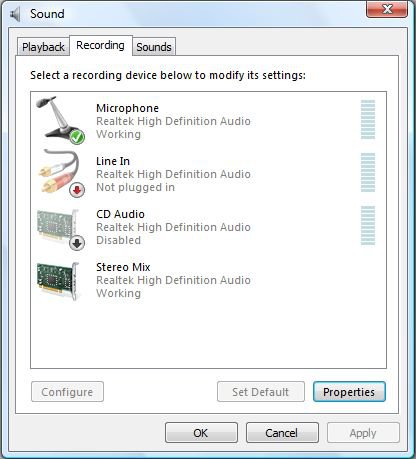
| Vista Home Premium 32-bit & Vista Ultimate 64-bit both Service Pack 2 W7 Pro RTM 7600 32 & 64 | Re: Stereo Mix / SigmaTel Drivers Installing Problem Hi Trace, Right click the speaker icon in the system tray at the bottom right hand corner of your screen (where the time is displayed) and select Recording Devices.![]() If Stereo Mix isn't showing, right click on this section and select Show Disabled Devices. ![]() Right click on Stereo Mix and select Enable. ![]() Again, if you highlight Stereo Mix and click on Properties, you can change the settings, such as balance and volume, for this device. |
My System Specs![]() |
![]() |
| Thread Tools | |
| |
Similar Threads | ||||
| Thread | Forum | |||
| Stereo Mix and Sigmatel Audio and driver problem! | Sound & Audio | |||
| Problem Installing ATI 8.10 Drivers | Drivers | |||
| Updated Sigmatel Audio Drivers for SP1 | Vista General | |||
| Problem installing ethernet-card drivers | Vista hardware & devices | |||
| Problem installing Synpatics drivers | Vista General | |||