![]() |
![]() | ![]() | ![]() | ![]() | ![]() | ![]() | ![]() |
| Welcome to Windows Vista Forums. Our forum is dedicated to helping you find solutions with any problems, errors or issues you are experiencing with Windows Vista. The Vista forum also covers news and updates and has an extensive Windows Vista tutorial section that covers a wide range of tips and tricks. |
| |||||||
![]() |
| |
| | #1 (permalink) |
| vista home premium | Sounds wont play The volume on taskbar is turned all the way up like it playing but no sounds plays. I dont know what happen to the sounds.I went to sounds and its say it's works. |
My System Specs![]() |
| | #2 (permalink) |
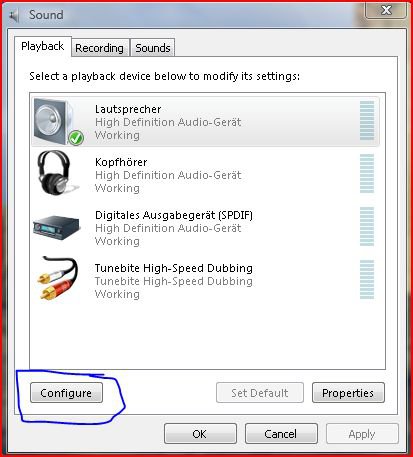
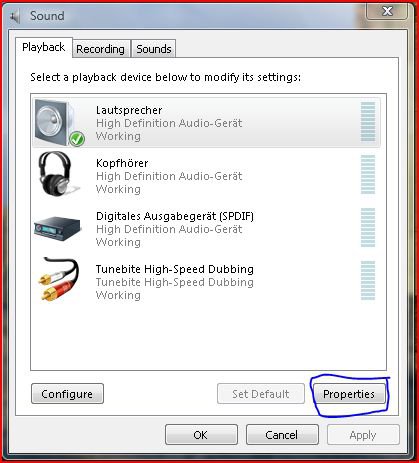
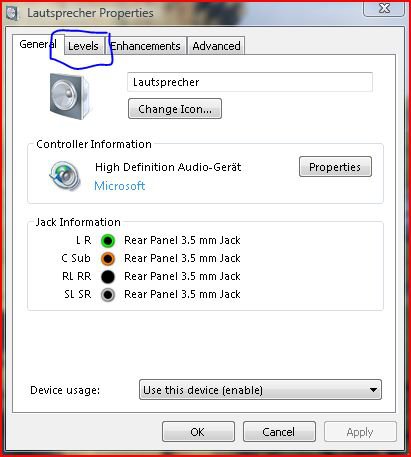
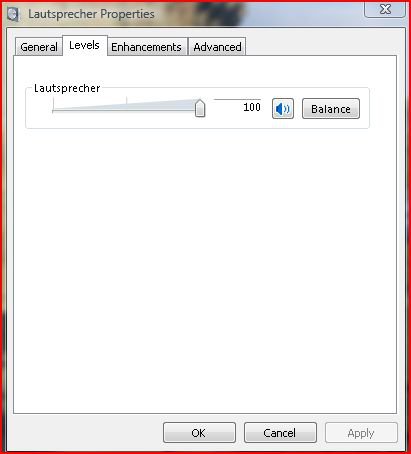
| Vista Ultimatex64 Windows 7 build 7100 | Re: Sounds wont play Did the sound work before? When you went to sounds and it was working do you mean here? [IMG]file:///C:/Users/pooch/Desktop/Capture.JPG[/IMG] ![]() If yes then try clicking configure and follow the Wizard to setup your speakers Next click on properties ![]() and then on levels ![]() Then make sure that the sound is turned up ![]() I hope this helps Pooch |
My System Specs![]() |
| | #3 (permalink) |
| Vista Ultimate x64_SP1 | Re: Sounds wont play You most likely didn't set the output jack correctly. Click on your output jack you are using in Realtek HD manager and go through the options that appear one by one. One of them will work. I have mine set on "Front Out" in Vista and "Line Out" in XP. |
My System Specs![]() |
![]() |
| Thread Tools | |
| |
Similar Threads | ||||
| Thread | Forum | |||
| PLEASE HELP!! DVD / CD Wont play | Media Center | |||
| DVD wont play | Vista General | |||
| DVD wont play in WMC | Vista music pictures video | |||
| some sounds play even though volume is on mute | Vista General | |||
| Re: How to play sounds from a batch file | Vista General | |||