O.K I've had this problem for a while now. All I want to do is have my headphone to have a different audio stream than my speakers so that I can talk to a friend through my headset and receive the voice audio, but to also have through my speakers sound from other programs. Basically I just want the system to recognise the speaker and my headphone as different output devices instead of tieing them together. The software I'm using is Realtek Audio Manager and it hasn't been helpful whatsoever, I've had two computers and I've had the same problem with them both.

You are using an out of date browser. It may not display this or other websites correctly.
You should upgrade or use an alternative browser.
You should upgrade or use an alternative browser.
Headphone and Speaker
- Thread starter Cal360
- Start date

O.K I've had this problem for a while now. All I want to do is have my headphone to have a different audio stream than my speakers so that I can talk to a friend through my headset and receive the voice audio, but to also have through my speakers sound from other programs. Basically I just want the system to recognise the speaker and my headphone as different output devices instead of tieing them together. The software I'm using is Realtek Audio Manager and it hasn't been helpful whatsoever, I've had two computers and I've had the same problem with them both.
Hi Cal360,
Welcome to the forum
This is an interesting request I know that it is possible to have 2 or more sounds coming out of the same speakers, but to separate these sounds??
The only way I can think that this might work would be to use 2 soundcards, a quick search through the net shows that this might well work, I am not so sure, so I am going to try it (if I can find my old soundcard) I'll let you know the result
Pooch
My Computer
System One
-
- Manufacturer/Model
- Self build
- CPU
- Phenom II x4 Black Edition 940-Arctic-Cooling Freezer Xtreme
- Motherboard
- Asus M3A32-MVP Deluxe
- Memory
- 8 gig Samsung PC800 RAM
- Graphics card(s)
- NVidia 9600gt
- Sound Card
- AD1988b
- Monitor(s) Displays
- 22" TFT-MONITOR WIDESCREEN mit VGA/DVI 17" Video7 TFT
- Screen Resolution
- 1680 : 1050 1280 : 1024
- Hard Drives
- Drive #1 - SAMSUNG HD252HJ (250 GB) Drive #2 - Hitachi HDT721010SLA360 (1000 GB) Drive #3 - SAMSUNG HD250HJ (250 GB) Drive #4 - SAMSUNG HD103UJ (1000 GB) External eSATA
- PSU
- Thermaltake Toughpower Cable Management 750W
- Case
- Enermax Chakra
- Cooling
- 2x 120mm Front and Back 1x 250mm Side
- Mouse
- Easy Line Laser Mouse
- Keyboard
- Standard
- Internet Speed
- 16000
- Other Info
- I have also used Fedora, Suse, Ubuntu Linux And all other Windows from 95 to date except ME
Forget my last. It would work with two sound cards, but I think it should also work by right clicking on the sound icon in the notification area, click on Open Volume Mixer, select the device tab and select your device (ie Headset) you can then adjust the volumes of the running software to suit your needs. You will have to do this for both working devices I cant test this myself as I don't have a headset
Pooch
Pooch
Last edited:
My Computer
System One
-
- Manufacturer/Model
- Self build
- CPU
- Phenom II x4 Black Edition 940-Arctic-Cooling Freezer Xtreme
- Motherboard
- Asus M3A32-MVP Deluxe
- Memory
- 8 gig Samsung PC800 RAM
- Graphics card(s)
- NVidia 9600gt
- Sound Card
- AD1988b
- Monitor(s) Displays
- 22" TFT-MONITOR WIDESCREEN mit VGA/DVI 17" Video7 TFT
- Screen Resolution
- 1680 : 1050 1280 : 1024
- Hard Drives
- Drive #1 - SAMSUNG HD252HJ (250 GB) Drive #2 - Hitachi HDT721010SLA360 (1000 GB) Drive #3 - SAMSUNG HD250HJ (250 GB) Drive #4 - SAMSUNG HD103UJ (1000 GB) External eSATA
- PSU
- Thermaltake Toughpower Cable Management 750W
- Case
- Enermax Chakra
- Cooling
- 2x 120mm Front and Back 1x 250mm Side
- Mouse
- Easy Line Laser Mouse
- Keyboard
- Standard
- Internet Speed
- 16000
- Other Info
- I have also used Fedora, Suse, Ubuntu Linux And all other Windows from 95 to date except ME

the only way you can do this is with a USB headset or an xbox 360 headset connected to your computer with the wired pad. Or alternatively you can purchase another sound card.O.K I've had this problem for a while now. All I want to do is have my headphone to have a different audio stream than my speakers so that I can talk to a friend through my headset and receive the voice audio, but to also have through my speakers sound from other programs. Basically I just want the system to recognise the speaker and my headphone as different output devices instead of tieing them together. The software I'm using is Realtek Audio Manager and it hasn't been helpful whatsoever, I've had two computers and I've had the same problem with them both.
My Computer
System One
-
- Manufacturer/Model
- Custom Build
- CPU
- Intel Q6600 @ 2.8GHz
- Motherboard
- Evga NF78-CK-132-A 3-Way SLI
- Memory
- 8Gb DDR2 Corsair Dominator @ 1066Mhz 5-5-5-15
- Graphics card(s)
- EVGA 560 GTX SC FTW 1GB
- Sound Card
- Realtek ALC888 7.1 Audio, Logitech G35 7.1 Surround Headset
- Monitor(s) Displays
- Dell S2409W 16:9, HDMi, DVI & VGA
- Screen Resolution
- 1920 x 1080
- Hard Drives
- Samsung 7200rpm 250Gb SATA, Samsung 7200rpm 750Gb SATA, WD 7200rpm 1TB SCSI SATA.
- PSU
- Xigmatek 750W Quad sli quad core 80% eff
- Case
- Antec 900 Gaming Case
- Cooling
- Zalman CNPS9700-NT NVIDIA Tritium, Dominator RAM cooler
- Mouse
- Razor Lachesis Banshee V2 Blue, 4000DPI
- Keyboard
- Logitech generic keyboard
- Internet Speed
- 16Mb Sky bb
- Other Info
- Wireless Gaming Receiver for Windows, Wireless Xbox 360 Pad, Wireless Xbox 360 Les Paul Guitar
I thought I might have to get a USB headphone to solve this problem, thanks for the help I think I will either get a usb headphone or a soundcard as that should solve everything for me. Thanks again.
My Computer

akagiredsun1
New Member
I have a USB headset, and speaker setup just like above. I too am trying to get my USB mic to control voice chat alone with all other program sounds being routed through the desktop speakers.
I have the following two playback devices:
1) Speakers (Realtek HD Audio)
2) Speakers (USB Headphone Set)
I think it is a problem relating to my sound mixer managment. All programs seem to open through the first option, the Realtek, instead of routing voice comm through the headset. There are no program options available at all for the headset mixer.
It seems to be confusing some of my programs too. I use Steam to voice chat (or try) and the program is under Realtek control, but no sound comes out through the speakers at all. In other programs, voices come through, but still through the Realtek channel only.
At one point, a different headset and different install ago, this used to rout properly.
Can anyone provide any insight to what I need to do?
I have the following two playback devices:
1) Speakers (Realtek HD Audio)
2) Speakers (USB Headphone Set)
I think it is a problem relating to my sound mixer managment. All programs seem to open through the first option, the Realtek, instead of routing voice comm through the headset. There are no program options available at all for the headset mixer.
It seems to be confusing some of my programs too. I use Steam to voice chat (or try) and the program is under Realtek control, but no sound comes out through the speakers at all. In other programs, voices come through, but still through the Realtek channel only.
At one point, a different headset and different install ago, this used to rout properly.
Can anyone provide any insight to what I need to do?
My Computer
System One
-
- CPU
- Intel Core2 Quad Q6600 @ 2.4GHz
- Motherboard
- nVidia nForce 650i SLI
- Memory
- 6.0 GB
- Graphics card(s)
- nVidia GeForce GTX 295
- Sound Card
- Integrated
- Monitor(s) Displays
- Dual: 1) ViewSonic VX2240w, 2) Sony Bravia 32"
- Screen Resolution
- 1) 1680x1050, 2) 1920x1080
- Hard Drives
- 1) 500GB Internal, NTSF 2) 500GB External, NTSF
- Cooling
- Triple-Exhaust Fan w/ Temp Readout Display
- Internet Speed
- D: 6.58MB/s, U: 0.74MB/s
i used to use a 360 headset to talk and hear voices from apps like ventrilo and teamspeak, i set them in the appropriate programs, i will try to replicate the situation and post my results here.
EDIT:
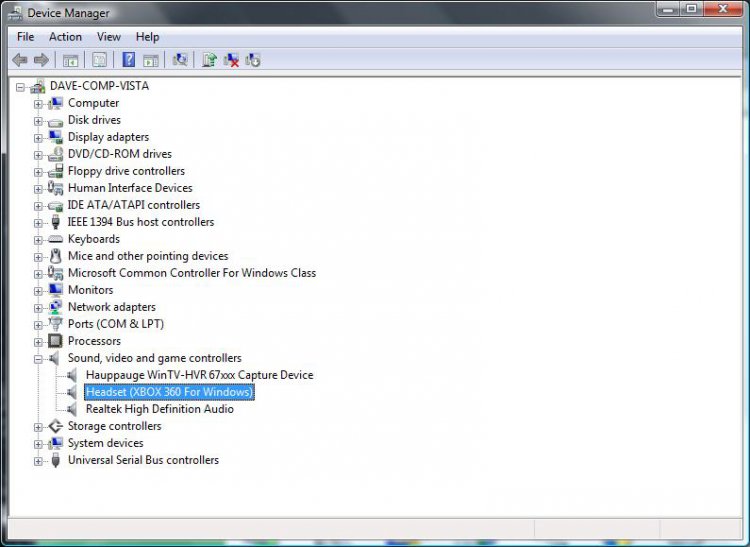
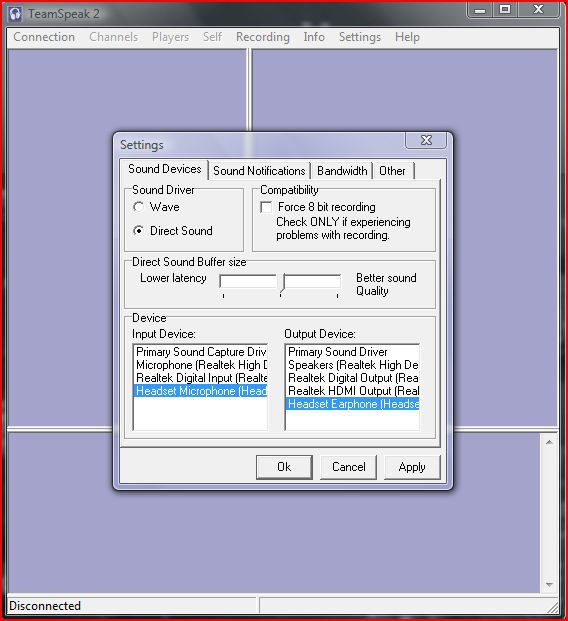
ok ive successfully replicated my previous setup and it works perfectly within vistax64 HP, heres some screenshots of the setup...
here's the install of the headset:
and here's the setup in teamspeak:
EDIT:
ok ive successfully replicated my previous setup and it works perfectly within vistax64 HP, heres some screenshots of the setup...
here's the install of the headset:
and here's the setup in teamspeak:
My Computer
System One
-
- Manufacturer/Model
- Custom Build
- CPU
- Intel Q6600 @ 2.8GHz
- Motherboard
- Evga NF78-CK-132-A 3-Way SLI
- Memory
- 8Gb DDR2 Corsair Dominator @ 1066Mhz 5-5-5-15
- Graphics card(s)
- EVGA 560 GTX SC FTW 1GB
- Sound Card
- Realtek ALC888 7.1 Audio, Logitech G35 7.1 Surround Headset
- Monitor(s) Displays
- Dell S2409W 16:9, HDMi, DVI & VGA
- Screen Resolution
- 1920 x 1080
- Hard Drives
- Samsung 7200rpm 250Gb SATA, Samsung 7200rpm 750Gb SATA, WD 7200rpm 1TB SCSI SATA.
- PSU
- Xigmatek 750W Quad sli quad core 80% eff
- Case
- Antec 900 Gaming Case
- Cooling
- Zalman CNPS9700-NT NVIDIA Tritium, Dominator RAM cooler
- Mouse
- Razor Lachesis Banshee V2 Blue, 4000DPI
- Keyboard
- Logitech generic keyboard
- Internet Speed
- 16Mb Sky bb
- Other Info
- Wireless Gaming Receiver for Windows, Wireless Xbox 360 Pad, Wireless Xbox 360 Les Paul Guitar