Windows Vista Forums
Vista Forums Home Join Vista Forums Windows 7 Forum Vista Tutorials Tags
Welcome to Windows Vista Forums. Our forum is dedicated to helping you find solutions with any problems, errors or issues you are experiencing with Windows Vista. The Vista forum also covers news and updates and has an extensive Windows Vista tutorial section that covers a wide range of tips and tricks.

Go Back   Vista Forums > Vista Forums > Sound & Audio

Vista - Realtek Digital Out(RCA) Only 2 Channel sound to RCA Digital into Reciever

Reply
 
Old 12-31-2008   #1 (permalink)


Vista Ultimate x64


Realtek Digital Out(RCA) Only 2 Channel sound to RCA Digital into Reciever

Sound functions but reciever is only detecting 2 channel output. Apon browsing RealTekHD audio properites I discovered that the only options for Digital Output(RCA) were all 2-Channel under "Default Format" tab. However my front pannel Audio Output Jack(HD Audio 2nd Output) has an extra third tab labeled "Speaker Configuration" and has options for up to 7.1 surround but these settings do not impact my Digital Output(RCA) channel. Now my reciever does have a multi-channel input that could take advantage of the Analog Outputs in the rear but the distance is to great and multiple wires are expensive.

My question is how can i configure my RealTek Digital Output(RCA) to ouput 7 channel sound?

My System SpecsSystem Spec
Old 01-01-2009   #2 (permalink)


Vista Home Premium 32-bit & Vista Ultimate 64-bit both Service Pack 2 W7 Pro RTM 7600 32 & 64


Re: Realtek Digital Out(RCA) Only 2 Channel sound to RCA Digital into Reciever

Hi 2C0J2H2 and welcome to Vista Forums

First things first. Please give people chance to have a look at your post. Depending on what they are doing, this may be almost immediately or it could be several days. Accordingly, I have removed your second post.

Back to your problem. It would assist us if you provided full specifications of your system (fill in your System Specs)
My System SpecsSystem Spec
Old 01-01-2009   #3 (permalink)


Vista Ultimate x64


Re: Realtek Digital Out(RCA) Only 2 Channel sound to RCA Digital into Reciever

my computer was custom built so all parts are random.. mainly ASUS however the sound is intergrated onto my motherboard which is on an Asus P5Q motherboard. mainly thou i belief my question is related to vista sound settings.. so i can't see u needing any specs. so i'll repeat..

my only way to change options for my "Digital Output(RCA)" is under the "Default Setting" tab an include a list of 16 or 24bit sound with different frequencys. however all options are 2 Channel. right now it is on "2-Channel 24-bit 192,000hz" i can't figure out how to enable a "Speaker Setting" tab or how to enlarge the list to a 7.1 option.. its digital output so it should work, but all im gettign is an analog output
My System SpecsSystem Spec
Old 01-02-2009   #4 (permalink)


Vista Home Premium x64


Re: Realtek Digital Out(RCA) Only 2 Channel sound to RCA Digital into Reciever

Quote  Quote: Originally Posted by 2C0J2H2 View Post
Sound functions but reciever is only detecting 2 channel output. Apon browsing RealTekHD audio properites I discovered that the only options for Digital Output(RCA) were all 2-Channel under "Default Format" tab. However my front pannel Audio Output Jack(HD Audio 2nd Output) has an extra third tab labeled "Speaker Configuration" and has options for up to 7.1 surround but these settings do not impact my Digital Output(RCA) channel. Now my reciever does have a multi-channel input that could take advantage of the Analog Outputs in the rear but the distance is to great and multiple wires are expensive.

My question is how can i configure my RealTek Digital Output(RCA) to ouput 7 channel sound?
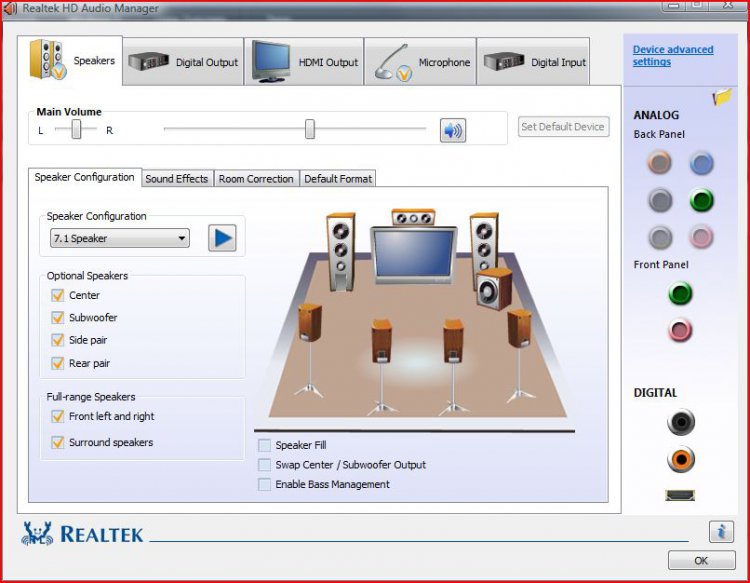
have you tried configuring it in the realtek audio control panel, since that is nothing to do with windows built in audio device manager? see attachment below...
Attached Thumbnails
realtekhdaudiocontrol.jpg  
My System SpecsSystem Spec
Old 01-02-2009   #5 (permalink)


Vista Ultimate x64


Re: Realtek Digital Out(RCA) Only 2 Channel sound to RCA Digital into Reciever

yes.. that was the first thing i tried. but as i mentioned in my first post if u read it all there is no "Speaker Configuration" for the "Digtal Output(RCA)" only under the "Speaker" tab like in your image.. and adjustments here have no effect on the "Digital Output(RCA)" it seems.. my only options for the "Digital Output(RCA)" were located under a default configuration tab(as mentioned above in eairly post)all options provided are 2 channel with a range of 12-24bit sound and 33-192khz frequency
My System SpecsSystem Spec
Old 01-03-2009   #6 (permalink)


Vista Home Premium 64bit


Re: Realtek Digital Out(RCA) Only 2 Channel sound to RCA Digital into Reciever

I stand to be corrected but I think this is the situation.

In on board sound the output can only be 2 channel (left and Right) as that's all the mother board stereo jack (line out) can support. For true 6 channel out you will need 6 jacks ( or 3 stereo jack? I dunno)

My system says the same as yours.

"Digital out" means that the signal is going out (obviously) so it needs to go out into something else. Perhaps something that can convert stereo to emulated 5.1. (which is what my TV does for example)

RCA is two channels anyway (two cables).

You don't really explain what you are trying to set up and why you need to digital out?
My System SpecsSystem Spec
Old 01-03-2009   #7 (permalink)


Vista Ultimate x64


Re: Realtek Digital Out(RCA) Only 2 Channel sound to RCA Digital into Reciever

interesting.. okay well im trying to hook my computer up to my yamaha reciever to intigrate it into my home theatre set-up. however my computer is like 20 feet from my tv and reciever so i wanted a single cable. i.e the digital RCA. to trasmit true7.1 sound to my recieve as if it was going to a computer surround system.. the multiple imput u mention is for "Multi-Channel" which is analog and requires multiple coords that i dont wish to ru around my room.. or the distance.. wires are expensive. i was hopeing that the Single RCA cable would be able to transmit 7.1 information just because its digital out to a digital in... yes i coud use 7.1 enhancer on my reciever.. its not bad.. but its not the same and i was hopeing it was a simple option im too nub to find.
My System SpecsSystem Spec
Old 01-04-2009   #8 (permalink)


Vista Home Premium 32-bit & Vista Ultimate 64-bit both Service Pack 2 W7 Pro RTM 7600 32 & 64


Re: Realtek Digital Out(RCA) Only 2 Channel sound to RCA Digital into Reciever

Hi 2C0J2H2,

Please DO NOT keep bumping your thread, especially after such a short period of time. You need to give people chance to respond, and repeated bumping will only put people off. Accordingly, I have removed the post (please see my earlier post as well). Can I ask you again to please provide your system specifications? We need that information in order to be able to help you. For example, we need to know how the front panel is wired to your motherboard, and whether there are any jumpers or settings in the BIOS that would affect its operation.
My System SpecsSystem Spec
Old 01-04-2009   #9 (permalink)


Vista Home Premium 64bit


Re: Realtek Digital Out(RCA) Only 2 Channel sound to RCA Digital into Reciever

If for example you have a true surround sound commercial DVD movie playing on your PC...if your connecting your stero jacks in the RCA outlet (stereo) you cannot expect it to come out as anything other than Stereo out the other end....
My System SpecsSystem Spec
Old 02-16-2009   #10 (permalink)


stupid forum


Re: Realtek Digital Out(RCA) Only 2 Channel sound to RCA Digital into Reciever

I have the same problem...I have a modern Motherboard with surround sound and digital output just like yours and am very knowledgeable about computers, but don't know a whole ton about audio. After researching this problem for a week I discovered some interesting things...

I got 5.1 surround sound working using PowerDVD and Media Player Classic which comes with the K-lite codec pack and enables AAC/Dolby Digital. This works for playing DVD's/Divx and other media formats in 5.1 surround, even though Windows control panel it still shows only 2 speaker config as you mentioned, it plays in 5.1. The stock Windows Media player did not originally support AAC or one of the functions required to make it work, so it wouldn't play 5.1 at all. After configuring Media Player Classic codecs on my system I can now play files in 5.1 surround using the stock WMP... but who uses that anyways... its slow and glitchy.

However when I try to play games I cannot seem to get the 5.1 to work, they all play in stereo, however if I select analog output and hook up a surround sound set of headphones (via the 3 headphone jacks) it plays fine in 5.1.

So basically 5.1 surround works fine through the old analog jacks, but works only with certain applications through the digital SPDIF output.

From the reading I have done I understand that optical output only supports two channels, but encodes those channels (if the application supports it) into 5.1 dolby digital or DTS. Based upon what I have read Windows Vista does not natively support encoding those channels and therefore it shows up as only two speakers. If I am wrong feel free to correct me... I would love to get World at War working in 5.1 using Optical output.

Vista Ultimate
Abit Ix38 Quad-GT MB
Core2duo E8400 @ 4ghz (water-cooled)
8800GTS w/voltmod @800mhz (water-cooled)
Two IBM Deathstar's in RAID 0 (fingers-crossed)
1 Seagate 1TB Data Drive (full of pr0n)

Last edited by blahspam; 02-16-2009 at 06:16 PM.. Reason: Sys Specs
My System SpecsSystem Spec
Reply

Thread Tools


Similar Threads
Thread Forum
Realtek, digital sound, 5.1 - no sound? Sound & Audio
no multi channel digital output from auzen prelude Sound & Audio
Loss of one OTA digital channel Vista music pictures video
Vista/Realtek digital sound - help Vista music pictures video
Digital Channel OTA on Media Center Vista music pictures video


Vista Forums is an independent web site and has not been authorized,
sponsored, or otherwise approved by Microsoft Corporation.
"Windows Vista", the Start Orb, and related materials are trademarks of Microsoft Corp.
© Designer Media Ltd

1 2 3 4 5 6 7 8 9 10 11 12 13 14 15 16 17 18 19 20 21 22 23 24 25 26 27 28 29 30 31 32 33 34 35 36 37 38 39 40 41 42 43 44 45 46