![]() |
![]() | ![]() | ![]() | ![]() | ![]() | ![]() | ![]() |
| Welcome to Windows Vista Forums. Our forum is dedicated to helping you find solutions with any problems, errors or issues you are experiencing with Windows Vista. The Vista forum also covers news and updates and has an extensive Windows Vista tutorial section that covers a wide range of tips and tricks. |
| |||||||
![]() |
| |
| | #1 (permalink) |
| Vista Home | Hdmi to lcd get video no audio My setup is as follows: HP S3330F Slimline W/Vista Sony DN1000 A/V Receiver LCD TV I have the computer HDMI hooked to the receiver HDMI and the receiver HDMI output hooked to the LCD HDMI input. I see Vista DESKTOP on the TV but do not have sound. When I go into the Realtek HD Audio Manager I do not see an option to Choose Digital Output device HDMI. Bios does not have an HDMI choice. I tried driver updates did not work. I have another Media Center PC. which I connected the same way the HP is connected I do get Video and Sound. Any suggestions. . |
My System Specs![]() |
| | #2 (permalink) |
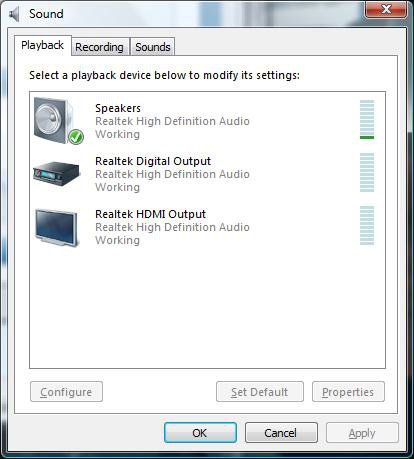
| Vista Ultimate x64 | Re: Hdmi to lcd get video no audio Did you set it to HDMI Out as the default playback device in the Windows playback properties? |
My System Specs![]() |
| | #3 (permalink) |
| Vista Home | Re: Hdmi to lcd get video no audio |
My System Specs![]() |
| | #4 (permalink) |
| Vista Ultimate x64 | Re: Hdmi to lcd get video no audio Not the Realtek control panel, but Windows own sound properties, |
My System Specs![]() |
| | #5 (permalink) |
| Vista Home | Re: Hdmi to lcd get video no audio Speakers Realtek HD Audio Not Plugged IN and Realtek Digital Output Reatek HD Audio Working I do not see a choice for HDMI or SPDIF. |
My System Specs![]() |
| | #6 (permalink) |
| Vista Ultimate x64 | Re: Hdmi to lcd get video no audio What are you using for a video card? Reason for asking is according to the specs for your computer it comes with the 8500 GT, which will require a cable like this, ![]() to be connected between teh SPDIF header on video card and the SPDIF header on the motherboard/sound card. Might be worth popping the side off the case and seeing if HP installed that cable. |
My System Specs![]() |
| | #7 (permalink) |
| Vista Home | Re: Hdmi to lcd get video no audio What are you using for a video card? Reason for asking is according to the specs for your computer it comes with the 8500 GT, which will require a cable like this, ![]() to be connected between teh SPDIF header on video card and the SPDIF header on the motherboard/sound card. Might be worth popping the side off the case and seeing if HP installed that cable. |
My System Specs![]() |
| | #8 (permalink) |
| Vista Ultimate x64 | Re: Hdmi to lcd get video no audio What driver version are you running for your video card? Apparently HDMI isn't working with some of the newer nvidia video drivers, HDMI audio doesn't work with new drivers - NVIDIA Forums |
My System Specs![]() |
| | #9 (permalink) |
| Vista Home | Re: Hdmi to lcd get video no audio What driver version are you running for your video card? Apparently HDMI isn't working with some of the newer nvidia video drivers, HDMI audio doesn't work with new drivers - NVIDIA Forums realtek audio driver 6.0.1.5991 |
My System Specs![]() |
| | #10 (permalink) |
| Vista Home Premium x64 | Re: Hdmi to lcd get video no audio |
My System Specs![]() |
![]() |
| Thread Tools | |
| |
Similar Threads | ||||
| Thread | Forum | |||
| No audio through hdmi to tv | Sound & Audio | |||
| HDMI audio fades in | Sound & Audio | |||
| pc to lcd via hdmi = some audio | Sound & Audio | |||
| Vista HDMI audio Issues | Sound & Audio | |||
| HDMI Audio | Vista General | |||