Windows Vista Forums
Vista Forums Home Join Vista Forums Windows 7 Forum Vista Tutorials Tags
Welcome to Windows Vista Forums. Our forum is dedicated to helping you find solutions with any problems, errors or issues you are experiencing with Windows Vista. The Vista forum also covers news and updates and has an extensive Windows Vista tutorial section that covers a wide range of tips and tricks.

Go Back   Vista Forums > Vista Forums > Sound & Audio

Vista - Realtek HD manager missing

Reply
 
Old 09-01-2009   #1 (permalink)


Vista home premium 32bit


Realtek HD manager missing

Hello guys, this is my last hope to make this work.
I'm using the realtek HD audio, when i plug my headphone or my speaker they work fine but i tried to mess with a microphone and i can't open the realtek manager, i can't even find it anywhere actually.

I'm using windows vista home premium 32bit. I tried the new drivers, tried uninstalling and everything else. Is there something that i'm missing here?

I can't seem to make the mic work w/o the manager apparently. On the device manager the Realtek high def audio shows this version 6.0.6000.16386.
I tried download the 2.31 on the realtek website, to no avail.


Any help would be really appreaciated, probably loved.

Thanks in advance.

My System SpecsSystem Spec
Old 09-01-2009   #2 (permalink)


Vista x64 Ultimate SP2, Windows 7 Ultimate x64


Re: Realtek HD manager missing

Hello Haryel, and welcome to Vista Forums.

That image shows that you do not have the Realtek HD driver installed. Try installing it only one more time and restart the computer to see if the Realtek HD Manager will then show in the Control Panel (classic view).

Hope this helps,
Shawn
My System SpecsSystem Spec
Old 09-01-2009   #3 (permalink)


Vista Home Premium 32bit [x86] - SP2


Re: Realtek HD manager missing

Quote  Quote: Originally Posted by Haryel View Post
Hello guys, this is my last hope to make this work.
I'm using the realtek HD audio, when i plug my headphone or my speaker they work fine but i tried to mess with a microphone and i can't open the realtek manager, i can't even find it anywhere actually.

I'm using windows vista home premium 32bit. I tried the new drivers, tried uninstalling and everything else. Is there something that i'm missing here?

I can't seem to make the mic work w/o the manager apparently. On the device manager the Realtek high def audio shows this version 6.0.6000.16386.
I tried download the 2.31 on the realtek website, to no avail.


Any help would be really appreaciated, probably loved.

Thanks in advance.
G'Day Haryel,

First of all, welcome to Vista Forums, and may you find the experience a rewarding and happy one.

I was forever having problems 'getting it right' until I got some good advice and assistance from Dwarf and Brink, a couple of the great guys here. Do a bit of reading and have a look at this thread, and specifically from post #721(permalink) through to #737, just to see how my own problems were fixed;

Latest Realtek HD Audio Driver Version


You will find that I make reference to a Tutorial by Dwarf. That "Device Manager - Install Device" Tutorial is here;

Device Manager - Install Driver

I hope that this helps you get your problem sorted, and never forget that there is always someone around, ready and willing to help. Just one bit of advice though, it helps if you complete all the information in your 'My System Specs'

Dang! Speak of the Devil, I've just seen that Brink has beaten me to the reply.....never mind, you're in good and capable hands, and I'll put this up as well.

Cheers, and all the best

EDIT

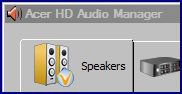
This is where your System Specs are useful. Some PC/Laptop Makers have the Realtek HD Audio Drivers and Manager, assume their identity. To explain, these are my 'Realtek' Details in Control Panel [Classic View] and in Audio Manager;

Name:  Acer HD etc.JPG
Views: 312
Size:  10.9 KB Name:  Acer HD etc.2.JPG
Views: 314
Size:  11.9 KB

Last edited by sassofalco; 09-02-2009 at 08:14 AM.. Reason: Detail on possible different label.
My System SpecsSystem Spec
Old 09-02-2009   #4 (permalink)


Vista home premium 32bit


Re: Realtek HD manager missing

I followed the tutorials faithfully and reinstalled everything, still no manager sadly.
I appreciate the help here guys, but this realtek stuff it's getting complicated.

EDIT: By the way, when i try to update the driver manually like the tutorial, it says that its already up to date.

This is my Mobo, got the info from the everest program: Motherboard ID 63-0100-001131-00101111-021808-Lakeport$P17G_P17GRELEASE
Motherboard Chipset Intel Lakeport-G i945G
My System SpecsSystem Spec
Old 09-02-2009   #5 (permalink)


Vista Home Premium 32-bit & Vista Ultimate 64-bit both Service Pack 2 W7 Pro RTM 7600 32 & 64


Re: Realtek HD manager missing

Hi Haryel,

Your motherboard does not have Realtek audio - this would explain why the above didn't work.

PCCHIPS Web Site P17G (V1.0)

PCCHIPS Web Site P17G/1333 (V1.0A)

Choose the appropriate link, depending on m/b revision. The option you require is Sound Driver.
My System SpecsSystem Spec
Old 09-02-2009   #6 (permalink)


Vista home premium 32bit


Re: Realtek HD manager missing

It's weird that it shows realtek then.
Thanks for the help Dwarf, i really appreciate it.

You guys can do it all.
My System SpecsSystem Spec
Old 09-02-2009   #7 (permalink)


Vista Home Premium 32-bit & Vista Ultimate 64-bit both Service Pack 2 W7 Pro RTM 7600 32 & 64


Re: Realtek HD manager missing

Hi Haryel,

It's the LAN (network) driver that is Realtek. Have you solved your sound problem?
My System SpecsSystem Spec
Old 09-02-2009   #8 (permalink)


Vista home premium 32bit


Re: Realtek HD manager missing

I tried the PCCHIPS sound driver it gives me an error tho, it says "We can' find the HD audio drive"

EDIT: Actually nevermind. The other link Dwarf provided me made everything install properly. You're the man Dwarf.

Thanks to everyone that replied!

Last edited by Haryel; 09-02-2009 at 10:53 AM..
My System SpecsSystem Spec
Old 09-02-2009   #9 (permalink)


Vista Home Premium 32bit [x86] - SP2


Re: Realtek HD manager missing

Quote  Quote: Originally Posted by sassofalco View Post
Quote  Quote: Originally Posted by Haryel View Post
Hello guys, this is my last hope to make this work.
I was forever having problems 'getting it right' until I got some good advice and assistance from Dwarf and Brink, a couple of the great guys here..... I make reference to a Tutorial by Dwarf. I hope that this helps you get your problem sorted, and never forget that there is always someone around, ready and willing to help.
Dang! Speak of the Devil, I've just seen that Brink has beaten me to the reply.....never mind, you're in good and capable hands.....
Quote  Quote: Originally Posted by Haryel View Post
The other link Dwarf provided me made everything install properly. You're the man Dwarf.
...............and Double-Dang! I knew it! I knew it!! My waters told me that the second Devil would come to the party!! I am so glad that you got your issue resolved. See you around again, sometime.......
My System SpecsSystem Spec
Old 09-02-2009   #10 (permalink)


Vista Home Premium 32-bit & Vista Ultimate 64-bit both Service Pack 2 W7 Pro RTM 7600 32 & 64


Re: Realtek HD manager missing

Hi Haryel,

I'm pleased that you have managed to install the driver. Is your microphone working now?
My System SpecsSystem Spec
Reply

Thread Tools


Similar Threads
Thread Forum
Missing Realtek HD Audio Manager in system tray Sound & Audio
32 bit vista no sound realtek hd audio manager missing Sound & Audio
Realtek Manager Missing Options Drivers
Realtek Audio Manager (Yes Again) Sound & Audio
Realtek HD Audio Manager Vista music pictures video


Vista Forums is an independent web site and has not been authorized,
sponsored, or otherwise approved by Microsoft Corporation.
"Windows Vista", the Start Orb, and related materials are trademarks of Microsoft Corp.
© Designer Media Ltd

1 2 3 4 5 6 7 8 9 10 11 12 13 14 15 16 17 18 19 20 21 22 23 24 25 26 27 28 29 30 31 32 33 34 35 36 37 38 39 40 41 42 43 44 45 46