Windows Vista Forums
Vista Forums Home Join Vista Forums Windows 7 Forum Vista Tutorials Tags
Welcome to Windows Vista Forums. Our forum is dedicated to helping you find solutions with any problems, errors or issues you are experiencing with Windows Vista. The Vista forum also covers news and updates and has an extensive Windows Vista tutorial section that covers a wide range of tips and tricks.

Go Back   Vista Forums > Vista Forums > Sound & Audio

Vista - volume keys not working

Reply
 
Old 09-02-2009   #1 (permalink)


Vista Home Premium 32 bit


volume keys not working

I just bought this Laptop for the wife. HP G60-445DX Notebook PC. The volume keys don't work. Does any one have a suggestion or a fix for this problem. It's brand spanking new with all updates. I contacted HP and they told me that I have to press the fn key and the up/down keys at the same time to activate them. It doesn't work. If I hold down the fn key and press either up/down key then they work. Big pain in the butt, can some one help. thanks.

My System SpecsSystem Spec
Old 09-02-2009   #2 (permalink)


Vista 32 win 7 7600 32 bit


Re: volume keys not working

Quote  Quote: Originally Posted by bassfisher6522 View Post
I just bought this Laptop for the wife. HP G60-445DX Notebook PC. The volume keys don't work. Does any one have a suggestion or a fix for this problem. It's brand spanking new with all updates. I contacted HP and they told me that I have to press the fn key and the up/down keys at the same time to activate them. It doesn't work. If I hold down the fn key and press either up/down key then they work. Big pain in the butt, can some one help. thanks.
Are you sayung that it is a pain to hit the Fn and Pgdwn to enter a Volume lic key. If it is a legit key you could call Ms and ask for a diffrent key.

Ken
My System SpecsSystem Spec
Old 09-02-2009   #3 (permalink)


Vista Home Premium 32bit OS / Sp2


Re: volume keys not working

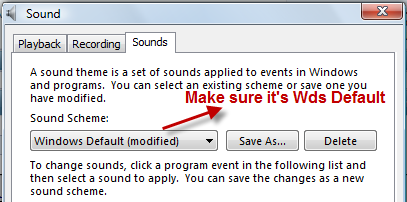
Hey ZZ . I think bass is talking about "Sound" volume key ....

Right click on "Speaker" ...

Name:  9-2-2009 5-05-58 PM.png
Views: 207
Size:  20.3 KB
My System SpecsSystem Spec
Old 09-02-2009   #4 (permalink)


Windows 7 Ultimate x64


Re: volume keys not working

That seems fine. I have to hold down fn and press f3 or f4 to decrease or increase the volume. You can download a macro recoder and make your own macro if it annoys you that much.
My System SpecsSystem Spec
Reply

Thread Tools


Similar Threads
Thread Forum
Esc and Tab keys stop working Virtual PC
Volume Keys on Wireless Natural Kbrd no workie Vista hardware & devices
keys & SHIFT keys not working properly in Vista Home Premium Vista General
Fn keys no longer working Vista General
Family Duscount Keys not working Vista General


Vista Forums is an independent web site and has not been authorized,
sponsored, or otherwise approved by Microsoft Corporation.
"Windows Vista", the Start Orb, and related materials are trademarks of Microsoft Corp.
© Designer Media Ltd

1 2 3 4 5 6 7 8 9 10 11 12 13 14 15 16 17 18 19 20 21 22 23 24 25 26 27 28 29 30 31 32 33 34 35 36 37 38 39 40 41 42 43 44 45 46