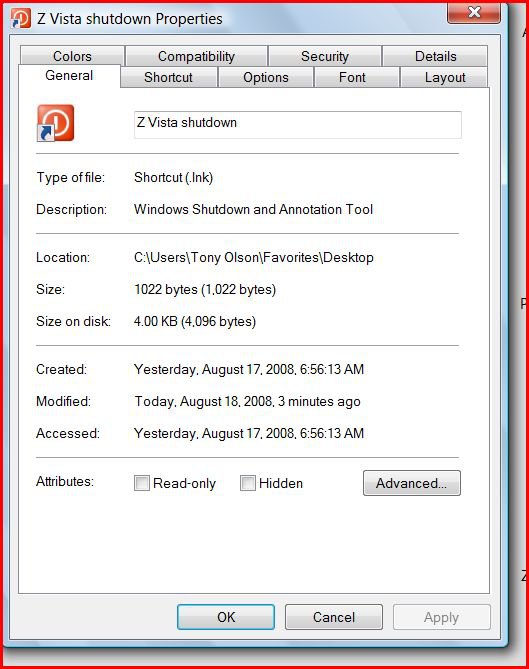
I created a desktop (shutdown) shortcut on both my desktop and laptop PC's both running Vista Home Premium.
On my desktop I click the shortcut and get a shutdown will occur in "X" minutes message (I'm paraphrasing) and everyting is shut down in an orderly manner.
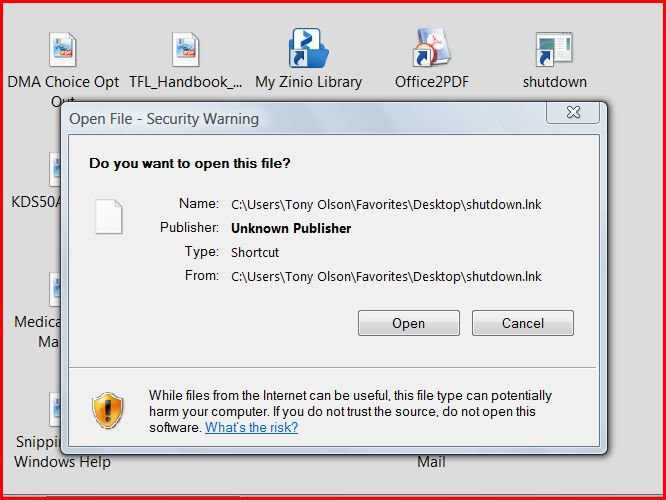
On my laptop using a wireless keyboard and mouse (the reason I really wanted the shortcut) I click on the shortcut and get a "open file- security warning" - Do you want to open this file?
I've been checking security settings on both PC's but have been unable to get rid of this Security warning dialog box on my laptop.
Right click on the shortcut and click on Properties. Under the General tab, if you have a Unblock button, click on it to unblock the shortcut to allow it run normally.
Thanks again for the rapid reply Brink. I created the (desktop) Shutdown shortcut as you instructed and I did see an "unblock" button under the General tab in it's properties. I clicked on it to unblock it and closed/saved the shortcut.
I clicked on the shortcut and got the same "open file- security warning" - Do you want to open this file?" message as before.
I think I may do a "repair" Vista install on my laptop and try this again.
On my desktop this shutdown shortcut does appear to work without the unblock command button in the properties (which probably has nothing to do with the problem on my laptop). I used the Vista shortcut wizard to create both with the command "shutdown.exe -s -t 01".
Strange. You would get that message if the shortcut had the Unblock still, but you should not have it after you extracted the Shutdown shortcut from the ZIP file, or when you have created the shortcut manually. Do you have UAC turned on in your laptop?
SanDisk Ultra SDSSDHII-960G-G25 960 GB SATA III SSD (System)
Crucial MX100 CT256MX100SSD1 256GB SATA III SSD (User Tree)
2 * Seagate Barracuda 7200.12 ST31000528AS 1TB 7200 RPM SATA II Mech. HD
Seagate ST1500DL001-9VT15L Barracuda 7200.12 1.5 TB S
PSU
Thermaltake Black Widow TX TR2 850W 80+ Bronze Semi-Mod ATX
Case
ThermalTake Level 10 GT (Black)
Cooling
Corsair H100 (CPU, dual 140 mm fans on radiator) + Air (2 *
Mouse
Logitech MX Master (shared)
Keyboard
Logitech G15 (gen 2)
Internet Speed
AT&T Lightspeed Gigabit duplex
Operating System
Sabayon Linux (current, weekly updates, 5.1.x kernel)
Manufacturer/Model
Lenovo ThinkPad E545
CPU
AMD A6-5350M APU
Motherboard
Lenovo
Memory
8 GB
Sound Card
Conextant 20671 SmartAudio HD
Monitor(s) Displays
Lenovo 15" Matte
Screen Resolution
1680 * 1050
Hard Drives
INTEL Cherryvill 520 Series SSDSC2CW180A 180 GB SSD
In trying to get this (simple) Shutdown shortcut to work I've went through a number of permutations. I've created the laptop shortcut by copying/pasting from the desktop to the laptop (via wireless network). Also I created the shortcut (on the laptop) via the shortcut wizard (with the same results).
I installed the tutorial version of shutdown seperately on both PC's (turned off unblock command button). Worked fine on desktop but not on laptop (still got "open file- security warning).
I've tried with UAC On and Off (no difference except the "continue message).
I appreciate the help thus far. I have my laptop hooked up to my Sony HD TV - I watch movies (Amazon and Netflix) and on ocassion turn off (shutdown ) the laptop from a distance (with the TV screen on something else). I know it's the height of laziness <g>. I can still do this although I have to answer the "open file- security warning dialog box.
Since you've not printed a copy of your shortcut on this forum, I'm not sure if we're talking about the same thing.
I install shortcuts to many programs to the desktops of PC's I work on,
from install batch files on my Utilities CD. So typing them on each individual PC is not required.
The shortcut for XP does not work right on Vista.
So, I constructed this one specifically for Vista. It works on both Vista 32 and Vista 64.
%windir%\System32\shutdown.exe -s -t 00 -f
The spaces, which I've tried to denote here are critical to the operation of the command.
This shutdown shortcut has worked flawlessly on every Vista PC that I've worked on so far, both desktop and laptop.
Give it a try.
Copy and paste the above shortcut into a NEW Shortcut on your desktop.
Sorry I didn't reply quicker. I setup and tried your shortcut but had the same problem (see attach). Previously I reinstalled Vista Home Premium with no change.
I'm not sure.....but, that looks like a message from UAC......
My only question is "Why is that P.O.C. even running on your PC?"
It's almost the very first thing I disable when working on a Vista PC.
Because, it interferes with everything else I have to do.
What happens if you tell it to allow that shortcut to run?
Thanks for the reply...
I've disabled UAC and had it active (with the same behavior). After replying afirmative to the file security message the shortcut/cmd executes.
I'm going to reinstall Vista with a fresh install on my Laptop (no I don't have Norton). Things are starting to go wrong so it's time to do a cleanup.
Thanks for the help - it's shortcuts that point to EXE files that have the trouble. I'm always doing things like testing beta browsers (IE8 and Chrome). The good is I've learned things about Vista security via your forum etc.
I'm using the laptop to watch movies (from Netflix, Amazon etc) on my HD TV so I'll cut my Laptop some slack in the future and limit the experimentation on it <g>.