Windows Vista Forums
Vista Forums Home Join Vista Forums Windows 7 Forum Vista Tutorials Tags
Welcome to Windows Vista Forums. Our forum is dedicated to helping you find solutions with any problems, errors or issues you are experiencing with Windows Vista. The Vista forum also covers news and updates and has an extensive Windows Vista tutorial section that covers a wide range of tips and tricks.

Go Back   Vista Forums > Vista Forums > System Security

Vista - Uninstall Comodo Pro Firewall

Reply
 
Old 08-22-2008   #1 (permalink)


Vista Home Premium 32bit


Uninstall Comodo Pro Firewall

Can anyone help me with uninstalling Comodo completely? I have uninstalled using windows and everything seemed ok. However, using Security Center, Comodo is still showing as installed. Have tried using Revo Uninstaller and also a registry cleaned. Have also tried Scans with Spybot and Adware but it still sits there in an 'on' state. I have tried to reinstall Comodo but get the message that 'Comodo is already installed and would I like to uninstall now'.When I click ok to uninstall the box disappears but nothing else happens. So it appears that I am stuck with this firewall but there is no way to access it as the only reference to it is via Security Center. The next step is throwing the window......can someone please assist in this. Not too technically minded so worried about any remedies involving regedit or cmd !

My System SpecsSystem Spec
Old 08-22-2008   #2 (permalink)


Vista Ultimate x64 SP1


Re: Uninstall Comodo Pro Firewall

My System SpecsSystem Spec
Old 08-22-2008   #3 (permalink)


Vista Home Premium 32bit


Re: Uninstall Comodo Pro Firewall

I have tried the CFP 3 Registry+File Cleaner with no success. All it did was kill the internet connection and i had to use 'system restore' so looking at other option !
My System SpecsSystem Spec
Old 08-22-2008   #4 (permalink)


Vista Ultimate x64 SP1


Re: Uninstall Comodo Pro Firewall

Did you try the long way? Full Removal of Comodo Firewall Pro 3 with SafeSurf Toolbar (If Regular Uninstall Method Fails)
Quote:
1. Mandatory: create a System Restore point and label it appropriately. Optionally, perform a full backup of your system (you should be doing this, anyway).

2. Temporarily disable your Internet connection and shut down ALL unnecessary processes using Task Manager (a utility called EndItAll can make this task easier).
There are other things to do, but I would make sure to follow the rules.
My System SpecsSystem Spec
Old 08-23-2008   #5 (permalink)


Vista 64-bit Ultimate Win7 64-bit Ultimate XP SP3 32-bit Pro


Re: Uninstall Comodo Pro Firewall

Hello Stefano, just a silly thought.

Have you tried to re-enable the built in "Windows Fire Wall" to see if that will disable CFP?

Keep us informed!


Later Ted
My System SpecsSystem Spec
Old 08-23-2008   #6 (permalink)


Vista Home Premium 32bit


Re: Uninstall Comodo Pro Firewall

Helo Bare Foot Kid,
Yes I have re-enabled Windows Firewall but now system shows both running so I have diabled it again. Only a novice so worried about the Full Removal of Comodo Firewall Pro 3 with SafeSurf Toolbar (If Regular Uninstall Method Fails)
Seems a little difficult for me. I did download CFP 3 Registry+File Cleaner with no success. At the moment I am unable to download any other reg cleaners etc as whenever I try I get the message 'unable to connect to web server' which I'm thinking is caused by Comodo blocking the connection ??
Stefano
My System SpecsSystem Spec
Old 08-23-2008   #7 (permalink)


Vista x64 Ultimate SP2, Windows 7 Ultimate x64


Re: Uninstall Comodo Pro Firewall

Hi Steve,

To see if Comodo is blocking the program from connecting and to unblock it:
  • Right click on the Comodo tray icon and click on Open.
  • Click on the Firewall button at the top.
  • Click on the Advanced button to the left.
  • Click on the Network Security Policy link.
  • Look for anything with a red X in a cricle that is set to be blocked to see if it is that program you want not to be blocked.
    • If it is, then click on it to highlight it, and click the Edit button to the right.
    • Change the Action to allow and click Apply.
    • Repeat for any other entries for that program you find.
  • Click Apply .
Hope this helps,
Shawn
My System SpecsSystem Spec
Old 08-23-2008   #8 (permalink)


Vista Home Premium 32bit


Re: Uninstall Comodo Pro Firewall

Hi Brink,
The problem is that I have uninstalled comodo but it still shows as 'on' in security centre even though it shows as uinstalled.There aer still register residues but no icon in the system tray. I have tried a search for comodo but windows can't find it even though its sat in the registry keys. Don't know where to go from here.
Steve
My System SpecsSystem Spec
Old 08-23-2008   #9 (permalink)


Vista x64 Ultimate SP2, Windows 7 Ultimate x64


Re: Uninstall Comodo Pro Firewall

Steve,

Have you already looked in Services and made sure that the COMODO Firewall Pro Helper Service is stopped and disbled if listed?

When you uninstalled COMODO from Programs and Features, did you turn it off and disabled it first?

When you searched the registry, did you use the Edit and Find/Find Next option while using Comodo to search for and right click on and Delete all entries found?
My System SpecsSystem Spec
Old 08-23-2008   #10 (permalink)


Vista 64-bit Ultimate Win7 64-bit Ultimate XP SP3 32-bit Pro


Re: Uninstall Comodo Pro Firewall

Quote  Quote: Originally Posted by Stefano
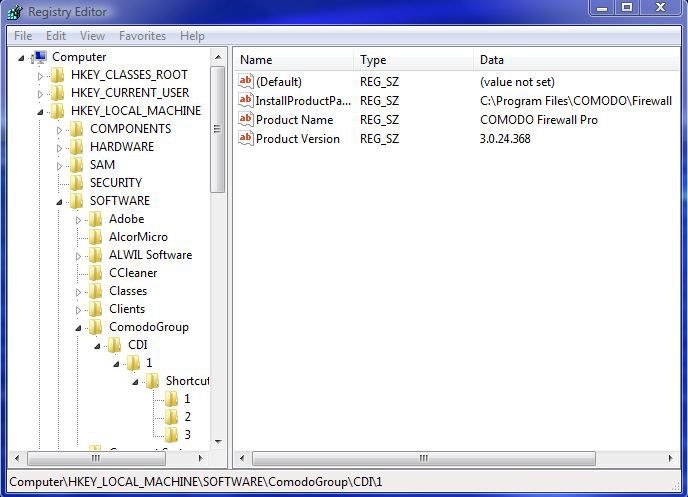
Not too technically minded so worried about any remedies involving regedit or cmd !
Going in the "Registry" isn't too difficult; but you may want to have a look to see,
once you get there you don't have to do 'anything'.

comodo.jpg

Keep us informed!


Later Ted
My System SpecsSystem Spec
Reply

Thread Tools


Similar Threads
Thread Forum
question about comodo firewall System Security
Firewall problem after updating comodo ! ! System Security
Comodo firewall now out for x64 System Security
Comodo firewall queries System Security
COMODO firewall pro System Security


Vista Forums is an independent web site and has not been authorized,
sponsored, or otherwise approved by Microsoft Corporation.
"Windows Vista", the Start Orb, and related materials are trademarks of Microsoft Corp.
© Designer Media Ltd

1 2 3 4 5 6 7 8 9 10 11 12 13 14 15 16 17 18 19 20 21 22 23 24 25 26 27 28 29 30 31 32 33 34 35 36 37 38 39 40 41 42 43 44 45 46