![]() |
![]() | ![]() | ![]() | ![]() | ![]() | ![]() | ![]() |
| Welcome to Windows Vista Forums. Our forum is dedicated to helping you find solutions with any problems, errors or issues you are experiencing with Windows Vista. The Vista forum also covers news and updates and has an extensive Windows Vista tutorial section that covers a wide range of tips and tricks. |
| |||||||
![]() |
| |
| | #1 (permalink) |
| Vista Home Premium 32bit | Avast is giving me a headache! Hi group! Before I explain my Avast headache let me say that out of all the online informative help-yourself learning centers I have come across this place is hands down the best! I have Vista Home Premium it is running on a HP pavilion dv6000. I am current in all the applicable updates from both HP and Microsoft. Here is the situation: My antivirus proggy is Avast ver 4.8. It seems to be a fine free antivirus program. The problem is that in spite of it launching perfectly if I am signed in on the admin account. Windows defender stops the program from launching unassisted in the limited user's account. I have attempted to (from the admin side) see that it is allowed full admin privileges for all users. But still no joy! What else can I try here? Thanks in advance for your insightful input. StarBaseONE2 |
My System Specs![]() |
| | #2 (permalink) |
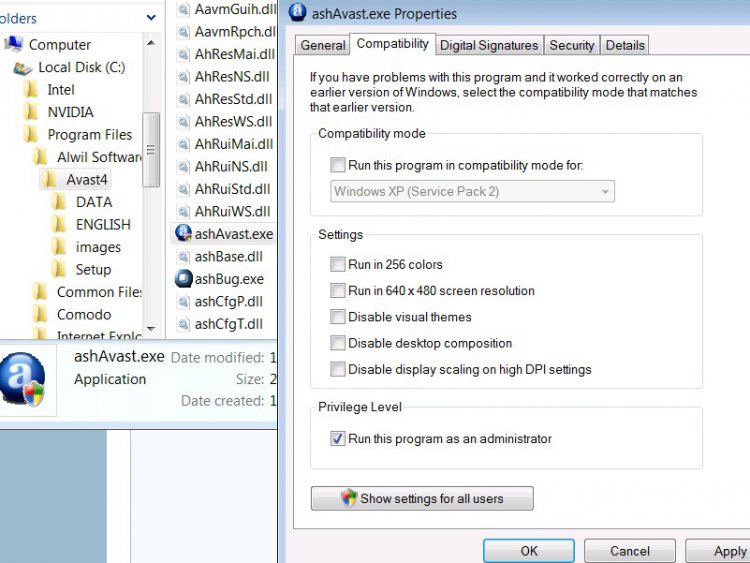
| VISTA HOME PREMIUM X64/ 7 x64 / 7x86 | Re: Avast is giving me a headache! Hi, Go to C:Program Files , double click it, then double click the Alwil folder, then double click Avast 4 . Right click Avast.exe, click Properties - under the Compatiblity tab tick Run this program as administrator,click Apply,click OK. See below : ![]() Hope this helps SIW2 Click the middle icon at top right of this post if it helps - thanks Last edited by SIW2; 09-16-2008 at 11:07 PM.. |
My System Specs![]() |
| | #3 (permalink) |
| Vista Home Premium 32bit | Re: Avast is giving me a headache! Thanks for swift response SIW2. Still there is a complication. following the pathway you set forth all the way to the compatibility tab. The Privilege Level area is shaded in, giving me no option to check the check box. I then clicked the button just underneth that that says "Show settings for all users" I entered the admin password. Then I have an option to check this check box. I checked it. Clicked "apply" and then "ok" which returns me to the original properties window. There the check box is still unchecked! LOL I am attempting a quick reboot now to see if that will do it... I'll let you know. Thanks for the response! |
My System Specs![]() |
| | #4 (permalink) |
| Vista Home Premium 32bit | Re: Avast is giving me a headache! Dog gone it! No joy! Windows defender identifies the program it is holding as "ashDisp.exe" Following the same path as before to this programs "Compatibility" tab reveals that the "run as an administator" box is shaded in as before BUT it is checked! LOL Any other ideas? |
My System Specs![]() |
| | #5 (permalink) |
| VISTA HOME PREMIUM X64/ 7 x64 / 7x86 | Re: Avast is giving me a headache! If you were logged into your Aministrator account - then followed path to Compatibility tab - the privilege level box should be available for you to tick, then Apply and OK. Worth trying it now in your Admin account - should work (Not sure if what you have done in your user account will have now affected this ?) You need to be the Administrator in order to give the instruction to the prog to always run as Admin ( no matter who the user ). SIW2 Last edited by SIW2; 09-16-2008 at 11:47 PM.. |
My System Specs![]() |
| | #6 (permalink) |
| Vista Home Premium 32bit | Re: Avast is giving me a headache! Thanks I was logged in as limited as I executed your instructions. I will try again. |
My System Specs![]() |
| | #7 (permalink) |
| Vista Home Premium 32bit | Re: Avast is giving me a headache! Still no joy! Idunno what to think... Let me re-cap here. I first restored the machine to an earlier restore point on this day. (in hopes of heading off complications from my earlier settings changes) Then I logged in on the admin account. I followed the pathway to the compatibility tab checked the "run as an administrator" check box. Rebooted. No joy. No change actually. The program still launched correctly on the admin side and required assistance on the limited user side. Back to the admin user I navigated to the ashDisp.exe there on the compatibility tab I checked "run as an admin" box and rebooted. Still no joy on the Limited User account. Same assistance required to launch avast. But on the Admin side it required the same assistance to launch as it needed on the Limited User side! LOL I am out of ideas again. Anyone have any thoughts on how I should proceed from here? |
My System Specs![]() |
| | #8 (permalink) |
| VISTA HOME PREMIUM X64/ 7 x64 / 7x86 | Re: Avast is giving me a headache! Had something similar on another post - got spybot to work for him by uninstalling, then reinstalling by rt click and run as admin on setup.exe file - as he had not installed it this way at first - he also ticked box under compatiblity tab (did all this while logged in as admin. ) Worth a try - don't forget to update Avast - in fact may as well go to www. avast.com and get new setup file - can use same product key as you have now. SIW2 |

My System Specs![]() |
| | #9 (permalink) |
| Vista Home Premium 32bit | Re: Avast is giving me a headache! Thank you so much for your help. I will try the re-installation today. |
My System Specs![]() |
![]() |
| Thread Tools | |
| |
Similar Threads | ||||
| Thread | Forum | |||
| Archiving Headache | Software | |||
| Re: Why all the headache? | Vista General | |||
| internet headache | Live Mail | |||
| UAC can be a headache | Vista General | |||
| Vista Installation Issues, Headache after Headache | Vista General | |||