Windows Vista Forums
Vista Forums Home Join Vista Forums Windows 7 Forum Vista Tutorials Tags
Welcome to Windows Vista Forums. Our forum is dedicated to helping you find solutions with any problems, errors or issues you are experiencing with Windows Vista. The Vista forum also covers news and updates and has an extensive Windows Vista tutorial section that covers a wide range of tips and tricks.

Go Back   Vista Forums > Vista Forums > System Security

Vista - No AV installed for Vista (perfmon.exe bug!)

Reply
 
Old 01-06-2009   #1 (permalink)


Vista Home Premium (SP1, x86, Ita)


No AV installed for Vista (perfmon.exe bug!)

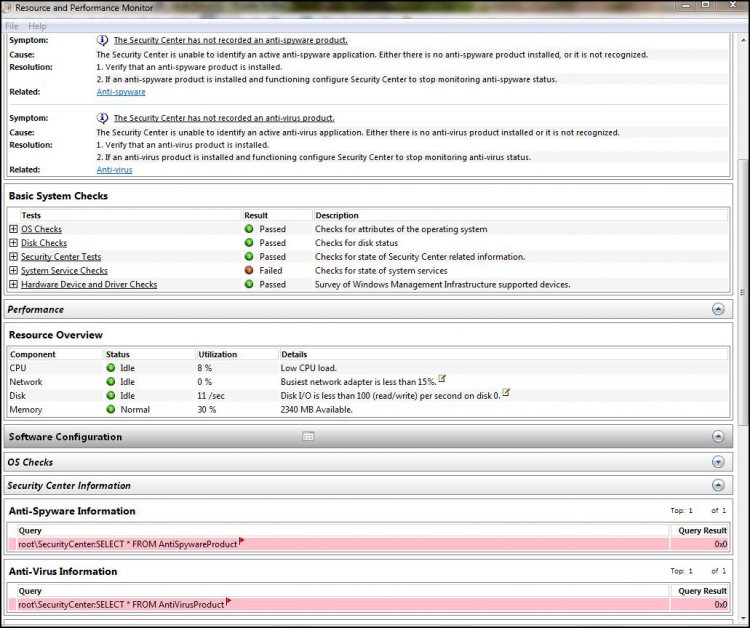
Whether you have an AV installed and running or not if you run from an Admin prompt:
C:\Windows\System32\perfmon.exe /report
it will report that no AV is installed (??) even if Protection Center says it is!


http://www.pctunerup.com/up/results/...5_Immagine.jpg
http://www.pctunerup.com/up/results/..._Immagine2.jpg

It is a bug in Perfmon.exe. Securty center correctly reports the AV is installed.
I've tested this with 2-3 AVs, including Nor**n 2009 and it does always the same.
It's clearly a bug in this Vista's component.

EDIT: please read the full thread. It's a bug in some AVs installation as they forget to register some infos and not a bug in Perfmon.


Last edited by hexaae; 01-07-2009 at 04:29 AM..
My System SpecsSystem Spec
Old 01-06-2009   #2 (permalink)


Vista Home Premium 32-bit & Vista Ultimate 64-bit both Service Pack 2 W7 Pro RTM 7600 32 & 64


Re: No AV installed for Vista (perfmon.exe bug!)

Hi hexae,

This is strange. I have executed the command like you have, and this is my result:
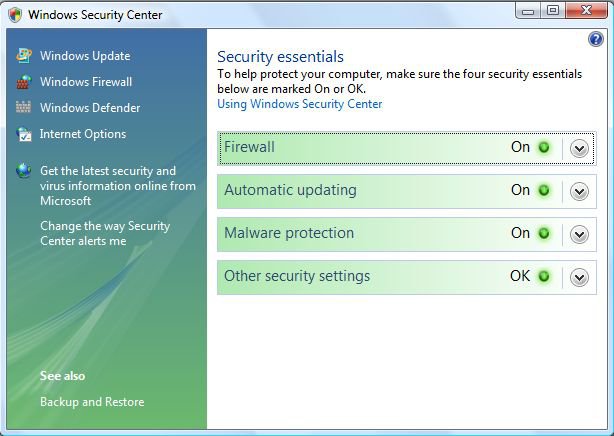
Security Center
capture.jpg
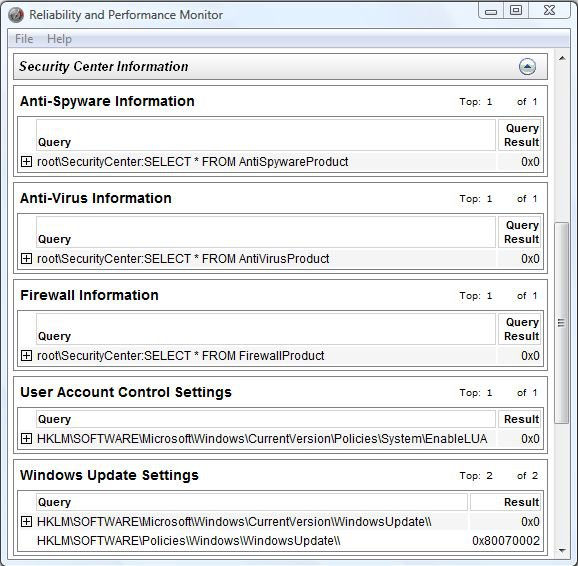
PerfMon
capture1.jpg
As you can see, there are no problems here.
What is puzzling from your post is the fact that in the Security Center Automatic updating is shown in yellow whereas in PerfMon Anti-Virus Information is showing red. I can understand the former being yellow as you can configure Automatic Updating to just notify you of any updates. I would be concerned at your Ant-Virus Information. The fact that you are getting different results for this category from Security Center and PerfMon would seem to indicate that your AV is not integrating correctly with Vista. I notice from your post that you mention Norton. I used this myself a couple of years ago when Vista first came out and was very disappointed with it. Even on clean installs, with everything done in exactly the same order, I would get different results. I came to the conclusion that, although it said it was Vista compatible, it clearly wasn't. Since then, I have used Kaspersky and have had no problems. Sometimes, the red warning shield appears after it has done the first update when I first boot up my system for the day, but that resolves itself when I reboot. This is just an indication that certain files have been updated and that they cannot be used until the system has been restarted, much as in the same way you sometimes get from Windows Update.

Last edited by Dwarf; 01-06-2009 at 12:44 PM..
My System SpecsSystem Spec
Old 01-06-2009   #3 (permalink)


Vista Ultimate SP2 x64 Windows 7 Ultimate x64 TECHNET


Re: No AV installed for Vista (perfmon.exe bug!)

Quote  Quote: Originally Posted by hexaae View Post
Whether you have an AV installed and running or not if you run from an Admin prompt:
C:\Windows\System32\perfmon.exe /report
it will report that no AV is installed (??) even if Protection Center says it is!


http://www.pctunerup.com/up/results/...5_Immagine.jpg
http://www.pctunerup.com/up/results/..._Immagine2.jpg

It is a bug in Perfmon.exe. Securty center correctly reports the AV is installed.
I've tested this with 2-3 AVs, including Nor**n 2009 and it does always the same.
It's clearly a bug in this Vista's component.

Hi hexaae,

It could very well be a bug. I have had this happen to me a few times in vista when generating a health report. Even now in Win 7 I still have the same problem with it not reporting that I have Avast installed or even Win Defender. Your AV still works just fine, it just doesn't report it in the health report. You might send a report of it to your AV provider and Microsoft.
My System SpecsSystem Spec
Old 01-06-2009   #4 (permalink)


Vista Home Premium (SP1, x86, Ita)


Re: No AV installed for Vista (perfmon.exe bug!)

Quote  Quote: Originally Posted by Dwarf View Post
Hi hexae,

This is strange. I have executed the command like you have, and this is my result:
Security Center
PerfMon
As you can see, there are no problems here. What is puzzling from your post is the fact that in the Security Center Automatic updating is shown in yellow whereas in PerfMon Anti-Virus Information is showing red.
Interesting. I've set Updating manually: Vista will advise me when updates are available, but nothing will be automatically downloaded and/or installed. That's why it's yellow. Nothing wrong, theoretically. Here is the bug?

BTW, what's the AV used?
My System SpecsSystem Spec
Old 01-06-2009   #5 (permalink)


Vista Ultimate SP2 x64 Windows 7 Ultimate x64 TECHNET


Re: No AV installed for Vista (perfmon.exe bug!)

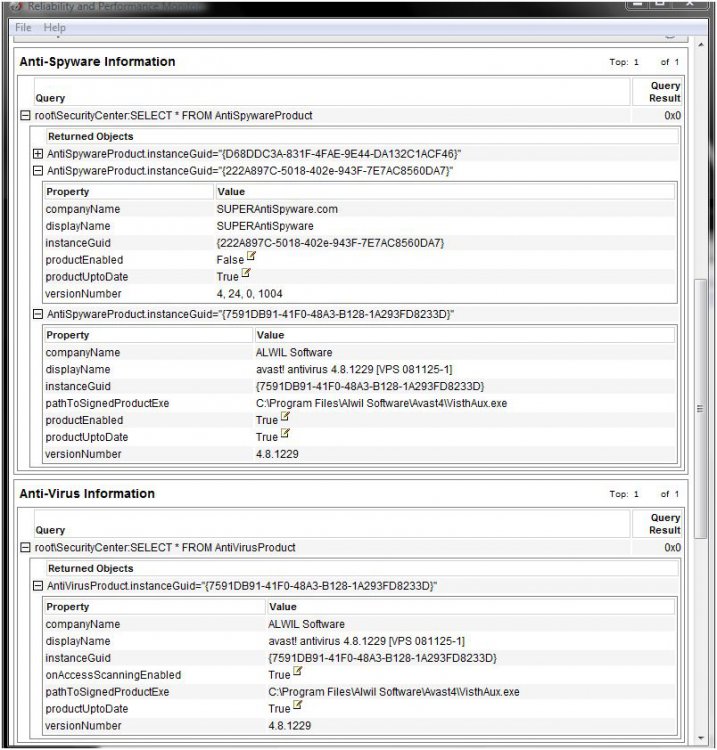
This is in Win 7 but I have Avast and windows defender installed and active.


safe.jpg
My System SpecsSystem Spec
Old 01-06-2009   #6 (permalink)


Vista Home Premium 32-bit & Vista Ultimate 64-bit both Service Pack 2 W7 Pro RTM 7600 32 & 64


Re: No AV installed for Vista (perfmon.exe bug!)

Hi hexaae,

First of all, apologies for spelling your name wrong on my previous post. As you can see, I updated that post whilst you were replying to it. I tried the command several times, and got exactly the same result every time. This is why your result is perplexing. I can understand Aaron's result because Windows 7 is currently in Beta and, as far as I am aware (but I might be wrong), there isn't currently any AV designed specifically for that platform.
My System SpecsSystem Spec
Old 01-06-2009   #7 (permalink)


Vista Ultimate SP2 x64 Windows 7 Ultimate x64 TECHNET


Re: No AV installed for Vista (perfmon.exe bug!)

But what about windows defender though Dwarf?
My System SpecsSystem Spec
Old 01-06-2009   #8 (permalink)


Vista Home Premium 32-bit & Vista Ultimate 64-bit both Service Pack 2 W7 Pro RTM 7600 32 & 64


Re: No AV installed for Vista (perfmon.exe bug!)

Hi Aaron,

I'm not sure. Perhaps you could ask the question here: Windows 7 Forums and see what they say.
My System SpecsSystem Spec
Old 01-06-2009   #9 (permalink)


Vista Home Premium (SP1, x86, Ita)


Re: No AV installed for Vista (perfmon.exe bug!)

Quote  Quote: Originally Posted by Dwarf View Post
Hi hexaae,

First of all, apologies for spelling your name wrong on my previous post. As you can see, I updated that post whilst you were replying to it. I tried the command several times, and got exactly the same result every time. This is why your result is perplexing. I can understand Aaron's result because Windows 7 is currently in Beta and, as far as I am aware (but I might be wrong), there isn't currently any AV designed specifically for that platform.
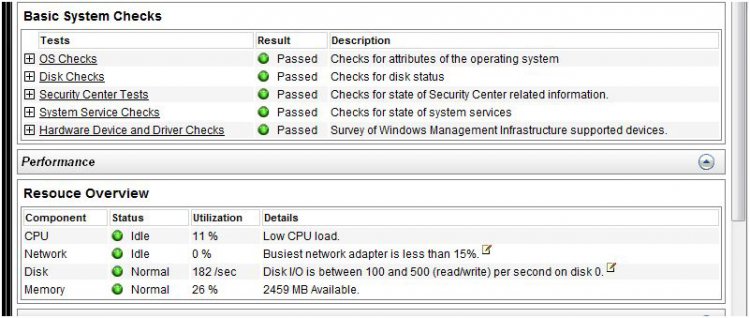
Have you tried after setting "manual updates"? Gives the same ok results?
Honestly you're the first person I see without this problem In other forums ALL users have posted the same bogus in Perfrom.exe... What AV do you have?
My System SpecsSystem Spec
Old 01-06-2009   #10 (permalink)


Vista Ultimate SP2 x64 Windows 7 Ultimate x64 TECHNET


Re: No AV installed for Vista (perfmon.exe bug!)

Yeah, I already did before, they don't really know why either, lol.
My System SpecsSystem Spec
Reply

Thread Tools


Similar Threads
Thread Forum
How to start Perfmon data collection automatically when Vista boots up ? Vista performance & maintenance
perfmon logging to SQL Vista performance & maintenance
how to disable Perfmon... General Discussion
Perfmon.exe Vista General
Corrupted perfmon.msc? Vista performance & maintenance


Vista Forums is an independent web site and has not been authorized,
sponsored, or otherwise approved by Microsoft Corporation.
"Windows Vista", the Start Orb, and related materials are trademarks of Microsoft Corp.
© Designer Media Ltd

1 2 3 4 5 6 7 8 9 10 11 12 13 14 15 16 17 18 19 20 21 22 23 24 25 26 27 28 29 30 31 32 33 34 35 36 37 38 39 40 41 42 43 44 45 46