![]() |
![]() | ![]() | ![]() | ![]() | ![]() | ![]() | ![]() |
| Welcome to Windows Vista Forums. Our forum is dedicated to helping you find solutions with any problems, errors or issues you are experiencing with Windows Vista. The Vista forum also covers news and updates and has an extensive Windows Vista tutorial section that covers a wide range of tips and tricks. |
| |||||||
![]() |
| |
| | #1 (permalink) |
| Vista Home Premium 32bit | AVG found trojan horse It called "Trojan Horse Downloader Agent2 APF". Path to file: ProgramsFiles>Real>RealPlayer\Setup\au_setup6.exe Of course I sent it to the Virus Vault. And I wondered why Real Player was just launching itself randomly. My question is I cannot find the setup6.exe file. I guess it went to the vault? I am wondering if I should uninstall and re-install RealPlayer again? What's the best rule of thumb to download with safety? I've heard of "mirror" sites? Should I uninstall Realplayer? I've got a lot of playlists in there. Just wondering if this is going to be a problem. Thanks! |
My System Specs![]() |
| | #2 (permalink) |
| Vista Ultimate x64 SP1 | Re: AVG found trojan horse Check this, last post Re: Trojan horse detected message when downloading RealPlayer 11 Gold - RealPlayer - Real Support Community so probably false alarm You are right about some download sites only being a menu to far away servers, SoftPedia does that a lot. Use something like Filehippo FileHippo.com - Download Free Software - has most of what you need and probably more control over content than certain other sites. |
My System Specs![]() |
| | #3 (permalink) |
| Vista Home Premium 32bit | Re: AVG found trojan horse dk, Thanks! I'm not sure if I downloaded from the "Real" site. But now I know better, and I bookmarked the link you gave me. I'm kind of stumped if I should uninstall my current RealPlayer program. When I went to the control panel to uninstall, it does show Real Networks as the publisher, so I'm not sure if that means I went to the Real site to download. Sometimes I go to free downloads.com or cnet, etc. I guess if I see RealPlayer acting up again, or if I get another message from AVG, it's time to uninstall, huh? |
My System Specs![]() |
| | #4 (permalink) |
| Microsoft® Windows Vista™ Ultimate x64 SP2 Windows 7 7127 x64 | Re: AVG found trojan horse Unfortunately there have been quite a few false positives from AVG lately. Because of this quite a few of us have changed to AVAST free. |
My System Specs![]() |
| | #5 (permalink) |
| Vista Ultimate x64 SP1 | Re: AVG found trojan horse They all do. Unless too many like in being annoying I dont see much trouble with FPs. Program is set up to deal with false positives and user, or whoever is admin, should know. Part of AV. If whatever product, or review, claim there are no FPs they are lying or worse have made AV foolproof by chosing safe path = low detection rate. Why Microsoft never have had many FPs - good but also bad. AV-Comparatives have also jumped the wagon. To some extend they award AVs according to number of FPs. That is nuts, also meaningless because it only take 1 FP to confuse users if they are to be stroked 100%. Stories about system files being quarantined are unfortunate of course, Eset False Positive Fiasco - DonationCoder.com Think he is pissed off because many of the tools he care about have been flagged, like autohotkey stuff They dont take notice because only few complain. Should be kept to the fire but is wrong to make FP a major issue. My Avira thing sucks with excluding programs. How program communicates with user regarding FPs, is much more important than if it happens to suspect Real Player for a day or 2 - or have X more than another AV with lower detection rate. Besides, flagging Real Player just shows AVG have some taste ![]() I like Avast, you can report FPs directly from Webshields "A Virus was found" window ("There is no reason to worry, though.") Disable that and you get same msg from standard shield, except now "There is no reason to panic, though". They have put some thought in to this problem. |
My System Specs![]() |
| | #6 (permalink) |
| Vista Home Premium 32bit | Re: AVG found trojan horse I'm getting a little more concerned now. I sent a picture to a friend and she said that her AV found a virus attached to my pic. I've been pop-ups like crazy using Firefox (just looked though and popups were not blocked). Firefox has been acting crazy like now downloading full files. I'm not sure if I should do a restore with Vista, just back a couple of weeks. I see there is a free PC scan link that was after your post. Is that link safe? I'm wondering if I should uninstall and reinstall Firefox. Guess I can save my bookmarks. Geez, what a hassle. I will try to decipher what you had written to me. Lots there. Thanks. |
My System Specs![]() |
| | #7 (permalink) |
| Vista Ultimate x64 SP1 | Re: AVG found trojan horse Well scan away with a new beta of ESETs online scanner then ESET Online Scanner Beta Program but I would not let it remove anything. Why is partly because of FP - just not safe to trust so much, even less an online scanner. Though this one seem to have implemented quarantine. Wise works from FAQ: Why are infected files in quarantine after the scan? All infiltrations and infected files are moved into the quarantine by default. Files in quarantine no longer represent a threat for your computer, because they are reliably isolated from all parts of the operating system. The user can choose either to restore selected files or delete the quarantine. Warning! Please, restore files from quarantine only if you are sure that it is not malware or an infected file. I will only suggest you let it report. Deal with infections afterwards. Old one was horrible because it would not let you save results, now you can - export to text-file and post it here. Should be close to 100% safe to install and run Malwarebytes Malwarebytes.org does also not find anything but is good at removal, not the same as detection but just as important. System Restore could work as wel, if there is anything to fix, but would be a good idea if you found out what problem is, what went wrong - what you will not do again, have to protect better against. ![]() |
My System Specs![]() |
| | #8 (permalink) |
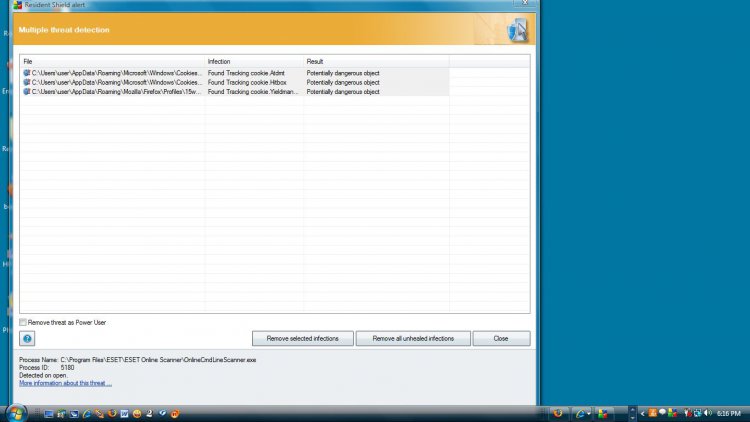
| Vista Home Premium 32bit | Re: AVG found trojan horse Well, I don't use IE, I use Firefox which could be one of my problems. But I did do the free scan. I do not know how to do a screen shot to show you. Please teach me how to do a screen shot and put this up on this site. Three threats, mostly cookies. I did not remove them, as you suggested. I my browser, should I accept all cookies? Let me know how I should take the next procedure. TXS. |
My System Specs![]() |
| | #9 (permalink) |
| Vista Home Premium 32bit | Re: AVG found trojan horse I'm gonna try this screen shot. It's the result of the free scan you suggested. ![]() I get these cookie warnings ALL the time using AVG. Maybe I should raise my level of protection in my browser? How much of a threat are these? What should my setting be in my browser? Should I remove these threats now? you said wait and show you first. |
My System Specs![]() |
| | #10 (permalink) |
| Vista Ultimate x64 SP1 | Re: AVG found trojan horse Good example of why so many security programs suck. Forget about those cookies, they are harmless. Damn ESET, let Spybot freak people out. According to ESET you are clean. Anyway I think you did not untick remove "unwanted" progams or something. Why it includes tiny cookies. Is a risky setting because many normal programs can be considered "unwanted", may be you dont even mind some adware. If just following program it will be removed... False Positives the same. Type Snip in start menu, there should be a build in screen capture in Vista. Yes you will get those cookies all the time - because they are all over the internet. Waste of your time to "handle" cookies to avoid but you could use Adblock Plus and subscribe to Easylist. Will remove most ads and fewer cookies will be on hd. There is also an addition to Easylist, called Easylist Privacy which block those sweet "tracking" cookies http://easylist.adblockplus.org/ - if you do that remember to whitelist/disable Adblock on sites you like. How to install Adblock http://adblockplus.org/en/ If you cant live with Cookies but not prepared to block all then go to add-on site - there are some extensions which can deal with them. Like Adblock does ads. Get one of the more popular ones. A simple search for cookies like this https://addons.mozilla.org/en-US/fir...ookies&cat=all will give plenty of choices. There is a technical side to cookies, from web developer point of view - you spending time allowing/blocking cookies is definition of being bored. For better protection against real dangers install WOT http://www.mywot.com/ May be also go through AVG settings, dont know if it is free or paid you have. You are not on top of things if scared by a text-file/cookie ![]() Keep Malwarebytes installed if you tried it. Is deadeasy to use, click update - then quickscan from time to time. You will find it hard to install stuff from crappy sites with WOT though. Check videos on their site for how it works, they just improved interface a lot. You decide what to block and what to warn against. Will not be problem to surf with. Last edited by dk70; 04-06-2009 at 10:42 PM.. |
My System Specs![]() |
![]() |
| Thread Tools | |
| |
Similar Threads | ||||
| Thread | Forum | |||
| Trojan Horse Agent 2.DVM | System Security | |||
| Executable file w/ Trojan Horse | Vista General | |||
| Trojan horse | System Security | |||
| Trojan Horse is there a way to get it out | Vista General | |||
| smss.exe winlogon.exe trojan horse | .NET General | |||