
Windows Vista Forums
Vista Forums Home Join Vista Forums Windows 7 Forum Vista Tutorials Tags
Welcome to Windows Vista Forums. Our forum is dedicated to helping you find solutions with any problems, errors or issues you are experiencing with Windows Vista. The Vista forum also covers news and updates and has an extensive Windows Vista tutorial section that covers a wide range of tips and tricks.

Go Back   Vista Forums > Vista Forums > System Security

Vista - Security Center Alert Windows

Reply
 
Old 10-15-2009   #1 (permalink)


vista home premium


Security Center Alert Windows

I keep getting these windows popping up. It asks me if I want to keep blocking yet the only button that is active is "enable protection". The other two are greyed out.
Can someone tell me what is going on... These windows are popping up all the time and I can't stop them.. After the window pops up and I indicate enable protection I get an "Active Security" window which I know is malware and i don't have installed.

Thank you
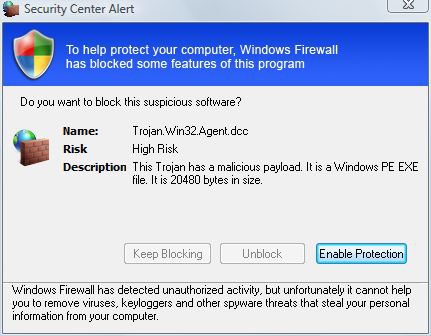
Attached Thumbnails
capture.jpg  
My System SpecsSystem Spec
Old 10-15-2009   #2 (permalink)


Vista Home Premium 64bit


Re: Security Center Alert Windows

What program were you trying to run ? I would deff. run malwarebytes and superantispyware + your anti-virus depending on what program it was.Sometimes windows firewall likes to block things that you need to unblock to run some programs.Better safe than sorry I'd run those scans / report back someone will help you.Best to jump on viruses,trojans,and the like fast nowadays or they spread fast !

Last edited by blue75; 10-15-2009 at 09:16 PM..
My System SpecsSystem Spec
Old 10-15-2009   #3 (permalink)


Vista Ultimate 64-bit, SP2


Re: Security Center Alert Windows

Quote  Quote: Originally Posted by kenshireen View Post
I keep getting these windows popping up. It asks me if I want to keep blocking yet the only button that is active is "enable protection". The other two are greyed out.
Can someone tell me what is going on... These windows are popping up all the time and I can't stop them.. After the window pops up and I indicate enable protection I get an "Active Security" window which I know is malware and i don't have installed.

Thank you
kenshireen,
Please give us some more information about what Security progs you have on your computer. [eg Anti Virus, Defender, if UAC is turned on]
blue75 has provided you with some good steps to start with. Both programs have a free version. Refer the links below.
I suggest that you download them to your desktop & run them. Reboot after each scan.
Also run the Windows Malicious Software Removal Tool.
Let us know how you go.
SUPERAntiSpyware.com | Remove Malware | Remove Spyware - AntiMalware, AntiSpyware, AntiAdware!
Malwarebytes.org
Download details: Windows Malicious Software Removal Tool
My System SpecsSystem Spec
Reply

Thread Tools


Similar Threads
Thread Forum
Security Center Specific Alert Notification Tutorials
Security Center Alert Warning Notification Tutorials
Windows Security alert... Vista security
windows security alert Vista security
Standard user can turn off Security Center Alert. no password requ Vista account administration


Vista Forums is an independent web site and has not been authorized,
sponsored, or otherwise approved by Microsoft Corporation.
"Windows Vista", the Start Orb, and related materials are trademarks of Microsoft Corp.
© Designer Media Ltd

1 2 3 4 5 6 7 8 9 10 11 12 13 14 15 16 17 18 19 20 21 22 23 24 25 26 27 28 29 30 31 32 33 34 35 36 37 38 39 40 41 42 43 44 45 46