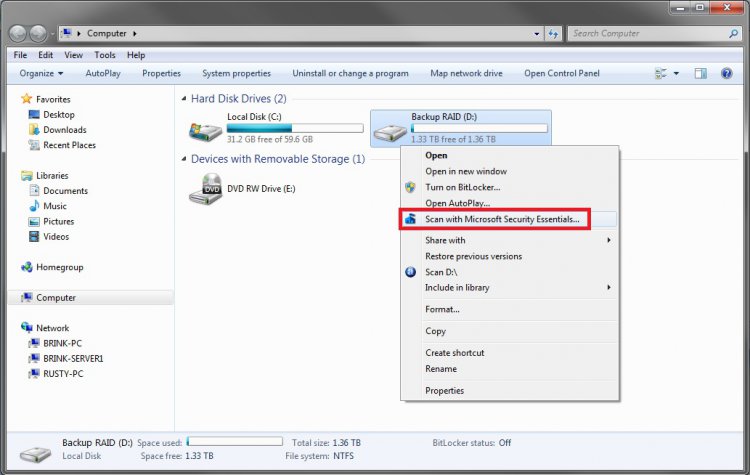
If you want to scan the file from the Context Menu using the Microsoft Security Essentials and you don't have such option over there, as I found out on friend's fresh install of the Vista x64, you can follow this tutorial.
In order to do this, you should backup the registry first by creating a system restore point. When done restart your computer.
Upon boot up open the Run terminal and type "regedit" (without quotes) and hit Enter. Go to this registry entry: HKEY_CLASSES_ROOT\*\shellex\ContextMenuHandlers. Click on the ContextMenuHandlers, now we have to create the new entry.
To do that:
1. Right Click on ContextMenuHandlers ->New ->Key and name the new key "MSSE".
2. Left-Click on the "MSSE" key you just created. In the right pane, you should see "(Default) REG_SZ (value not set)".
3. Now, we need to create a new value, so right-click on the "(Default)" in the right pane, then select Modify...
Enter the path to the application you want to run, in our case the MSE so the path is "{0365FE2C-F183-4091-AC82-BFC39FB75C49}", without quotes.
4. That's it. Close the Registry Editor window.
5. Reboot.
If you did it right, the option "Scan with Microsoft Security Essential..." should be there in the context menu and you should now launch the scan of any file you need from there.
In order to do this, you should backup the registry first by creating a system restore point. When done restart your computer.
Upon boot up open the Run terminal and type "regedit" (without quotes) and hit Enter. Go to this registry entry: HKEY_CLASSES_ROOT\*\shellex\ContextMenuHandlers. Click on the ContextMenuHandlers, now we have to create the new entry.
To do that:
1. Right Click on ContextMenuHandlers ->New ->Key and name the new key "MSSE".
2. Left-Click on the "MSSE" key you just created. In the right pane, you should see "(Default) REG_SZ (value not set)".
3. Now, we need to create a new value, so right-click on the "(Default)" in the right pane, then select Modify...
Enter the path to the application you want to run, in our case the MSE so the path is "{0365FE2C-F183-4091-AC82-BFC39FB75C49}", without quotes.
4. That's it. Close the Registry Editor window.
5. Reboot.
If you did it right, the option "Scan with Microsoft Security Essential..." should be there in the context menu and you should now launch the scan of any file you need from there.
My Computer
System One
-
- Manufacturer/Model
- Gateway P7805u FX
- CPU
- Intel Core2Duo T9600 2.80GHz 1066MHz FSB
- Motherboard
- Intel PM45
- Memory
- 8GB 1066MHz DDR3
- Graphics card(s)
- Nvidia GeForce 9800M GTS 1GB DDR3
- Monitor(s) Displays
- LG 17" WUXGA TFT
- Screen Resolution
- 1920x 1200
- Hard Drives
- WD 2x500GB
- Case
- notebook
- Other Info
- BT/BD