Windows Vista Forums

antivirus cant update
  1. #1


    Newbie
    Join Date : Jun 2011
    Coevorden
    Posts : 6
    Vista Home Premium
    Local Time: 11:52 PM
    netherlands

    antivirus cant update

    hi,

    im having a problem on my laptop it doesnt mater what virusscanner i try (avira, panda, super antispyware ,....) i cant update them anymore they cannot conect to the internet im sure i putted every firewall off, wich was only windows firewall. Like super antispyware was working before and im trying to get them updated on the same iternet from the same router im always using (not that im on a other location). i did not change settings anywere atleast i m thinking that its possible that it changed without i knowing it. and yes im sure im conected to internet i can use internet browsers and i can even use bittorrent.
    does somebody know how to possible could make it? any help is welkom
    sorry about my writing, enlish is not my 1st landwich


    thanks in advance,

    Lars

      My System SpecsSystem Spec

  2. #2
    richc46's Avatar

    BSOD Squad


    Join Date : Dec 2008
    Fairfield County, CT
    Posts : 19,253
    Windows 7 SP1 x64
    Local Time: 05:52 PM
    usa us connecticut


    Re: antivirus cant update

    Welcome
    My guess is that you have malware or a virus, what you are experiencing is a trademark.
    See if you can use this. It does not require a download and may be able to be updated. Run the scan and let us know
    Free ESET Online Antivirus Scanner - New Features<
    If you know when the problem started go back a week prior with system restore. Only if the first test is negative.
    System Restore - How to

      My System SpecsSystem Spec

  3. #3
    ilikefree's Avatar

    Senior Member


    Join Date : Jan 2010
    New Zealand
    Posts : 2,383
    Vista Home Premium 32bit.SP2
    Local Time: 09:52 AM
    newzealand


    Re: antivirus cant update

    Also try renaming Super Antispyware to something else like sas.

      My System SpecsSystem Spec

  4. #4
    richc46's Avatar

    BSOD Squad


    Join Date : Dec 2008
    Fairfield County, CT
    Posts : 19,253
    Windows 7 SP1 x64
    Local Time: 05:52 PM
    usa us connecticut


    Re: antivirus cant update

    Great approach. You know I never thought of that one.

      My System SpecsSystem Spec

  5. #5


    Newbie
    Join Date : Jun 2011
    Coevorden
    Posts : 6
    Vista Home Premium
    Local Time: 11:52 PM
    netherlands

      Thread Starter

    Re: antivirus cant update

    Quote Originally Posted by richc46 View Post
    Welcome
    My guess is that you have malware or a virus, what you are experiencing is a trademark.
    See if you can use this. It does not require a download and may be able to be updated. Run the scan and let us know
    Free ESET Online Antivirus Scanner - New Features<
    If you know when the problem started go back a week prior with system restore. Only if the first test is negative.
    System Restore - How to
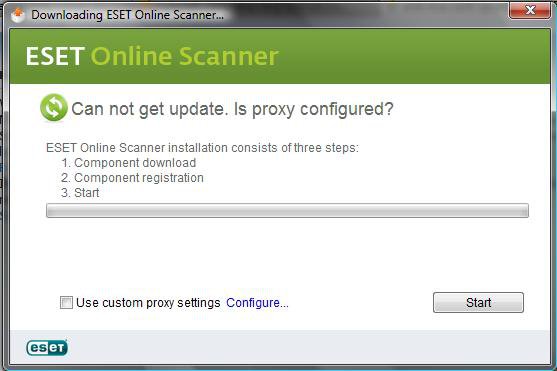
    naamloos.jpg ty for helping, but this is what i get

      My System SpecsSystem Spec

  6. #6


    Newbie
    Join Date : Jun 2011
    Coevorden
    Posts : 6
    Vista Home Premium
    Local Time: 11:52 PM
    netherlands

      Thread Starter

    Re: antivirus cant update

    thanks for helping
    but non of it did work renaming it to sas did not work and "eset online scanner" says; "can not get update. is proxy configured?" so is something wrong with the proxy? how do i change that?

      My System SpecsSystem Spec

  7. #7
    richc46's Avatar

    BSOD Squad


    Join Date : Dec 2008
    Fairfield County, CT
    Posts : 19,253
    Windows 7 SP1 x64
    Local Time: 05:52 PM
    usa us connecticut


    Re: antivirus cant update

    Lets try a few other things first, to try and find the cause
    Set up a clean boot and then see if it works
    How to troubleshoot a problem by performing a clean boot in Windows Vista or in Windows 7
    If that does not work, here if info on proxy
    http://windows.microsoft.com/en-US/w...ernet-Explorer
    I dont think that you need a proxy setting, turn it off.

      My System SpecsSystem Spec

  8. #8
    ilikefree's Avatar

    Senior Member


    Join Date : Jan 2010
    New Zealand
    Posts : 2,383
    Vista Home Premium 32bit.SP2
    Local Time: 09:52 AM
    newzealand


    Re: antivirus cant update

    Go to Super Antispyware site and download the portable version save it to a USB stick and run it from there. In your firewall you would need core networking allowed for the updates.

      My System SpecsSystem Spec

  9. #9
    richc46's Avatar

    BSOD Squad


    Join Date : Dec 2008
    Fairfield County, CT
    Posts : 19,253
    Windows 7 SP1 x64
    Local Time: 05:52 PM
    usa us connecticut


    Re: antivirus cant update

    If nothing else works, give this a try for Seven or Vista
    Microsoft Standalone System Sweeper - Windows 7 Forums

      My System SpecsSystem Spec

  10. #10
    tom982's Avatar

    ٩(͡๏̯͡๏)۶


    Join Date : Mar 2010
    England
    Posts : 3,645
    Windows 7 Ultimate x64 SP1
    Local Time: 10:52 PM
    uk uk england


    Re: antivirus cant update

    Try scanning your computer with the AVG Rescue CD. You will need to download it and burn it to a disc, then boot from this disc

    AVG - Rescue CD | PC Rescue and Repair Toolkit

    How to download and create AVG Rescue CD

    How to remove an infection with the AVG Rescue CD

    OTL

    Download OTL to your desktop.
    Double click on the icon to run it. Make sure all other windows are closed to let it run uninterrupted.
    When the window appears, underneath Output at the top change it to Minimal Output.
    Under the Standard Registry box change it to All.
    Check the boxes beside LOP Check and Purity Check.
    Click the Run Scan button. Do not change any settings unless otherwise told to do so. The scan wont take long.
    When the scan completes, it will open two notepad windows. OTL.Txt and Extras.Txt. These are saved in the same location as OTL.
    Please copy (Edit->Select All, Edit->Copy) the contents of these files, one at a time, and post it with your next reply.


    Once OTL has completed its first scan it will save notepad copies of the scans in the folder that OTL was started from. Unless set to produce an Extras log it will only produce OTL.txt in subsequent scans.

    A copy of an OTL fix log is saved in a text file at

    :\_OTL\MovedFiles
    in most cases this will be C:\_OTL\MovedFiles

    Please attach both OTL.txt and Extras.txt with your next post for me to analyse

    Malwarebytes Anti-Malware

    Download and install MBAM from here
    Run a full scan and attach the log with your next post for me to analyse

    CKScanner

    Please download CKScanner from here to your Desktop.

    Make sure that CKScanner.exe is on the your Desktop before running the application!

    Double-click on CKScanner.exe and click Search For Files.
    After a very short time, when the cursor hourglass disappears, click Save List To File.
    A message box will verify the file saved
    Attach the log CKFiles.txt that has been created on your desktop with your next post

    HijackThis

    Please download HijackThis from Trend Micro - Hijackthis

    Click on the "Do a system scan and save a log file" button. Attach the log with your next post

    Please post back with: OTL.txt, Extras.txt, CKFiles.txt, the malwarebytes log and the hijackthis log attached. See this

    Tom

      My System SpecsSystem Spec

antivirus cant update problems?

Similar Threads
Thread Thread Starter Forum Replies Last Post
Free Antivirus vs Paid Antivirus Wandering Flame System Security 17 05 Feb 2011
Conflict with Symantec AntiVirus and KB905866 update TomHe Vista General 0 09 Jan 2008
Antivirus: Smallest update file sizes? LewBob Vista security 2 05 Jun 2007
antivirus Stephen S. Kenworthy Vista performance & maintenance 8 04 Jan 2007
EZ Antivirus =?Utf-8?B?Smlt?= Vista security 0 07 Jul 2006