
How to Reset a User Account Password in Vista
 Information
If you forgot the password for a user account, this will show you how to reset or change the password to gain access to the user account again.
 Note
Note- The password used in Vista is case sensitive. You might double check to make sure that you do not have the Caps Lock key on by mistake when typing it in.
- If you do not have a password for the user account, then clicking or pressing Enter with a blank field will usually work.
- METHOD THREE below should only be used a last resort to reset a Administrator account when it is the only account created, but it should do the job for you. Your only other option is to reinstall Vista.
- If you are using BitLocker Drive Encryption, then this will most likely not work.
- If all of these methods fail, then you will need to reinstall Vista.
 Tip
TipFor a CMOS or BIOS Password:
You can usually reset this password by unplugging the computer and removing the battery on the motherboard for just a bit and/or temporarily crossing the CMOS jumper pin on the motherboard, then change or turn off the password in the BIOS at the next start. See your motherboard's documentation for these locations on it. You can usually find documentation at the motherboard's manufacturer's website.
You can usually reset this password by unplugging the computer and removing the battery on the motherboard for just a bit and/or temporarily crossing the CMOS jumper pin on the motherboard, then change or turn off the password in the BIOS at the next start. See your motherboard's documentation for these locations on it. You can usually find documentation at the motherboard's manufacturer's website.
 Warning
To avoid not being able to log on, be sure to write down you user account's username and password and store it in a safe place for future reference if you need it. Another great option is to create a Password Reset Disk. See: See: How to Create a Password Reset Disk in Vista
 METHOD ONE
  Note
NoteThis is if you have a administrator account that you can logon with to change or reset the password for a Standard or another administrator account.
WarningIf you use an Administrator account to remove the password for any other user account, the user account with the removed password will lose access to its encrypted files, e‑mail messages that are encrypted, and stored passwords for websites or network resources. If the user account doesn't have any of these things, or the user doesn't mind losing them, then using an Administrator account to remove the password is a fast and easy way to recover from a forgotten password.
1. Logon to the Administrator account.
NOTE: If you forgot the Administrator account password, then logon to another Administrator account.
2. Reset or Change the forgotten password for the user account.
NOTE: For how, see: How to Remove a Password from a User Account in Vista
METHOD TWO NOTE: A password reset disk will allow you to reset the password for the user account it was created in. You had to of created one first though. See: How to Create a Password Reset Disk in Vista.
1. Start the computer up into the Logon Welcome Screen.
2. Click on the Click to Play button in the video below.
METHOD THREE NoteThis should only be used on a Administrator account that you forgot the password for and do not have another Administrator account (METHOD ONE or TWO) or a Password Reset Disk (METHOD FOUR) to use to reset the password. This should only be a last resort to gaining access to an administrative account.
TipDepending on what you use, you will need to have the CD/DVD or USB key drive listed first in the boot order in the BIOS settings to be able to "Press any key to boot from CD/DVD.".
WarningIf you reset the password using the tool below, the user account will lose access to its encrypted files, encrypted e‑mail messages, and stored passwords for websites or network resources.
Offline NT Password and Registry Editor
1. For how, see this site: Offline NT Password and Registry Editor
NOTE: If you have no access to your computer, then you will need to create this boot CD/DVD or USB key drive on another computer so you can use it to boot into yours with and use.
2. Click the Bootdisk button at the top of that website. (See screenshot below)
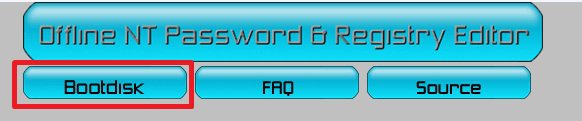
3. Scroll down to the Download section and download the lastest version ZIP file (ex: cd######.zip) for the Bootable CD image under (CD release, see below on how to use).
4. Extract the cd######.iso file from the downloaded ZIP file, then burn the ISO file to a DVD or USB key drive.
NOTE: You can use any ISO burner program you like, but the free ISO Recorder or ImgBurn programs are good ones to use.
5. Follow the instructions from their website on how to use the boot CD/DVD or USB key drive. See: Offline NT Password & Registry Editor
NOTE: Please direct your questions about this tool to the site providing the tool.
METHOD FOUR NoteThis is for the following scenarios. For more information, see: Microsoft Help and Support: KB940765
Scenario | Description |
Scenario 1: | You recently set a new password for the protected administrator account. However, you do not remember the new password, but do remember the old one. |
Scenario 2: | You type the correct logon password. However, Windows Vista does not accept the password because the system is corrupted. |
Scenario 3: | You deleted a password protected administrator account. Now, you cannot log on to another administrator account. |
Scenario 4: | You changed a protected administrator account to a standard user account. Now, you cannot log on to another administrator account. |
1. Do METHOD TWO here: How to Do a System Restore in Vista, or here: How to Do a System Restore in Windows 7.
NOTE: You will be booting from your Vista installation DVD to perform a System Retore with the method at this link.
2. Next, do the additional steps below for the scenario that is related to your situation.
- For Scenario 1
- After you log on, change the password for the protected administrator account. See: How to Remove or Change a Password for a User Account in Vista
- After you change the password, restart the computer. Make sure that you can log on by using the new password.
- For scenario 2
- After you log on, make sure that each user account can log on by using the appropriate credentials.
- Change the password for the user account that cannot log on. See: How to Remove or Change a Password for a User Account in Vista
- For Scenario 3
- After you log on, use the User Accounts item in Control Panel to create a new protected administrator account. See: How to Create a New User Account in Vista
- Log on by using the new protected administrator account. Then, delete the older protected administrator account that was restored. See: How to Delete a User Account in Vista
NOTE: For security reasons, do not use the restored protected administrator account.
- For Scenario 4
- After you log on, use the User Accounts item in Control Panel to create a new protected administrator account. See: How to Create a New User Account in Vista
- Log on by using the new protected administrator account.
- Change the old protected administrator account to a standard user account. See: How to Change a User Account Type in Vista
METHOD FIVE 1. For how, see: Password Reset - Windows 7 Forums
That's it,
Shawn
Related Tutorials
- How to Reset the Password of a User Account in Windows 7
- Reset your Windows Password
- How to Enable or Disable Secure Logon in Vista
- How to Make Vista Require a Username and Password at Logon
- How to Display Information About Previous Logons During User Logon in Vista
- How to Create a New User Account in Vista
- How to Change or Stop Password Expiration in Vista
- How to Remove or Change a Password for a User Account in Vista
- How to Remove the Password for Your or Another User Account in Windows 7
- How to Logon Automatically at Startup in Vista
- How to Create a Password Reset Disk in Vista
- How to Create a "Password Reset Wizard" Shortcut in Windows 7 and Vista
- How to Create a Password for a User Account in Vista
- How to Start Vista in Safe Mode
- How to Add or Remove Change Password from the Vista Ctrl+Alt+Delete Screen
- How to Prevent or Allow a User to Change their Password in Vista
- How to Enable or Disable Password Expiration for a User in Windows 7
- How to Change the Maximum and Minimum Password Age in Windows 7
- How to Prevent or Allow a User to Change their Password in Vista and Windows 7
- How to Create, Change, and Use a Password Hint in Windows 7
Attachments

Last edited by a moderator:


 . Please Help