Vista Forums
Vista Forums Home Join Vista Forums Donate Vista Tutorials Store Tags

Welcome to Vista Forums we are your forum to discuss Windows Vista x64 and x86 systems.

Go Back   Vista Forums > Vista Forums > Tutorials

Task Manager - Enable or Disable

Poll: Did this Tutorial help and work for you?
Poll Options
Did this Tutorial help and work for you?

Comment
 
Tutorial Tools Display Modes
<!-- google_ad_section_start -->Task Manager - Enable or Disable<!-- google_ad_section_end -->
Task Manager - Enable or Disable
How to Enable or Disable Task Manager in Vista
Published by Brink
11-01-2007

How to Enable or Disable Task Manager in Vista

Information
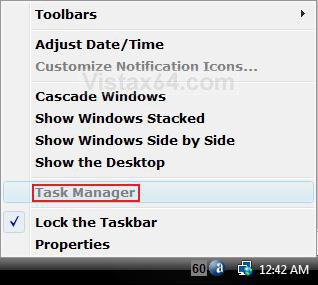
  If you find that the Task Manager option is grayed out (disabled) when you right click on the taskbar, then you may want to enable it again. You may also want to disable the Task Manager to prevent other user accounts from using it.
NOTE
  This will also add or remove Task Manager from the Windows Security screen when you press Ctrl+Alt+Delete.
WARNING
  If you did not disable Task Manager, then it may have been done by some kind of malware or spyware. You should do a complete scan of your computer for a virus and other malware to be safe.
Tip
  The Task Manager exe file is located at: C:\Windows\System32\taskmgr.exe
RELATED LINKS:
EXAMPLE: Enabled and Disabled Task Manager
NOTE: When the Task Manager is disabled, the CTRL+SHIFT+ESC does not work, Task Manager will not appear in CTRL+ALT+DELETE, and Task Manager is grayed out when you right click on the Task Bar.
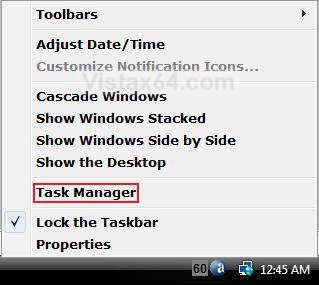
Enabled.jpgDisabled.jpg
EXAMPLE: ERROR MESSAGE
NOTE: You get this when you try to run taskmgr.exe .
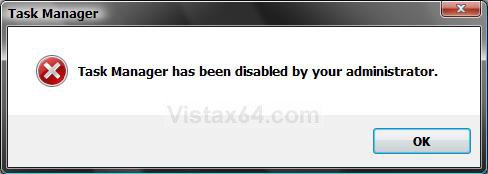
Error_Message.jpg

METHOD ONE:
Through the Local Group Policy Editor
NOTE
  This method is only available for the Vista Business, Ultimate, and Enterprise editions. See Method Two below for the Vista Basic and Home Premium editions.
1. Open the Start Menu.
2. In the white line (Start Search) area, type gpedit.msc and press Enter.
3. Click Continue for the UAC prompt.
4. In the left pane, click on User Configuration, Administrative Templates, System, and Ctrl+Alt+Del Options. (See screenshot below)
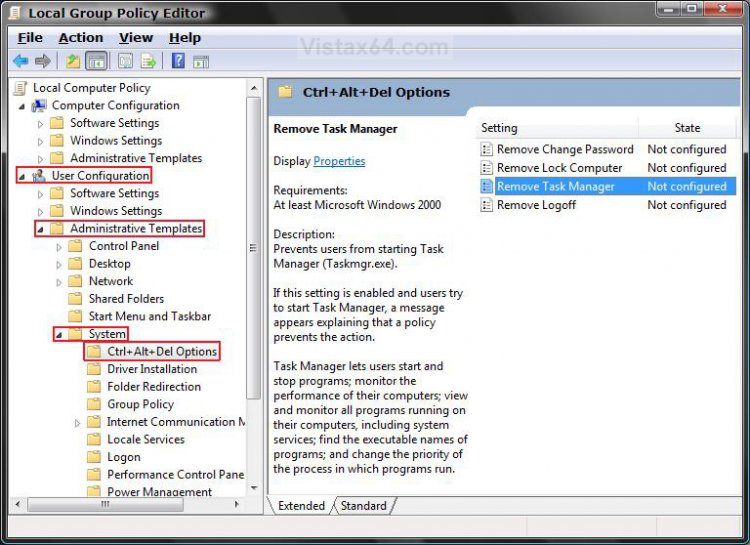
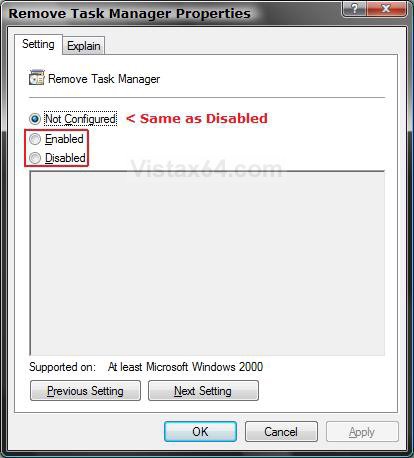
5. In the right pane, right click on Remove Task Manager and click Properties.

Group_Policy.jpg

6. To Enable Task Manager -
A) Dot Disabled or Not Configured and click OK. (See screenshot below step 7)
B) Go to step 8.
7. To Disable Task Manager -
A) Dot Enabled and click OK.
Properties.jpg

8. Close Local Group Policy Editor window. Your done.


METHOD TWO:
Through the Registry
NOTE
  This method will work for all Vista versions.
Through a Download:
1. To Disable Task Manager -
A) Click on the download button below to download the Disable_Task_Manager.reg file.
B) Go to step 3.


2. To Enable Task Manager -
A) Click on the download button below to download the Enable_Task_Manager.reg file.


3. Click on Save, and save the .reg file to the Desktop.
4. Right click the .reg (On Desktop) file and click Merge.
5. Click on the Run button for Security Warning pop-up.
6. Click on Continue (UAC), Yes, and then OK when prompted.
7. When done, you can delete the .reg file (On Desktop).


The Manual Way:
1. Open the Start Menu.
2. In the white line (Start Search) area, type regedit and press Enter.
3. Click the Continue button for the UAC prompt.
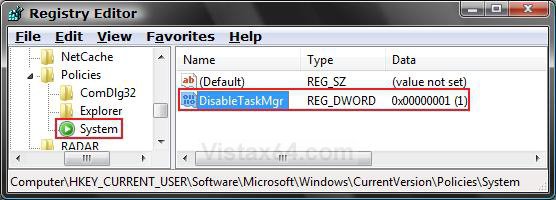
4. In regedit, go to: (See screenshot below step 5B)
HKEY_CURRENT_USER\Software\Microsoft\Windows\CurrentVersion\Policies\System
NOTE: If you do not have System, then right click on Polices and click New -> Key. Type System and press Enter.

5. To Disable Task Manager -
A) In the right pane, right click on a empty area and click New -> DWORD (32-bit) Value and type DisableTaskMgr and press Enter.
B) Right click on DisableTaskMgr and click Modify.
System_Key.jpg
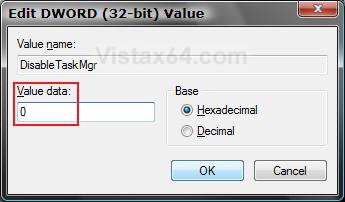
C) Type 1 and click OK. (See screenshot below)
Modify.jpg

6. To Enable Task Manager -
A) In the right pane, right click on DisableTaskMgr and click Delete. (See screenshot below step 5A)
B) Click Yes to confirm delete.
7. Close regedit.
That's it,
Shawn
Published by
Brink's Avatar
Administrator
Join Date: Apr 2007
Location: Texas, USA
Posts: 13,545
Rep Power: 200
Brink has a reputation beyond reputeBrink has a reputation beyond reputeBrink has a reputation beyond reputeBrink has a reputation beyond reputeBrink has a reputation beyond reputeBrink has a reputation beyond reputeBrink has a reputation beyond reputeBrink has a reputation beyond reputeBrink has a reputation beyond reputeBrink has a reputation beyond reputeBrink has a reputation beyond repute

Tutorial Tools

Applies to
All Vista Versions
64 Bit & 32 Bit

Rating
Skill Level
20%20%20%
1

Page copy protected against web site content infringement by Copyscape

Old 04-07-2008  
dellfreeke
Newbie
dellfreeke is on a distinguished road
 
Join Date: Apr 2008
Vista Home Premium 32bit
Posts: 1

Re: Task Manager - Enable or Disable

thanx so much!!!
dellfreeke is offline   Reply With Quote
Old 04-07-2008  
Brink
Administrator
Brink has a reputation beyond reputeBrink has a reputation beyond reputeBrink has a reputation beyond reputeBrink has a reputation beyond reputeBrink has a reputation beyond reputeBrink has a reputation beyond reputeBrink has a reputation beyond reputeBrink has a reputation beyond reputeBrink has a reputation beyond reputeBrink has a reputation beyond reputeBrink has a reputation beyond repute
 
Brink's Avatar
 
Join Date: Apr 2007
Vista x64 Ultimate SP1
Posts: 13,545

Location: Texas, USA
Re: Task Manager - Enable or Disable

Your welcome dellfreeke, and welcome to Vista Forums.

Shawn

There are no dumb questions, just the people that do not ask them.
Please post feedback to help others.
Brink is offline   Reply With Quote
Old 04-07-2008  
theteammax
Newbie
theteammax is on a distinguished road
 
Join Date: Apr 2008
Vista Home Premium 32bit
Posts: 2

Re: Task Manager - Enable or Disable

Thank you so much! It worked.
theteammax is offline   Reply With Quote
Old 04-07-2008  
Brink
Administrator
Brink has a reputation beyond reputeBrink has a reputation beyond reputeBrink has a reputation beyond reputeBrink has a reputation beyond reputeBrink has a reputation beyond reputeBrink has a reputation beyond reputeBrink has a reputation beyond reputeBrink has a reputation beyond reputeBrink has a reputation beyond reputeBrink has a reputation beyond reputeBrink has a reputation beyond repute
 
Brink's Avatar
 
Join Date: Apr 2007
Vista x64 Ultimate SP1
Posts: 13,545

Location: Texas, USA
Re: Task Manager - Enable or Disable

Your welcome theteammax, and welcome to Vista Forums also.

There are no dumb questions, just the people that do not ask them.
Please post feedback to help others.
Brink is offline   Reply With Quote
Old 04-07-2008  
theteammax
Newbie
theteammax is on a distinguished road
 
Join Date: Apr 2008
Vista Home Premium 32bit
Posts: 2

Re: Task Manager - Enable or Disable

Thanks
I had some problems deleting some viruses. I don't think I have alot of them anymore.
theteammax is offline   Reply With Quote
Old 04-07-2008  
Brink
Administrator
Brink has a reputation beyond reputeBrink has a reputation beyond reputeBrink has a reputation beyond reputeBrink has a reputation beyond reputeBrink has a reputation beyond reputeBrink has a reputation beyond reputeBrink has a reputation beyond reputeBrink has a reputation beyond reputeBrink has a reputation beyond reputeBrink has a reputation beyond reputeBrink has a reputation beyond repute
 
Brink's Avatar
 
Join Date: Apr 2007
Vista x64 Ultimate SP1
Posts: 13,545

Location: Texas, USA
Re: Task Manager - Enable or Disable

theteammax,

I would run a thorough scan with your antivirus program, and then run a anti-spyware program scan to see what it can find to. A good free one is Spybot Search & Destroy.

The home of Spybot-S&D!

Hope you get them all,
Shawn

There are no dumb questions, just the people that do not ask them.
Please post feedback to help others.
Brink is offline   Reply With Quote
Old 04-09-2008  
bobbyt2012
Newbie
bobbyt2012 is on a distinguished road
 
Join Date: Apr 2008
Vista Home Premium 32bit
Posts: 1

Re: Task Manager - Enable or Disable

This worked perfectly. A warning to windows users, I am on Vista Home Premium 32bit, and recently spyware was installed on my computer without me knowing about it. It came as a program called PC-Cleaner. I am almost certain that it is spyware / malware . My internet explorer has been disabled and it disabled my task manager. I have Bitdefender and it has been destroyed by whatever I have. It barely functions at all. I cannot restore to an earlier date, so I think I am going to recover to factory settings.
bobbyt2012 is offline   Reply With Quote
Old 04-11-2008  
talbotlaird
Newbie
talbotlaird is on a distinguished road
 
Join Date: Apr 2008
Vista Business
Posts: 1

Re: Task Manager - Enable or Disable

Quote:
dellfreeke
View Post
thanx so much!!!

HERE HERE dellfreeke - I second that.

BRINK AKA Shawn - You Rock, thank you so much, you info is very handy. KUTGW!!!

~Talbot
talbotlaird is offline   Reply With Quote
Old 04-11-2008  
Brink
Administrator
Brink has a reputation beyond reputeBrink has a reputation beyond reputeBrink has a reputation beyond reputeBrink has a reputation beyond reputeBrink has a reputation beyond reputeBrink has a reputation beyond reputeBrink has a reputation beyond reputeBrink has a reputation beyond reputeBrink has a reputation beyond reputeBrink has a reputation beyond reputeBrink has a reputation beyond repute
 
Brink's Avatar
 
Join Date: Apr 2007
Vista x64 Ultimate SP1
Posts: 13,545

Location: Texas, USA
Re: Task Manager - Enable or Disable

Your welcome Talbot.

There are no dumb questions, just the people that do not ask them.
Please post feedback to help others.
Brink is offline   Reply With Quote
 
Comment

Tags
enable, manager, task

Tutorial Tools
Display Modes


Vistax64.com is an independent web site and has not been authorized,
sponsored, or otherwise approved by Microsoft Corporation.
"Windows Vista", the Start Orb, and related materials are trademarks of Microsoft Corp.
© Designer Media 2005-2008
Tutorial powered by GARS 2.1.8m ©2005-2006

1 2 3 4 5 6 7 8 9 10 11 12 13 14 15 16 17 18 19 20 21 22 23 24 25 26 27 28 29 30 31 32 33 34 35 36 37 38 39 40 41 42 43 44 45 46 47 48