
How to Remove or Show the Start Menu Shutdown Options in Vista
 Information
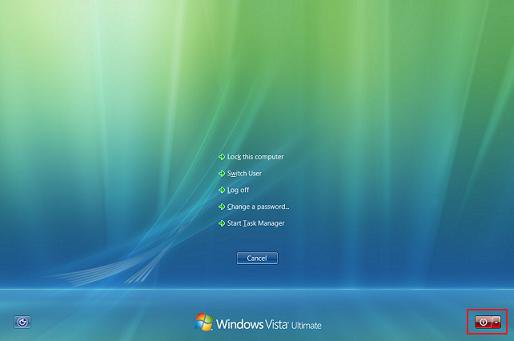
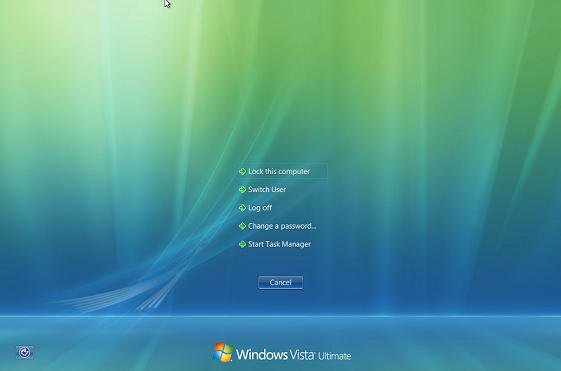
This will show you how to remove or show the Shut Down, Restart, Sleep, and Hibernate options from the Start menu and the red power button in the Windows Security screen when you press Ctrl+Alt+Delete.
 Note
NoteThis will also enable or disable the Shut Down Windows screen when you press ALT+F4. For more on this, see: How to Shutdown, Restart, Switch User, Log Off, Sleep, or Lock Vista from the Keyboard
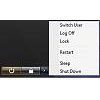
EXAMPLE: Start Menu Shutdown Options Before and After
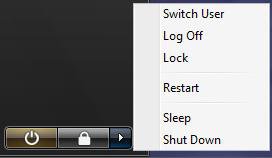
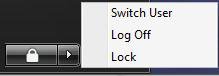
EXAMPLE: Ctrl+Alt+Del Shutdown Options Before and AfterNOTE: Notice the red shutdown options box is gone when this is enabled.
 METHOD ONE
NOTE: This method is only available for the Vista Business, Ultimate, and Enterprise editions. See Method Two below for the Vista Home Basic and Home Premium editions.
1. Open the all users, specific users or groups, or all users except administrators Local Group Policy Editor for how you want this policy applied.
2. In the left pane, click on User Configuration, Administrative Templates, and Start Menu and Taskbar. (See screenshot below)
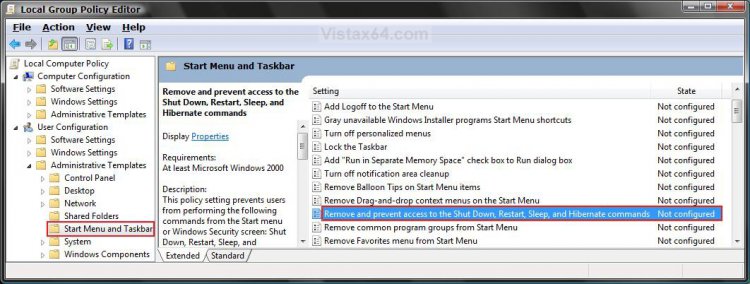
3. In the right pane, right click on Remove and prevent access to the Shutdown, Restart,Sleep, and Hibernate commands and click on Properties. (See screenshot above)
4. To Show Shutdown Options
A) Select (dot) Disabled or Not Configured and click on OK. (See screenshot below step 5A)
B) Go to step 6.
5. To Remove Shutdown Options
A) Select (dot) Enabled and click on OK.
NOTE: You can still access the Restart, Sleep, and Shutdown options when you click on Switch User or Log Off from the Start menu. They will be in the red power button options in the bottom right corner of the logon screen.
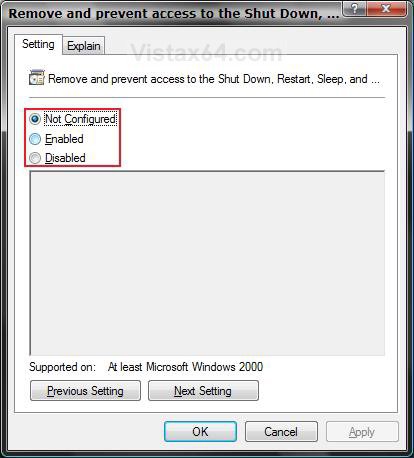
6. Close the Local Group Policy Editor window. Your done.
METHOD TWO NOTE: This method will work for all Vista versions.
1. To Remove Shutdown Options
A) Click on the download button below to download the file below.
Remove_Shutdown_Options.reg

B) Go to step 3.
2. To Show Shutdown Options
A) Click on the download button below to download the file below.
Show_Shutdown_Options.reg
3. Click on Save, and save the .reg file to the Desktop.
4. Right click on the downloaded .reg file and click on Merge.
5. Click on Run, Continue (UAC), Yes, and then OK when prompted.
6. Log off and log on, or restart the computer to apply the changes.
7. When done, you can delete the .reg file if you like.
METHOD THREE NOTE: This method will work for all Vista versions.
1. Open the Start Menu.
2. In the white line (Start Search) area, type regedit and press Enter.
3. Click on the Continue button in the UAC prompt.
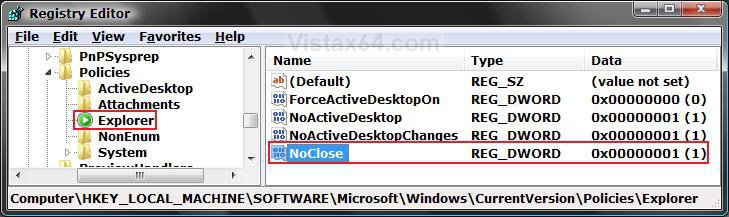
4. In regedit, go to: (See screenshot below step 5B)
NOTE: If you do not have Explorer, then right click on Polices and click on New and Key. Type Explorer and press Enter.
HKEY_CURRENT_USER\Software\Microsoft\Windows\CurrentVersion\Policies\Explorer
5. To Remove Shutdown Options
A) In the right pane, right click on a empty area and click on New and DWORD (32-bit) Value, then type NoClose and press Enter.
B) Right click on NoClose and click on Modify.
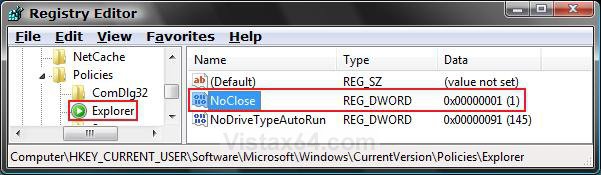
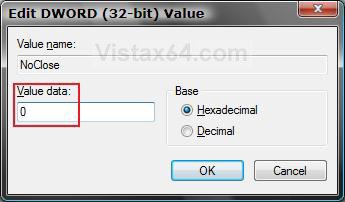
C) Type 1 and click on OK. (See screenshot below)
6. To Show Shutdown Options
A) In the right pane, right click on NoClose and click on Delete. (See screenshot below step 5B)
B) Click on Yes to confirm deletion.
C) In regedit, go to: (See screenshot below)
HKEY_LOCAL_MACHINE\SOFTWARE\Microsoft\Windows\CurrentVersion\Policies\Explorer
D) In the right pane, repeat steps 6A and 6B if NoClose is there to.
7. Close regedit.
8. Log off and log on, or restart the computer to apply the changes.
That's it,Shawn
Related Tutorials
- How to Shutdown, Restart, Switch User, Log Off, Sleep, or Lock Vista from the Keyboard
- How to Change Power Button Settings for the Start Menu and Case in Vista
- How to Create a Shutdown Computer Shortcut in Vista
- How to Customize the Start Menu in Vista
- How to Add or Remove Switch User from the Start Menu in Vista
- How to Add or Remove Log Off from the Start Menu in Vista
- How to Add or Remove Lock and Switch User from the Start Menu in Vista
- Removing the Sleep function in the Shutdown menu
- How to Remove or Restore the Vista Log On Shutdown Options
Attachments
Last edited:


