
How to Change the Windows Sidebar Theme in Vista
 Information
By default you cannot change the theme for Windows Sidebar in Vista. However, with the free 3rd party Windows Sidebar Styler program you can.
 Tip
TipFor free Windows Sidebar Themes to download, see: WinCustomize: Sidebar Styler Gallery
 STEP ONE
1. Go to the Windows Sidebar Styler website by Stanimir Stoyanov.
2. Download the 32-bit or 64-bit version for your version of Vista.
NOTE: To see what bit version you have of Vista, open Control Panel (Classic View) and click the System icon. You will see the version under System type:.
3. Turn off Windows Sidebar temporarily and install the downloaded program.
NOTE: This will add a Stanimir Stoyanov folder in the Start menu in All Progams. The Windows Sidebar Styler shortcut is located here.
STEP TWO 1. Make sure Windows Sidebar is turned off.
2. Open Windows Sidebar Styler.
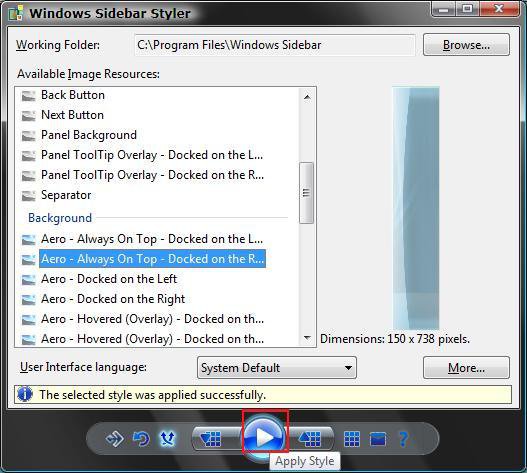
3. This screen will let you see all the individual items in the loaded theme. (See the left screenshot below)
NOTE: See step 7 for how to load a theme.
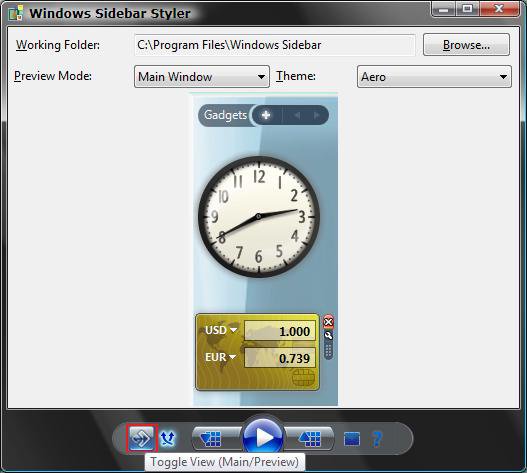
4. Click on the Toggle View button to see what the Sidebar will look like with the loaded theme. (See the right screenshot below)
5. To Change the Windows Sidebar Theme
A) Click on the Apply Style button. (See the screenshots above)
NOTE: If Windows Sidebar Styler did not automatically load Windows Sidebar, then turn it on to see the new theme.
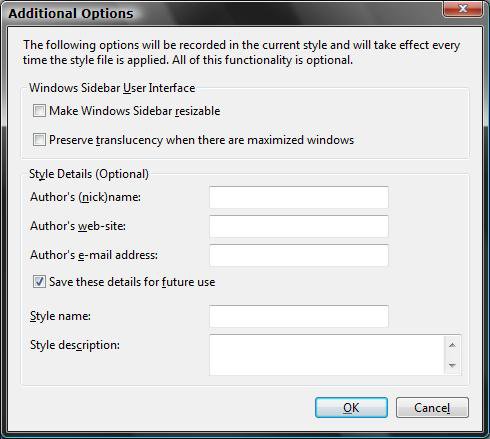
6. For Additional Options
A) Click on the More button. (See the left screenshot above)
B) Select the options you want and click on OK. (See screenshot below)
C) To Unlock and Lock the Sidebar
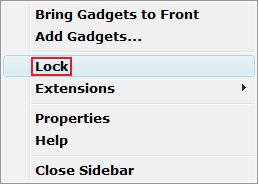
Right click on the Sidebar, when turned on later, and click Lock or Unlock. (See screenshot below)
NOTE: This acts like the Taskbar and allows you to drag the Sidebar wider or thinner when unlocked.
7. To Load a Theme
A) Click on the Load a Windows Sidebar Style button. (See screenshot below)
B) Navigate to where you saved the downloaded theme and select it and click on Open.
NOTE: You can download a theme from: WinCustomize: Sidebar Styler Gallery

8. To Save a Theme
A) Click on the Save Windows Sidebar Style button. (See screenshot below)

9. To Go Back to the Default Windows Sidebar Theme
A) Click on the Revert Images to Default button. (See screenshot below)
NOTE: This only loads the default Windows Sidebar theme into Windows Sidebar Styler. You can then Apply it to the sidebar.

10. To Uninstall a Theme
A) Click on the Uninstall Styles and Extensions button. (See screenshot below)
B) Confirm the action.

11. Turn Windows Sidebar back on.
That's it,Shawn
Attachments
Last edited:


