
How to Change a Personal User Folder Location in Vista
 Information
The personal user folders can be redirected to, and all files inside them, another partition, hard drive, or folder location to be stored in instead. The folder will still be in the (user name) location in the Start Menu as usual, but it will act like a shortcut to the new location instead.
 Note
Note This can be handy if you would like to save space on the drive or partition with Vista on it, or you prefer to just store the files in the use folders at another location.
 Tip
TipIf a personal user folder has been deleted, is missing, or does not work propely, then see: How to Restore a Missing Personal User Folder in Vista
 Warning
- If you have a program that places a folder in one these user folders, like the Documents folder, then you do not want to change it's location until you change the setting in the program to use another folder or the new personal folder location. Deleting the program's folder usually does not do any good. It will just be added back by the program. If you do not, then you will have two undeletable copies of the user folder. Example: Windows Live Messenger puts and uses a folder in the Documents folder.
- If you change the Favorites folder location, it will no longer show work from within IE7 unless you change the permission level of the new Favorites folder to give Authenticated User full control. For how, see: How to Change Folder Permissions
- If you use Windows Mail or any other email program that uses the Vista C:\Users\(user name)\Contacts folder for contacts, then do not change the Contacts folder default location to keep using Contacts in these programs.
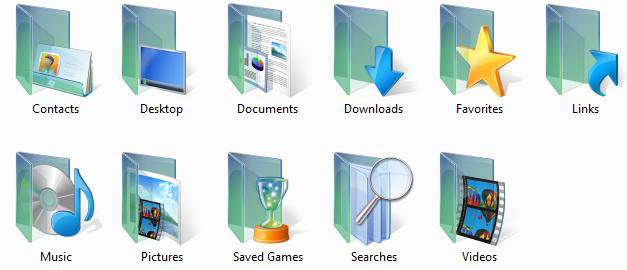
EXAMPLE: Personal User Profile Folder Icons
NOTE: Location is at C:\Users\(User Name)
 METHOD ONE
1. Right click on a personal user folder and click Properties.
NOTE: Open the Start menu and click on the username button to see them.
2. Click on the Location tab. (See screenshot below)
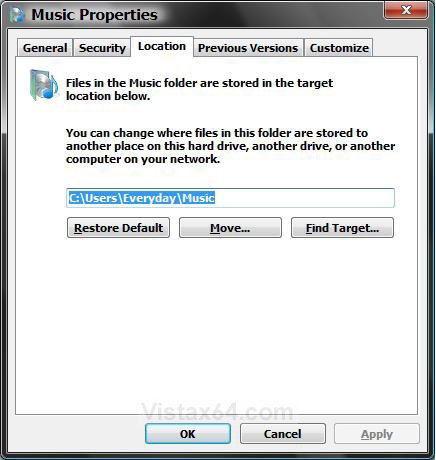
3. To Find the Personal User Folder Location
A) Click the Find Target button. (See screenshot above)
NOTE: This will open a window with the personal user folder location. You will see the full path of the location above the three buttons.
4. To Change the Personal User Folder Location
A) Click the Move button. (See screenshot above)
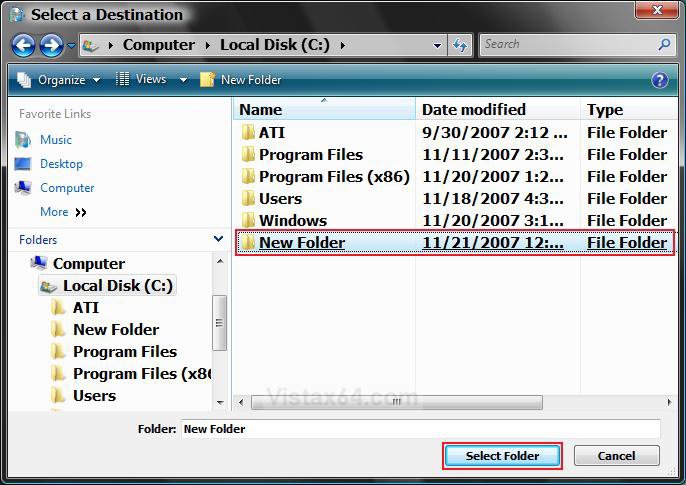
B) Navigate to the location you want to use to redirect the personal user folder to. (See screenshot below)
C) Right click on a empty area in the Select a Destination window and click New and Folder.
D) Rename the New Folder to the same name as the personal user folder and leave it highlighted, then click on the Select Folder button.
WARNING: Do not select another personal user folder to redirect this personal user folder to. You will not be able to use the Restore Default location option. Only use a New Folder.
E) Click OK. (See screenshot below step 2)
NOTE: You should see the new full path location above the three buttons.
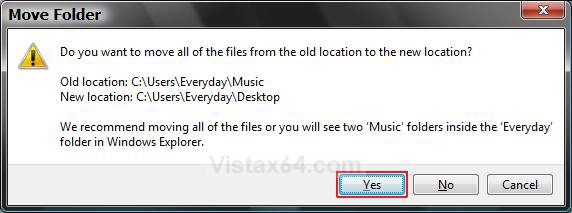
F) Click Yes. (See screenshot below)
NOTE: This will move all the files inside the personal user folder to the new location.
WARNING: If you do not click Yes, then you will have two copies of the personal user folder in the (your username) folder.
5. To Restore the Default Personal User Folder Location
A) For how, see OPTION TWO here: How to Restore a Missing Personal User Folder in Vista
METHOD TWO NoteThis method will show you how to change only the Downloads (long number), Desktop, Documents (Personal), Favorites, Music (My Music), Pictures (My Pictures), or Video (My Videos) user folder default locations.
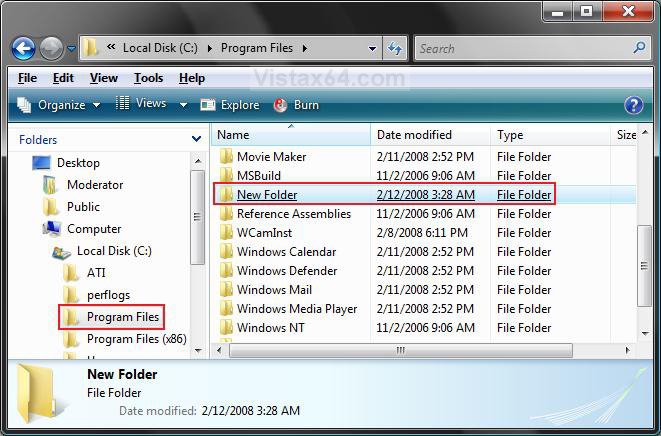
1. Go to the location in Windows Explorer for where you want to move the user folder location to.
NOTE: For example, in C:\Program Files.
WARNING: Do not select another personal user folder to redirect this personal user folder to. You will not be able to use the Restore Default location option.
A) Right click on a empty area in the window and click on New and Folder. (See screenshot below)
B) Leave the folder named New Folder.
NOTE: This new folder example location of C:\Program Files\New Folder will be used and replaced by the user folder.
C) Leave this window open.
2. Open the Start menu.
3. In the white line (Start Search) area, type regedit and press Enter.
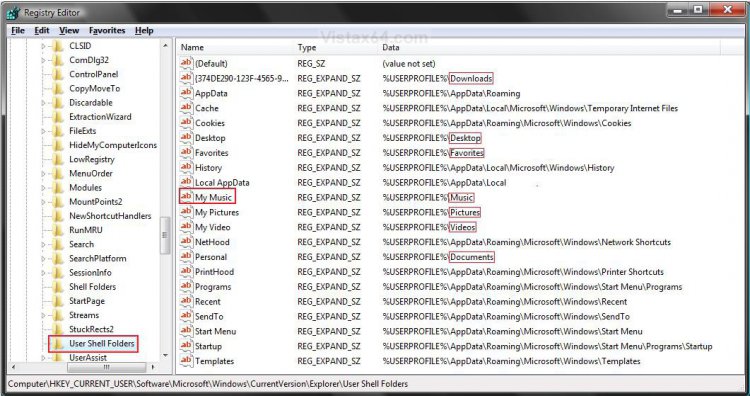
4. In regedit, go to: (See screenshot below 5)
NOTE: You can see the default paths for the user folders under the Data column.
Code:
[/INDENT]
[INDENT]HKEY_CURRENT_USER\Software\Microsoft\Windows\CurrentVersion\Explorer\User Shell Folders[/INDENT]
[INDENT]
5. In the right pane, right click on the personal user folder you want to change the location for and click on Modify.
6. To Change the Personal User Folder Location
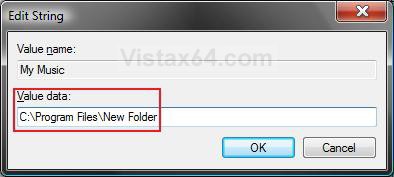
A) Type in the full path of the new location with the New Folder, and click on OK. (See screenshot below)
NOTE: For example, C:\Program Files\New Folder.
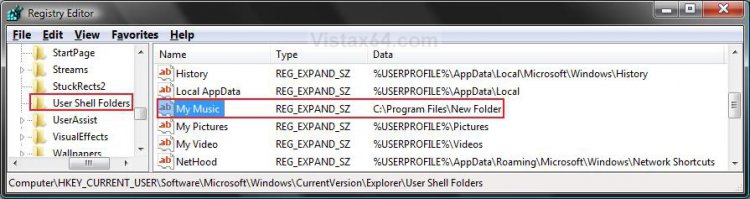
B) The registry will now look like this. (See screenshot below)
C) Close regedit.
D) Go back to the new location in step 1 above.
E) Right click on New Folder and click Rename. (See screenshot below step 1C)
F) Type in the name (EX: Music) of the user folder you want to change the location of, and press Enter.
NOTE: The folder will now change to the special green color with the name of the user folder.
G) Open the Start menu, and click on your username folder button.
NOTE: You will see two of these user folders (EX: Music) with the same name now.
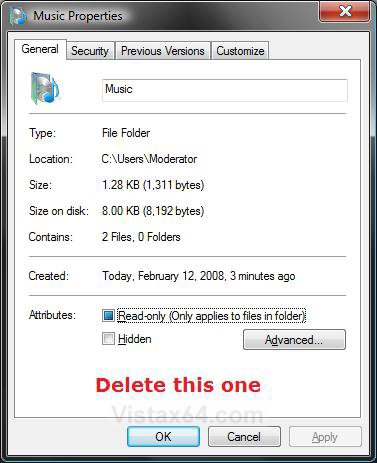
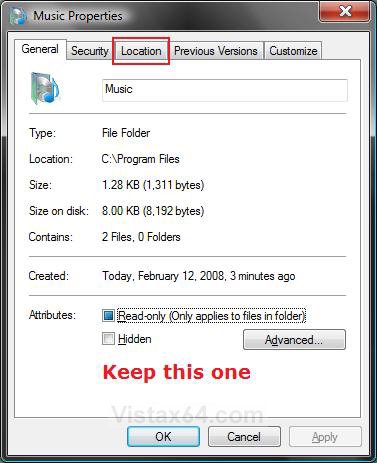
H) Right click on each one separately and click Properties.
I) Delete the one that does not have the Locations tab in the Properties window. (See screenshots below)
7. To Restore the Default Personal User Folder Location -
A) For how, see OPTION TWO here: How to Restore a Missing Personal User Folder in Vista
That's it,
Shawn
Related Tutorials
- How to Fix a Personal User Shell Folder Displayed as a Standard Yellow Folder Icon in Vista
- How to Change the Target Path Location of a Shortcut in Vista
- How to Change Windows Explorer Default Open Location
- How to Copy the Full Path of a File or Folder in Vista
- How to Restore a Missing Personal User Folder in Vista
- How to Prevent or Allow User Profile Folders Location Change in Vista
- How to Change the Default Location of a User Profile in Windows 7 and Vista
Attachments
Last edited by a moderator:


