
How to Change What Superfetch will Preload in Vista
 Information
Superfetch is a new improved feature in Vista that monitors which applications you use the most and preloads these into your system memory (RAM) so they'll be ready when you need them. This will show you how to change Superfetch to preload only the Boot files, Program files, or the default both Boot and Program files into memory.
 Note
NoteThe Boot files are the startup programs, system files, and drivers loaded during the startup (boot) of Vista. The Program files are the programs you or Vista open and close in Vista. Test to see what works best for you.
 OPTION ONE
1. To Allow Only Boot Files to Preload
A) Click on the download button below to download the file below.
Only_Boot_Files.reg

B) Go to step 4.
2. To Allow Only Program Files to Preload
A) Click on the download button below to download the file below.
Only_Programs.reg
B) Go to step 4.
3. To Allow Both Boot and Program Files to Preload
NOTE: This is the default setting for Superfetch if you want to undo any changes.
A) Click on the download button below to download the file below.
Boot_and_Programs_Files.reg
4. Click on Save, and save the .reg file to the Desktop.
5. Right click on the downloaded .reg file and click on Merge.
6. Click on Run, Continue (UAC), Yes, and then OK when prompted.
8. Log off and log on, or restart the computer to apply the changes.
9. When done, you can delete the downloaded .reg file if you like.
OPTION TWO 1. Open the Start Menu.
2. In the white line (Start Search) area, type regedit and press Enter.
3. Click on Continue in the UAC prompt.
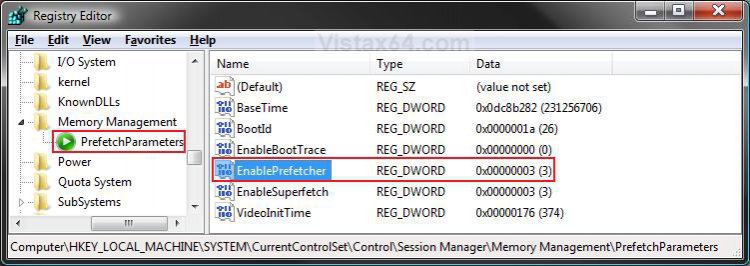
4. In regedit, navigate to the location below. (See screenshot below)
Code:
HKEY_LOCAL_MACHINE\SYSTEM\CurrentControlSet\Control\Session Manager\Memory Management\PrefetchParameters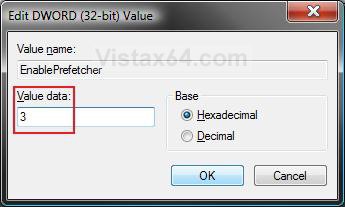
5. In the right pane, right click on EnablePrefetcher and click on Modify. (See screenshot above)
6. To Disable Prefetcher
A) Type 0 (number zero) and click on OK. (See screenshot below step 9)
B) Go to step 10.
7. To Allow Only Program Files to Preload
A) Type 1 and click on OK. (See screenshot below step 9)
B) Go to step 10.
8. To Allow Only Boot Files to Preload
A) Type 2 and click on OK. (See screenshot below step 9)
B) Go to step 10.
9. To Allow Both Boot and Program Files to Preload
NOTE: This is the default setting for Superfetch if you want to undo any changes.
A) Type 3 and click on OK. (See screenshot below)
10. Close regedit.
11. Log off and log on, or restart the computer to apply the changes.
That's it,Shawn
Attachments
Last edited:


