Vista Forums
Vista Forums Home Join Vista Forums Donate Vista Tutorials Tags

Welcome to Vista Forums we are your forum to discuss Windows Vista x64 and x86 systems. Whether you need help or just want to post an idea you have on Vista, this is the forum for you.
Register at Vista forums...the world biggest Windows Vista resource Join Vista Forums Now

Go Back   Vista Forums > Vista Forums > Tutorials

Vista Tutorial Categories Network & Internet Tutorials File & Folder Settings Tutorials Taskbar & Start Menu Tutorials Performance & Maintenance Tutorials General Tips Tutorials Programs & Features Tutorials Context Menu Tutorials Shortcut Tutorials Security & System Tools Tutorials Parental Controls Tutorials User Account Tutorials Hardware & Drivers Tutorials Appearance & Personalization Tutorials Backup & Restore Tutorials Music, Photo, Video and Media Tutorials Power Management Tutorials

Event Viewer Error 4201

Update your Vista Drivers Update Your Drivers Now!!
Poll: Did this Tutorial help and work for you?
Poll Options
Did this Tutorial help and work for you?

Comment
 
Tutorial Tools Display Modes
<!-- google_ad_section_start -->Event Viewer Error 4201<!-- google_ad_section_end -->
Event Viewer Error 4201
How to Fix the Event Viewer 4201 Error in Vista
Published by Brink
06-05-2007

How to Fix the Event Viewer 4201 Error in Vista
Information
  This will show you how to fix the Event viewer if you are getting this error :

ERROR_WMI_INSTANCE_NOT_FOUND
4201 The instance name passed was not recognized as valid by a WMI data provider

WARNING
  This may only work if you did a clean install of Vista and not a upgrade from XP. Instead, use this method for a upgrade verion of Vista to have it install as a clean install: How to Do a Clean Install of Vista with a Upgrade Version


NOTE
  One usual cause of this error is a corrupted Repository file.
RELATED LINK:
Here's How:
1. Restart the computer into Safe Mode (without networking).
NOTE: For how, see: How to Boot Up in and Use Advanced Boot Options in Vista

2. In Safe Mode, open the Start Menu.
3. In the white line (Start Search) area, type cmd. (See screenshot below)
4. Right click on cmd (at top) and click Run as administrator.

Name:  cmd_Start_Menu.jpg
Views: 293
Size:  83.5 KB

5. In the command prompt, type net stop winmgmt and press Enter.
NOTE: This is to make certain the wmi service is not running.

6. Wait until the successful message appears, then close the command prompt.
7. Open Windows Explorer and navigate to: C:\Windows\System32\wbem
8. Right click on the Repository folder and click on Rename.
9. Type in RepositoryOld and press Enter.
NOTE: This is to make this a backup of the original Repository folder.

10. Restart the computer back into normal mode to an administrator account.
11. When it is done starting up, open the Start Menu.
12. In white line (Start Search) area type cmd.
13. Right click cmd (at top) and click Run as administrator. (See screenshot below step 4)
14. In the command prompt, type net stop winmgmt and press Enter.
NOTE: This is to make certain the wmi service is not running.

15. Wait until successful message appears, and then type winmgmt /resetRepository and press Enter.
16. Wait until the successful message appears and then restart the computer.
17. Test the Event Viewer. It should be working now.
18. If it is working again, then go back and delete the RepositoryOld folder. (See step 9)
19. If it is still not working for you, then do a System Restore using a restore point dated before the problem.
NOTE: For how, see: How to Do a System Restore in Vista

20. If a System Restore did not help, then other than a clean reinstall, then you can do a Repair (upgrade) install to fix the problem.
NOTE: For how, see: How To Perform a Repair Installation For Vista
That's it,
Shawn

Published by
Brink's Avatar
Administrator
Join Date: Apr 2007
Location: Texas, USA
Posts: 16,597
Rep Power: 150
Brink has a reputation beyond reputeBrink has a reputation beyond reputeBrink has a reputation beyond reputeBrink has a reputation beyond reputeBrink has a reputation beyond reputeBrink has a reputation beyond reputeBrink has a reputation beyond reputeBrink has a reputation beyond reputeBrink has a reputation beyond reputeBrink has a reputation beyond reputeBrink has a reputation beyond repute

Tutorial Tools
Show Printable Version Show Printable Version
Email this Page Email this Page

Applies to
All Vista Versions
64 Bit & 32 Bit

Old 07-15-2008  
Rocky2xtreme's Avatar
Rocky2xtreme
IT Consultant


Join Date: Jul 2008
Vista Home Premium 32bit
Fort Lauderdale FL
 
Rep Power: 2
Rocky2xtreme is on a distinguished road
  Rocky2xtreme is offline

Question Re: Event Viewer Error 4201

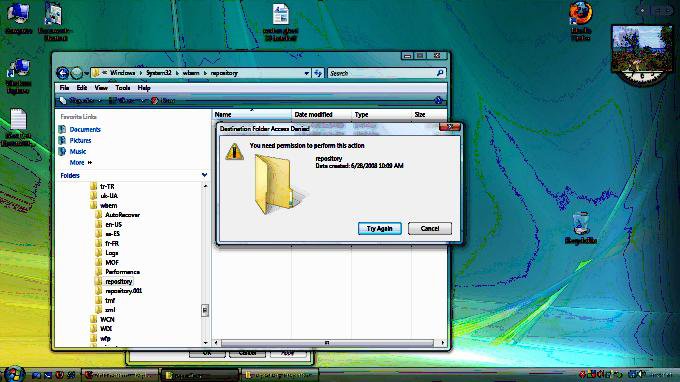
I tried your suggestion but the system security will not allow me to rename the repository folder. I tried changing ownership and adding my specific user to the folder and contents with full control but no such luck.

Attached is a screen print of "Access Denied" error message.

By the way I did this with the "Administrator" user.

Now what?

Name:  Access Denied.jpg
Views: 233
Size:  51.4 KB

My System SpecsSystem Spec
Old 07-15-2008  
Brink's Avatar
Brink
Administrator


Join Date: Apr 2007
Vista x64 Ultimate SP1
Texas, USA
 
Rep Power: 150
Brink has a reputation beyond reputeBrink has a reputation beyond reputeBrink has a reputation beyond reputeBrink has a reputation beyond reputeBrink has a reputation beyond reputeBrink has a reputation beyond reputeBrink has a reputation beyond reputeBrink has a reputation beyond reputeBrink has a reputation beyond reputeBrink has a reputation beyond reputeBrink has a reputation beyond repute
  Brink is offline

Re: Event Viewer Error 4201

Hi Rocky, and welcome to Vista Forums.

I updated the steps a little to help. Try again and see what you get this time.

Hope this helps,
Shawn
My System SpecsSystem Spec
Old 08-28-2008  
Tsumassa
Newbie


Join Date: Aug 2008
vista home premium 32bit sp1
Pietermaritzburg, South Africa
 
Rep Power: 2
Tsumassa is on a distinguished road
  Tsumassa is offline

Re: Event Viewer Error 4201

Hi Shawn,

I have been trying this approach to getting my event viewer running so that i can install vista sp1 and have religiously followed these steps. All the confirmations have worked and the repository folder has been reset yet I still get the same error message when i try and manually start the event viewer service. I would restore to a point before the problem but it seems the problem has always been there as I reinstalled vista only about a month ago. I am worried about doing a repair install as I have several software's on this machine worth a fortune and no install files for them. Are there any other ways to get the event viewer running or sp1 installed without having to take those steps?

Thanks a million

Evan
My System SpecsSystem Spec
Old 08-28-2008  
Brink's Avatar
Brink
Administrator


Join Date: Apr 2007
Vista x64 Ultimate SP1
Texas, USA
 
Rep Power: 150
Brink has a reputation beyond reputeBrink has a reputation beyond reputeBrink has a reputation beyond reputeBrink has a reputation beyond reputeBrink has a reputation beyond reputeBrink has a reputation beyond reputeBrink has a reputation beyond reputeBrink has a reputation beyond reputeBrink has a reputation beyond reputeBrink has a reputation beyond reputeBrink has a reputation beyond repute
  Brink is offline

Re: Event Viewer Error 4201

Hi Evan, and welcome to Vista Forums.

Have you already tried setting this Event Viewer service to just Automatic and restart the computer to allow it to start that way? You might also double check to make sure that all of it's Dependencies (other required services) are started to.

If you had to, a Repair install will not delete any installed software. It may remove the shortcuts for some of them in the Start menu, but you can easily recreate those from the program's exe file if needed.

Hope this helps,
Shawn
My System SpecsSystem Spec
Old 08-28-2008  
Tsumassa
Newbie


Join Date: Aug 2008
vista home premium 32bit sp1
Pietermaritzburg, South Africa
 
Rep Power: 2
Tsumassa is on a distinguished road
  Tsumassa is offline

Re: Event Viewer Error 4201

Hi Shawn,

Thank you for replying to my post. I had tried that to no avail but after some persistance I managed to follow some instructions on a post which solved the issue about an hour ago.

Thanks once again for your suggestions

Evan
My System SpecsSystem Spec
Old 08-28-2008  
Brink's Avatar
Brink
Administrator


Join Date: Apr 2007
Vista x64 Ultimate SP1
Texas, USA
 
Rep Power: 150
Brink has a reputation beyond reputeBrink has a reputation beyond reputeBrink has a reputation beyond reputeBrink has a reputation beyond reputeBrink has a reputation beyond reputeBrink has a reputation beyond reputeBrink has a reputation beyond reputeBrink has a reputation beyond reputeBrink has a reputation beyond reputeBrink has a reputation beyond reputeBrink has a reputation beyond repute
  Brink is offline

Re: Event Viewer Error 4201

I'm happy to hear that you got it sorted out Evan. Could you post the link to that post so that others with the same problem may be able solve their problem as well.

Thank you,
Shawn
My System SpecsSystem Spec
Old 08-28-2008  
Tsumassa
Newbie


Join Date: Aug 2008
vista home premium 32bit sp1
Pietermaritzburg, South Africa
 
Rep Power: 2
Tsumassa is on a distinguished road
  Tsumassa is offline

Re: Event Viewer Error 4201

Hi All,

After trying a few things after having started with the process at the top of this page I ended up following the steps at the following link and it has solved the problem:

Re: Serious security concern: event log error 4201 - MSDN Forums

It all started when I couldn't install vista SP1 and then traced back to the eventlog and viewer services being unable to start - it seems a few folk have been having the issue and I'm pleased to announce that this has worked (well so far - I'm only an hour and a half in ). The services now run and so far as I can tell there are no other deleterious effects. Vista sp1 has also now finally installed without difficulty. It all looked way too complicated at the beginning but if a simple plant breeder can pull it off - hopefully so can you. I hope this helps.

Evan
My System SpecsSystem Spec
Old 08-28-2008  
Brink's Avatar
Brink
Administrator


Join Date: Apr 2007
Vista x64 Ultimate SP1
Texas, USA
 
Rep Power: 150
Brink has a reputation beyond reputeBrink has a reputation beyond reputeBrink has a reputation beyond reputeBrink has a reputation beyond reputeBrink has a reputation beyond reputeBrink has a reputation beyond reputeBrink has a reputation beyond reputeBrink has a reputation beyond reputeBrink has a reputation beyond reputeBrink has a reputation beyond reputeBrink has a reputation beyond repute
  Brink is offline

Re: Event Viewer Error 4201

Thank you Evan for posting this link so that it can help others.

Shawn
My System SpecsSystem Spec
Comment

Tags
error, event, security & system tools, viewer

Tutorial Tools
Display Modes


Update your Vista Drivers Update Your Drivers Now!!

Similar Threads
Tutorial Tutorial Starter Category Comments Last Post
Event Viewer Error Help Please glatzfront General Discussion 0 08-20-2008 10:33 AM
COM+ Error In Event Viewer John Vista General 0 04-27-2008 06:26 AM
Windows Event Log Service will not run Error 4201 normviv73 Vista General 0 09-11-2007 12:46 PM
Concern: event log error 4201 CerB Vista General 1 08-09-2007 12:51 PM
Event viewer error Irv Vista performance & maintenance 0 03-03-2007 11:21 PM


Vistax64.com is an independent web site and has not been authorized,
sponsored, or otherwise approved by Microsoft Corporation.
"Windows Vista", the Start Orb, and related materials are trademarks of Microsoft Corp.
© Designer Media 2005-2008
Tutorial powered by GARS 2.1.8m ©2005-2006