
Vista Forums
Vista Forums Home Join Vista Forums Donate Vista Tutorials Tags

Welcome to Vista Forums we are your forum to discuss Windows Vista x64 and x86 systems. Whether you need help or just want to post an idea you have on Vista, this is the forum for you.
Register at Vista forums...the world biggest Windows Vista resource Join Vista Forums Now

Go Back   Vista Forums > Vista Forums > Tutorials

Vista Tutorial Categories Network & Internet Tutorials File & Folder Settings Tutorials Taskbar & Start Menu Tutorials Performance & Maintenance Tutorials General Tips Tutorials Programs & Features Tutorials Context Menu Tutorials Shortcut Tutorials Security & System Tools Tutorials Parental Controls Tutorials User Account Tutorials Hardware & Drivers Tutorials Appearance & Personalization Tutorials Backup & Restore Tutorials Music, Photo, Video and Media Tutorials Power Management Tutorials

Resource Monitor

Poll: Did this Tutorial help and work for you?
Poll Options
Did this Tutorial help and work for you?

Comment
 
Tutorial Tools Display Modes
<!-- google_ad_section_start -->Resource Monitor<!-- google_ad_section_end -->
Resource Monitor
How to Use the Resource Monitor in Vista
Published by Brink
12-03-2007

How to Use the Resource Monitor in Vista
Information
  The Resource Monitor allows you to see and monitor the real-time usage of CPU, Disk, Network, and Memory on your local computer. This can be helpful to determine where bottlenecks (slowdowns) are occurring and what is responsible for it. This gives you a lot more resource usage information than Task Manager.
NOTE
  For more information and help with the Resource Monitor, click on a item under the Learn More drop down menu in Resource Monitor, or click on Help and Resource Monitor Help on the menu bar in Resource Monitor.
RELATED LINKS:
Here's How:
1. Open the Start Menu.
2. In the white line (Start Search) area, type perfmon /res and press Enter.
A) Go to step 3.
OR

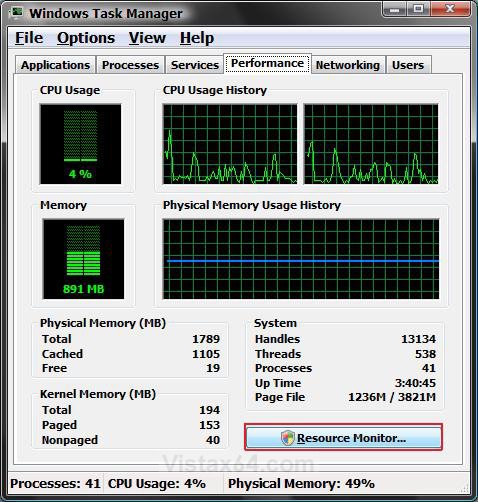
1. Open Task Manager.
NOTE: Press CTRL+SHIFT+ESC, or right click on the Taskbar and click on Task Manager.

2. Click on the Performance tab and click the Resource Monitor button. (See screenshot below)
Task_Manager.jpg

3. Click Continue button for UAC prompt.

4. To Start or Stop the Real-Time Monitoring -
A) Click on Monitor on the menu bar and click on Start or Stop.
(See screenshot below)
NOTE: These are the CPU, Disk, Network, and Memory graph monitors at the top. These are started by default.
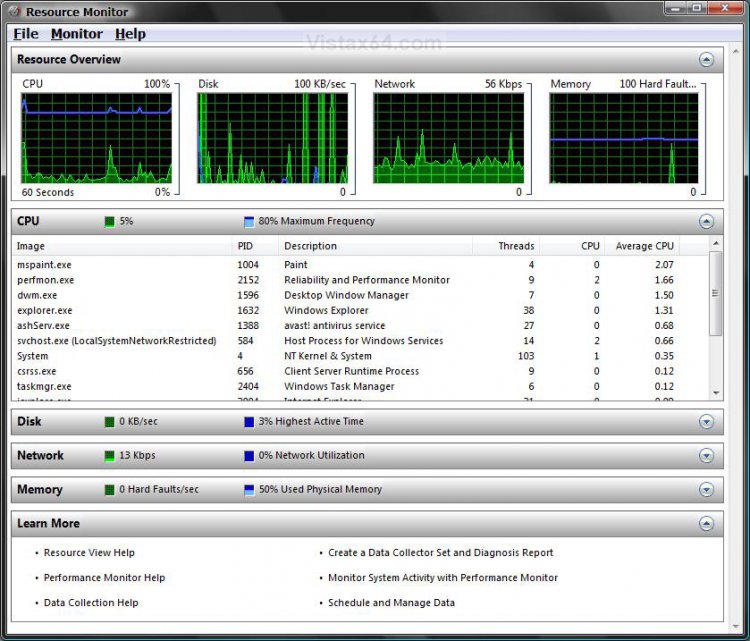
5. To See the CPU Usage -
A) Click on the CPU graph monitor or on the CPU gray bar. (See screenshot below)
CPU.jpg

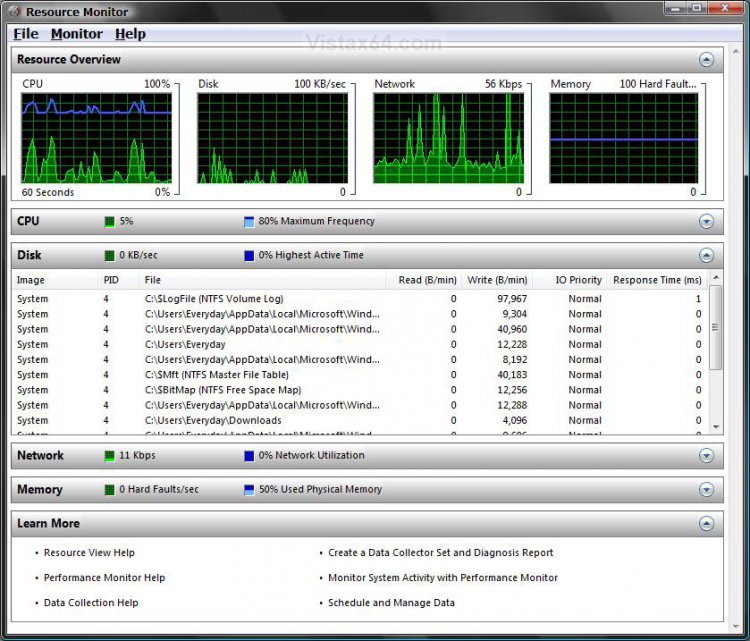
6. To See the Disk Input/Output -
A) Click on the Disk graph monitor or on the Disk gray bar. (See screenshot below)
Disk.jpg

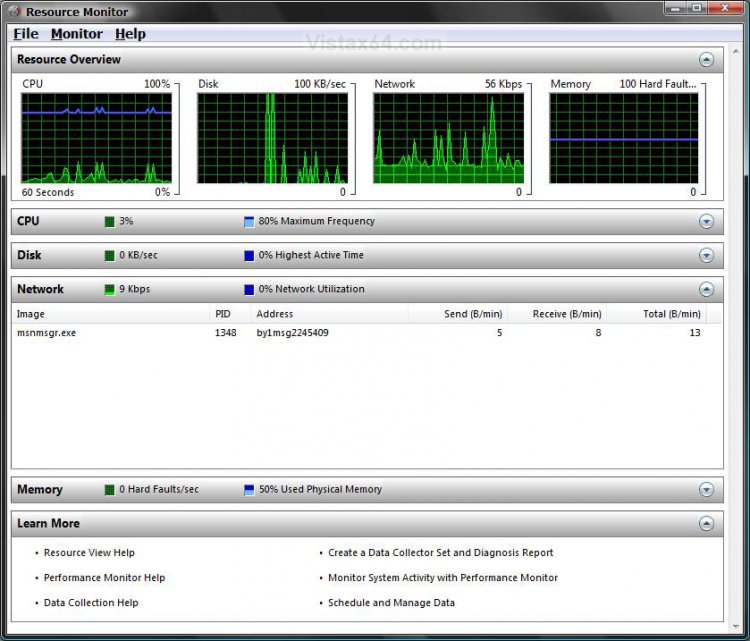
7. To See the Network Throughput -
A) Click on the Network graph monitor or on the Network gray bar.
(See screenshot below)
Network.jpg

8. To See the Memory Usage -
A) Click on the Memory graph monitor or on the Memory gray bar. (See screenshot below)
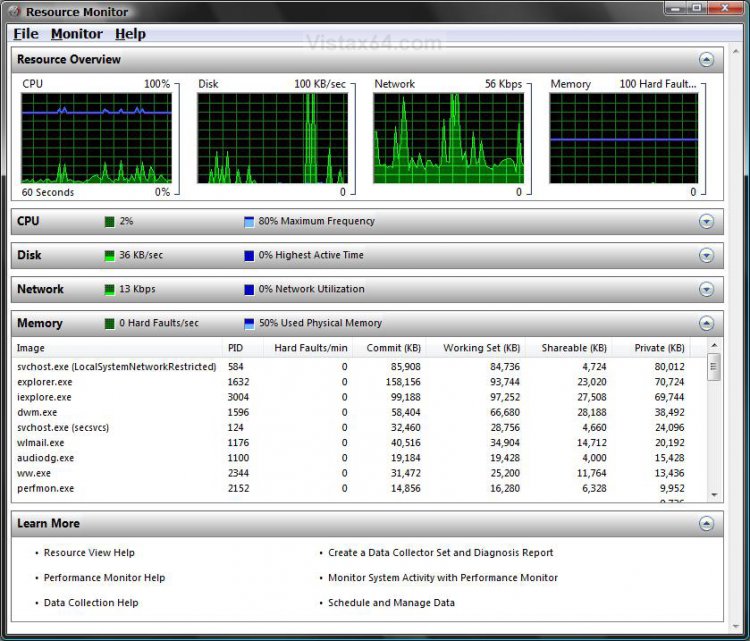
Memory.jpg
That's it,
Shawn
Published by
Brink's Avatar
Administrator
Join Date: Apr 2007
Location: Texas, USA
Posts: 15,437
Rep Power: 150
Brink has a reputation beyond reputeBrink has a reputation beyond reputeBrink has a reputation beyond reputeBrink has a reputation beyond reputeBrink has a reputation beyond reputeBrink has a reputation beyond reputeBrink has a reputation beyond reputeBrink has a reputation beyond reputeBrink has a reputation beyond reputeBrink has a reputation beyond reputeBrink has a reputation beyond repute

Tutorial Tools
Show Printable Version Show Printable Version
Email this Page Email this Page

Applies to
All Vista Versions
64 Bit & 32 Bit

Rating
Skill Level
40%40%40%
2

Comment

Tags
monitor, performance & maintenance, resource

Tutorial Tools
Display Modes


Similar Threads
Tutorial Tutorial Starter Category Comments Last Post
Resource Monitor question... rwphilips Vista performance & maintenance 3 12-02-2007 09:34 AM
Resource Monitor - CPU graph DevilsPGD Vista General 2 06-04-2007 01:06 PM
Resource Monitor - CPU graph DevilsPGD Vista performance & maintenance 3 06-02-2007 10:00 AM
resource monitor LarryW Vista General 5 02-21-2007 12:45 PM
NT Kernel & System (Resource Monitor) shay Vista General 1 02-02-2007 07:01 AM


Vistax64.com is an independent web site and has not been authorized,
sponsored, or otherwise approved by Microsoft Corporation.
"Windows Vista", the Start Orb, and related materials are trademarks of Microsoft Corp.
© Designer Media 2005-2008
Tutorial powered by GARS 2.1.8m ©2005-2006

1 2 3 4 5 6 7 8 9 10 11 12 13 14 15 16 17 18 19 20 21 22 23 24 25 26 27 28 29 30 31 32 33 34 35 36 37 38 39 40 41 42 43 44 45 46 47 48 49 50