
Windows Vista Forums
Vista Forums Home Join Vista Forums Windows 7 Forum Vista Tutorials Tags
Welcome to Windows Vista Forums. Our forum is dedicated to helping you find solutions with any problems, errors or issues you are experiencing with Windows Vista. The Vista forum also covers news and updates and has an extensive Windows Vista tutorial section that covers a wide range of tips and tricks.

Go Back   Vista Forums > Vista Forums > Tutorials

Vista - Time Zone

Comment
 

Time Zone

How to Change the Time Zone in Vista
Published by Brink
12-19-2007

How to Change the Time Zone in Vista
Information
  This will show you how to change the Time Zone in Vista.
RELATED LINKS:


OPTION ONE:
Click on Clock
1. Click on the clock on the taskbar. (See screenshot below)

Name:  Clock.jpg
Views: 1495
Size:  2.0 KB
2. Click on Change date and time settings. (See screenshot below)
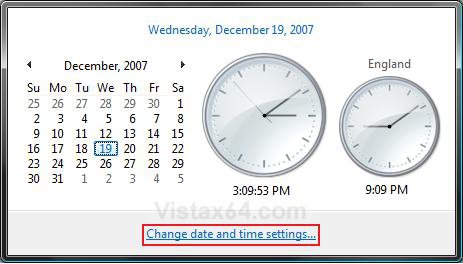
click_on_clock.jpg
3. Go to step 3 in OPTION TWO below.


OPTION TWO:
Use Clock Context Menu
1. Right click on the clock on the taskbar. (See screenshot below)
Name:  Clock.jpg
Views: 1495
Size:  2.0 KB
2. Click on Adjust Date/Time. (See screenshot below)
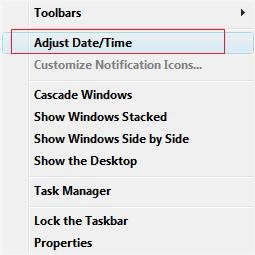
Name:  Right_Click.jpg
Views: 1496
Size:  12.4 KB
3. Click the Change time zone button. (See screenshot below)
NOTE: Check the Remind me one week before this change occurs box to be reminded of the Daylight Savings time change.
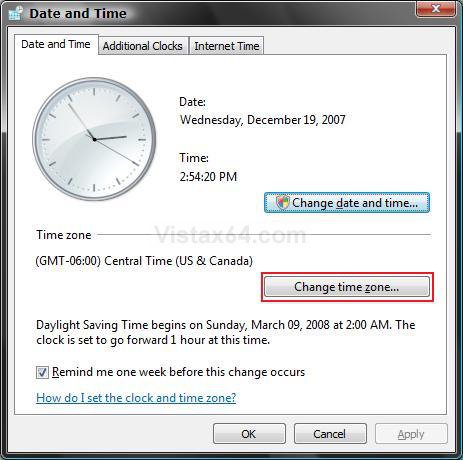
date_time_zone.jpg
4. Change the Time zone to the correct one for your region. (See screenshot below)
NOTE: If your time zone observes daylight saving time and you want your computer's clock to be adjusted automatically when daylight saving time changes, make sure the Automatically adjust clock for Daylight Saving Time check box is selected.

5. Click on OK to apply the changes.
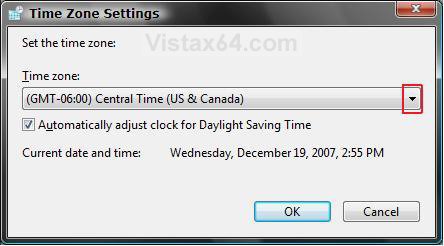
time_zone.jpg
6. Click on OK. (See screenshot below step 3)
That's it,
Shawn

Published by
Brink's Avatar
Administrator

Join Date: Apr 2007
Location: Texas, USA
Posts: 25,919
Rep Power: 150
Brink has a reputation beyond reputeBrink has a reputation beyond reputeBrink has a reputation beyond reputeBrink has a reputation beyond reputeBrink has a reputation beyond reputeBrink has a reputation beyond reputeBrink has a reputation beyond reputeBrink has a reputation beyond reputeBrink has a reputation beyond reputeBrink has a reputation beyond reputeBrink has a reputation beyond repute

Tutorial Tools

Applies to
All Vista Versions
64 Bit & 32 Bit

Old 11-27-2008  
official


vista home premium 32 bit


Re: Time Zone

I could open any of the ways in you help article

My System SpecsSystem Spec
Old 11-27-2008  
Brink


Vista x64 Ultimate SP2, Windows 7 Ultimate x64


Re: Time Zone

Hello Official,

I'm sorry, but could you explain your problem more? I'm not sure of what you mean. Did you mean could open or change Time Zone?

Thank you,
Shawn
My System SpecsSystem Spec
Old 11-28-2008  
official


vista home premium 32 bit


Re: Time Zone

When I open the adjust time in the task bar all I get is the calendar and the clock with no options to change time or date. I have even opened up the control panel to see if I could do it there with only the same options as the task bar. I went here to check Registry and re-downloaded the time zones:


Re: There is No Time Zone !!!
in
the registry, at
HKEY_LOCAL_MACHINE
|_ SOFTWARE
|__ Microsoft
|___ Windows NT
|____ CurrentVersion
|_____ Time Zones

there is only one value:
Name = default
Type = Reg_SZ
Data = (value not set)

I went to to the Dell site and looked for update to Bios, but I have the last update load in. Clock is exactly 1 hour off.
My System SpecsSystem Spec
Old 11-28-2008  
Brink


Vista x64 Ultimate SP2, Windows 7 Ultimate x64


Re: Time Zone

Official,

You can see if restoring the default Time Zones may help.

Time Zone - Restore Missing Time Zones
My System SpecsSystem Spec
Old 11-28-2008  
official


vista home premium 32 bit


Re: Time Zone

I did this but still no options to change either date or time.
My System SpecsSystem Spec
Old 11-28-2008  
Brink


Vista x64 Ultimate SP2, Windows 7 Ultimate x64


Re: Time Zone

It may be best to do a System Restore using a restore point dated before this problem. You may have other missing entries in the registry as well that this can also fix.

Hope this helps,
Shawn
My System SpecsSystem Spec
Old 11-28-2008  
official


vista home premium 32 bit


Re: Time Zone

Have done 10 different restore dates. No help there either.

If the battery was weak, I would imagine that the time would lose more than just 1 hour off?
My System SpecsSystem Spec
Old 11-28-2008  
Brink


Vista x64 Ultimate SP2, Windows 7 Ultimate x64


Re: Time Zone

In that case you may need to do a Repair (upgrade) install to fix this.

If the battery was weak or dead, you would have inaccurate time or time that always reset after you shutdown. However, you should still be able to change the time and date though.
My System SpecsSystem Spec
Comment

Tutorial Tools


Similar Threads
Tutorial Category
Time Zone - Restore Missing Time Zones Tutorials
PC Time zone change .NET General
Changing the time zone changes the appointment time in calendar .NET General
travelling laptop - set time & time zone Vista General
There is No Time Zone !!! Vista General


Vista Forums is an independent web site and has not been authorized,
sponsored, or otherwise approved by Microsoft Corporation.
"Windows Vista", the Start Orb, and related materials are trademarks of Microsoft Corp.
© Designer Media Ltd
Tutorial powered by GARS 2.1.8m ©2005-2006

1 2 3 4 5 6 7 8 9 10 11 12 13 14 15 16 17 18 19 20 21 22 23 24 25 26 27 28 29 30 31 32 33 34 35 36 37 38 39 40 41 42 43 44 45 46