
How to Enable or Disable Regedit in Vista and Windows 7
 Information
This will allow you to enable or disable Registry Editor (aka: regedit) for all users in Windows 7 and Vista.
By default, regedit.exe is enabled.
You must be logged in as an administrator to be able to do the steps in this tutorial.
By default, regedit.exe is enabled.
You must be logged in as an administrator to be able to do the steps in this tutorial.
 Note
NoteEven if you disable access to registry editor, you can still use registry editor in silent mode by using the /s switch. For example, if you type regedit /s filename.reg at the command prompt, you can import the filename.reg registry file into the registry, even though the Prevent access to registry editing tools policy is enabled. In order to prevent this, make sure you select Yes for Disable regedit from running silently? (See step below).
 Tip
TipThe Registry Editor EXE file is located at: C:\Windows\regedit.exe
 Warning
If you did not disable regedit.exe, then it may have been done by some kind of malware or spyware. You should do a complete scan of your computer for a virus and other malware to be safe.
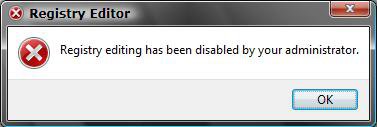
EXAMPLE: Error Message
NOTE: You get this when you try to run Regedit.exe or a REG file when set to disabled.
 OPTION ONE
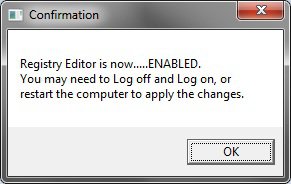
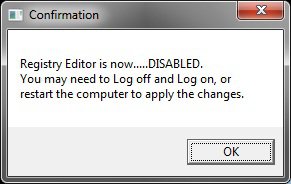
NOTE: This VBS script will toggle Registry Editor to be enabled or disabled when runned. If regedit was disabled before running the VBS script, then it will be enabled automatically. If regedit was enabled before running the VBS script, then it will be disabled automatically
1. Click on the Download button below to download the .vbs file below.
Enable-Disable_regedit.vbs

2. Click on Save, and save the .vbs file to your desktop.
3. Open an elevated command prompt.
4. In the elevated command prompt, copy and paste the command below and press Enter. (see screenshot below)
cd /d %userprofile%\desktop
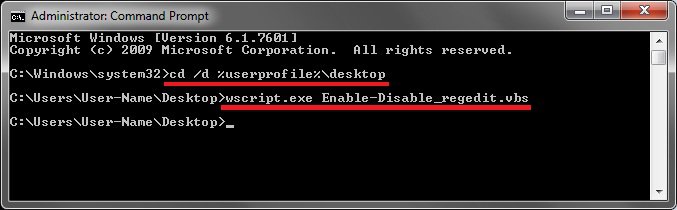
5. In the elevated command prompt, copy and paste the command below and press Enter. (see screenshot above)
wscript.exe Enable-Disable_regedit.vbs
6. Click on OK. (see screenshots below)
7. Close the elevated command prompt window.
OPTION TWO WARNING: Once you disable regedit, you will not be able to enable regedit again through the registry or from a REG file. See OPTION ONE or OPTION FOUR to be able to enable regedit again.
Disable regedit from running silently?
1. To Disable Regedit and Allow Silent Mode
NOTE: See NOTE at the top about Silent Mode.
A) Click the download button below to download the file below.
Disable_Registry_No_Silently.reg
B) Go to step 3.
2. To Disable Regedit and Prevent Silent Mode
NOTE: See NOTE at the top about Silent Mode.
A) Click the download button below to download the file below.
Disable_Registry_Yes_Silently.reg
3. Click on Save, and save the .reg file to the Desktop.
4. Right click on the downloaded .reg file and click on Merge.
5. Click on Run, Continue (UAC-Vista) or Yes (UAC-Windows 7), Yes, and then OK when prompted.
6. When done, you can delete the .reg file (on Desktop).
OPTION THREE WARNING: Once you disable regedit and close the registry, you will not be able to enable regedit again through the registry or from a REG file. See OPTION ONE or OPTION FOUR to be able to enable regedit again.
1. Open the Start Menu, then type regedit and press Enter.
2. If prompted by UAC, click on Continue (Vista)or Yes (Windows 7).
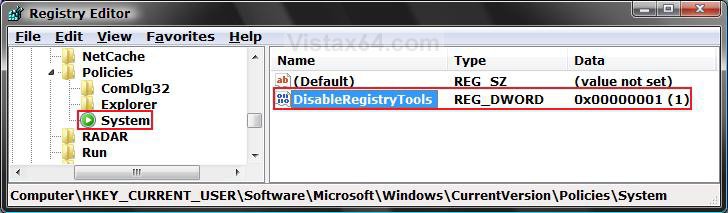
3. In regedit, navigate to the location below. (See screenshot below step 5)
NOTE: If you do not have System, right click on Polices, click on New and Key, then type System and press Enter.
HKEY_CURRENT_USER\Software\Microsoft\Windows\CurrentVersion\Policies\System
4. To Disable Regedit
A) In the right pane, right click on a empty area and click on New and DWORD (32-bit) Value. Type DisableRegistryTools and press Enter. (See screenshot below step 4)
5. Right click on DisableRegistryTools and click on Modify. (See screenshot below)
Disable regedit from running silently?
6. To Disable Regedit and Allow Silent Mode
NOTE: See NOTE at the top about Silent Mode.
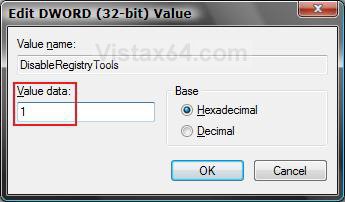
A) Type 1 and click on OK. (See screenshot below step 7A)
7. To Disable Regedit and Prevent Silent Mode
NOTE: See NOTE at the top about Silent Mode.
A) Type 2 and click on OK.
8. Close regedit.
OPTION FOUR 1. Open the all users, specific users or groups, or all users except administrators Local Group Policy Editor for how you want this policy applied.
2. In the left pane, click on User Configuration, Administrative Templates, and System. (See screenshot below)
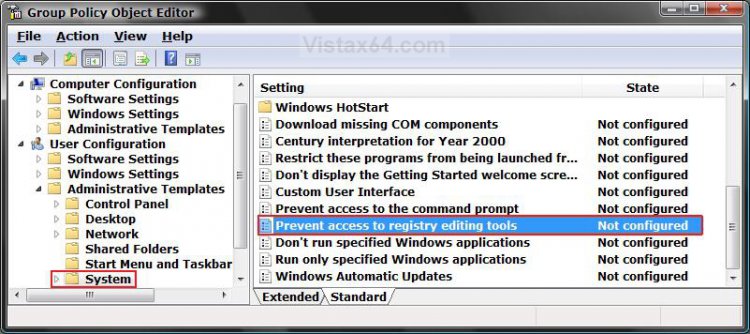
3. In the right pane, right click on Prevent access to registry editing tools and click on Properties. (See screenshot above)
4. To Enable Registry Editor
A) Select (dot) Disabled or Not Configured and click on OK. (See screenshot below 5D)
B) Go to step 6.
5. To Disable Regestry Editor
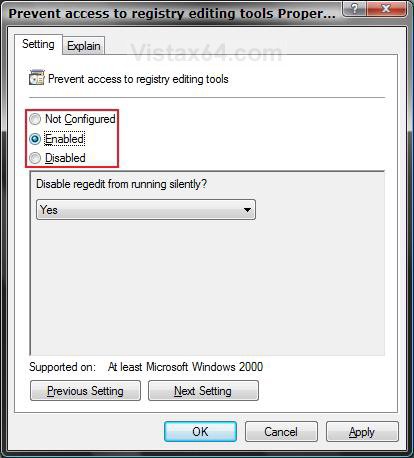
A) Select (dot) Enabled. (See screenshot below 5D)
Disable regedit from running silently?
NOTE: See NOTE at the top about Silent Mode.
B) To Allow Silent Mode - Select No. (See screenshot below 5D)
C) To Prevent Silent Mode - Select Yes. (See screenshot below 5D)
D) Click on OK. (See screenshot below)
6. Close the Local Group Policy Editor window. Your done
That's it,Shawn
Related Tutorials
- How to Fix a Slow Scan in a Registry Cleaner Program in 64 bit Vista
- How to Add or Remove Registry Editor from the Vista Control Panel
- How to Use the Registry Editor in Vista and other Techniques
- How to Find Text in the Vista Registry Editor - Regedit
- How to Backup and Restore the Registry in Windows 7 and Vista
- How to Enable or Disable the Command Prompt in Vista and Windows 7
Attachments

Last edited:


