Windows Vista Forums
Vista Forums Home Join Vista Forums Windows 7 Forum Vista Tutorials Tags
Welcome to Windows Vista Forums. Our forum is dedicated to helping you find solutions with any problems, errors or issues you are experiencing with Windows Vista. The Vista forum also covers news and updates and has an extensive Windows Vista tutorial section that covers a wide range of tips and tricks.

Go Back   Vista Forums > Vista Forums > Tutorials

Vista Tutorial - Folder Size

Comment
 
Old 01-06-2008  
Brink
Administrator


Join Date: Apr 2007
Vista x64 Ultimate SP2, Windows 7 Ultimate x64


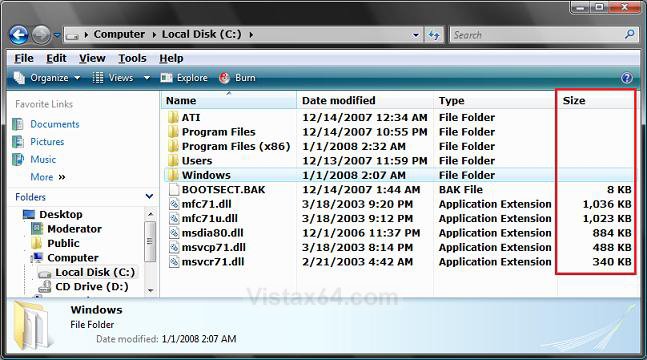
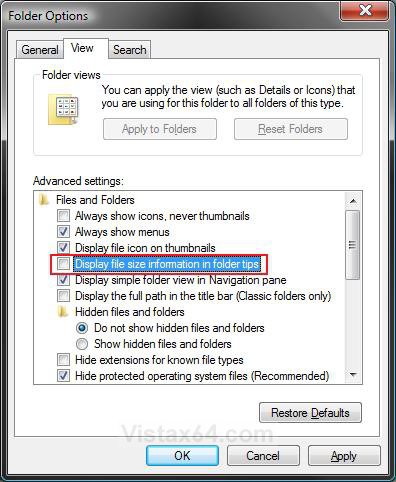
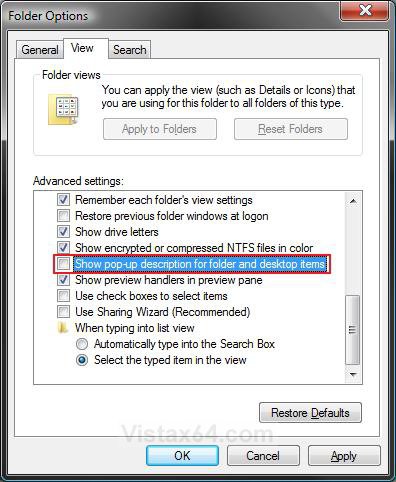
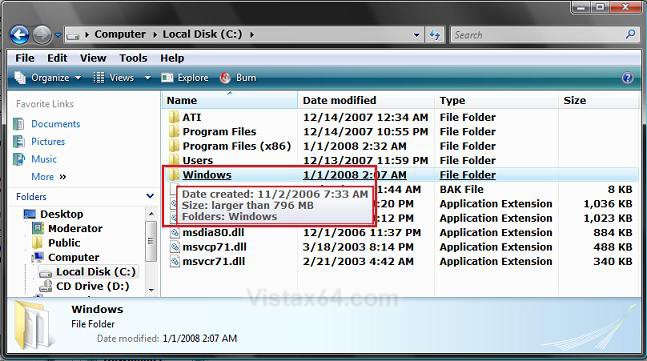
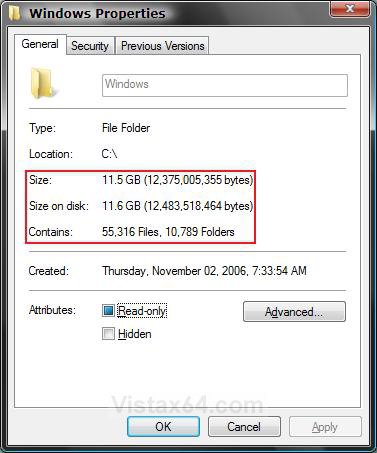
Folder Size

How to See the Folder Size in Vista
...

My System SpecsSystem Spec
Old 04-12-2008  
Jeffreybolle
Newbie


Join Date: Apr 2008
Vista Ultimate 32bit


Re: Folder Size

Hi HaZe303,

The problem is occurring on an OEM version of Vista that came preinstalled on a Toshiba laptop. The only things I've done are install service pack 1 and switch the language from Spanish to England using a 3rd party application. Either one of those could be causing the problem. I'm running the scan disk as I type and will let you know if that solves anything.

My System SpecsSystem Spec
Old 04-12-2008  
vista_man
Newbie


Join Date: Apr 2008
Vista Home Premium x32


Re: Folder Size

Apologies if this is out of contect of this thread

Not being able to show folder size in Vista (as you could in XP) is frustrating (dare i say dumb).

A work around is to use a freeware program called Free Commander.

It shows Folder Sizes and can do lots of nice thinks Windows Explorer can only dream about.

From the site:
Quote:
FreeCommander is an easy-to-use alternative to the standard windows file manager. The program helps you with daily work in Windows. Here you can find all the necessary functions to manage your data stock. You can take FreeCommander anywhere - just copy the installation directory on a CD, USB-Stick or even a floppy disk - and you can even work with this program on a foreign computer.


Main features in FreeCommander:
  • Dual-panel technology - horizontal and vertical
  • Tabbed interface
  • Optional tree view for each panel
  • Built in file viewer to view files in hex, binary, text or image format
  • File viewer inside archives too
  • Built in archive handling: ZIP (read, write), CAB (read, write), RAR (read)
  • Nested archive handling
  • Easy access to system folders, control panel, desktop and start menu
  • Copy, move, delete, rename files and folders
  • Wipe files
  • Create and verify MD5 checksums
  • File splitting
  • File properties and context menu
  • Calculation of folder size
  • Folder comparison / synchronization
  • Modification of file date and attributes
  • Folder / program favorites
  • File searching (inside archive too)
  • File filters for display
  • User defined columns for detailed view
  • DOS command line
  • Multiple language support

Here is a link to the program site

http://www.freecommander.com/

cheers

Ps works with x64 but may have some issues as yet
My System SpecsSystem Spec
Old 04-13-2008  
HaZe303
Member


Join Date: Apr 2008
Vista Home Premium x64


Re: Folder Size

Quote  Quote: Originally Posted by vista_man View Post
Apologies if this is out of contect of this thread

Not being able to show folder size in Vista (as you could in XP) is frustrating (dare i say dumb).

Ps works with x64 but may have some issues as yet

You shouldnt need any programs, it worked fine before, and does not anymore?? That is strange. The only reason I can think of is that vlite somehow altered something in my vista installation that did this?? Thx for the post thou.

Quote  Quote: Originally Posted by Jeffreybolle View Post
Hi HaZe303,

The problem is occurring on an OEM version of Vista that came preinstalled on a Toshiba laptop. The only things I've done are install service pack 1 and switch the language from Spanish to England using a 3rd party application. Either one of those could be causing the problem. I'm running the scan disk as I type and will let you know if that solves anything.
Yeah, thx. Post back if you find some solution? Thx.
My System SpecsSystem Spec
Old 04-17-2008  
mdshaman
Newbie


Join Date: Apr 2008
Vista Home Basic 32bit


Re: Folder Size

Hi all..
Actually my laptop came preinstalled with Japanese Vista and I've copied the English MUI to the respective folders in Vista so that i can use both Japanese and English as the language on the laptop.
It seems that when I'm in the Japanese language environment, the general tab is available. Only in the English environment it is missing. Since it was there (in English) before I installed SP1, I'm guessing SP1 is the culprit. However, scan disk does nothing to help so I'm still stuck.

To Haze303: I did not use vlite, so no help there pal. sorry.

To Jeffreybolle: So how's the scan? Any help to you?
My System SpecsSystem Spec
Old 04-17-2008  
HaZe303
Member


Join Date: Apr 2008
Vista Home Premium x64


Re: Folder Size

Quote  Quote: Originally Posted by mdshaman View Post
Hi all..
Actually my laptop came preinstalled with Japanese Vista and I've copied the English MUI to the respective folders in Vista so that i can use both Japanese and English as the language on the laptop.
It seems that when I'm in the Japanese language environment, the general tab is available. Only in the English environment it is missing. Since it was there (in English) before I installed SP1, I'm guessing SP1 is the culprit. However, scan disk does nothing to help so I'm still stuck.

To Haze303: I did not use vlite, so no help there pal. sorry.

To Jeffreybolle: So how's the scan? Any help to you?
I totally agree with you, im 100% sure its Vista SP1 that is the culprit, I was using a homemade MUI for Swedish Vista that is supposed to work in SP1, but as it seems is not 100% working atm. So I re-installed with English only and my problem is gone. BUt now the Wave1 versions of SP1 are out, so this issue should be old as of now?? Thx for all youre replies, this is why WWW is so great.
My System SpecsSystem Spec
Old 12-08-2008  
siskoray
Newbie


Join Date: Dec 2008
Vista Ultimate 32bit


Question Re: Folder Size

Quote:
This was done on purpose. On large content folders, it can take a few seconds to gather the size information for it. Now image that mulitplied by how many folders are in the window (EX: C:\Windows\System32). It could make navigating Windows Explorer an extremely slow nightmare.
I agree that by allowing this feature as a default would be a huge tack on resources, but I believe there has to be a more either sinister (okay a bit excessive) or embaressing reason that Mikesoft continues to refuse integrating it into OS's. I mean, if it's about resources, then let it be a selected feature. Certainly if third party peeps can make this happen then the good folks at Mikesoft could do it in a snap .

I mean, for at least forever, I've always had to rely on third party applications of which a dos application "Xtree" remains my favorite of all and I weeped when OS upgrades separated me from this app. Sure, it's got that whole Dos thing going for it, blue with subtle shades of white for borders , but heck it sure works like a dream.

Anyways, I apologize for getting offtrack. I just feel that MicSoft COULD incorporate this feature but just WON'T.

But while typing this reply I did happen upon Ztree which I'll have to investigate further. Apparently it's XTREE revived, but I'll have to see about that.

Cheers.
My System SpecsSystem Spec
Old 12-08-2008  
Brink
Administrator


Join Date: Apr 2007
Vista x64 Ultimate SP2, Windows 7 Ultimate x64


Re: Folder Size

Hello Siskoray, and welcome to Vista Forums.

Yes, it would be nice to have it as a selectable option.

Shawn
My System SpecsSystem Spec
Comment

Tutorial Tools


Similar Threads
Tutorial Category
Folder Size Vista General
Folder Size in Size Column Vista file management
Folder Size Vista General
Folder size Vista General
Folder size? Vista General


Vista Forums is an independent web site and has not been authorized,
sponsored, or otherwise approved by Microsoft Corporation.
"Windows Vista", the Start Orb, and related materials are trademarks of Microsoft Corp.
© Designer Media Ltd
Tutorial powered by GARS 2.1.8m ©2005-2006

1 2 3 4 5 6 7 8 9 10 11 12 13 14 15 16 17 18 19 20 21 22 23 24 25 26 27 28 29 30 31 32 33 34 35 36 37 38 39 40 41 42 43 44 45 46