Windows Vista Forums
Vista Forums Home Join Vista Forums Windows 7 Forum Vista Tutorials Tags
Welcome to Windows Vista Forums. Our forum is dedicated to helping you find solutions with any problems, errors or issues you are experiencing with Windows Vista. The Vista forum also covers news and updates and has an extensive Windows Vista tutorial section that covers a wide range of tips and tricks.

Go Back   Vista Forums > Vista Forums > Tutorials

Vista Tutorial - DEP - Enable or Disable

Comment
 

DEP - Enable or Disable

How to Enable or Disable DEP in Vista
Published by Brink
01-12-2008

How to Enable or Disable DEP in Vista
Information
  Data Execution Prevention (DEP) is a security feature that can help prevent damage to your computer from viruses and other security threats. Harmful programs can try to attack Windows by attempting to run (also known as execute) code from system memory (RAM) locations reserved only for Windows and other authorized programs. These types of attacks can harm your programs and files. If DEP notices a program on your computer using memory incorrectly, it closes the program and notifies you with the DEP stop error. DEP is ran in a software mode and in a hardware mode. If your processor supports DEP (NX for AMD, and XD for Intel), then you will have hardware and software DEP. If it doesn't, then Vista will just use software DEP. 64 bit applications will have DEP enabled all the time by default, but 32 bit applications do not and must have DEP manually enabled for them. For more information, see: Windows Help and Support: Data Execution Prevention: FAQs
NOTE
  If a program is being closed by DEP, then make sure that it is a DEP compatible version and check for an updated version. If it is not DEP compatible, then you can uninstall the program or turn off DEP for that particular program.
WARNING
  Do not disable DEP, or exclude (OptOut) a program, unless you have adequate protection and are having problems only with a known safe program that DEP will not let run and you cannot live without it. Remember DEP stopped the program for a reason. Either it is just a improperly running program, or some sort of malware trying to get into restricted memory.


Adequate Protection:
  • Antivirus program with realtime scanning (EX: Avast or AVG are good ones)
  • A spyware/adware program with realtime scanning (EX: Windows Defender, Spybot Search and Destroy)
  • Enable Vista's UAC (User Account Control). It asks you for permission first for anything that wants to run with full access to the computer.
RELATED LINKS:
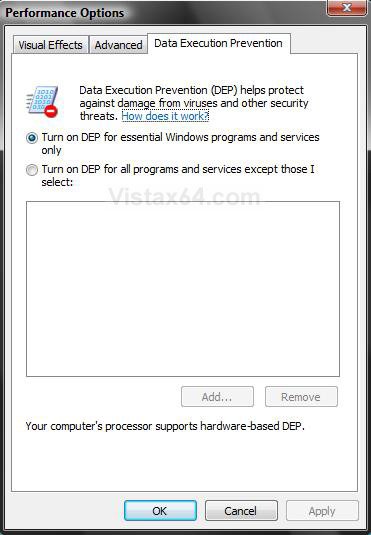
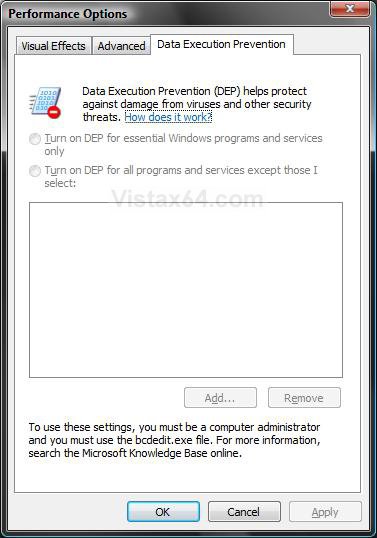
EXAMPLE: DEP Enabled and Disabled
NOTE: DEP is enabled by default.
dep_enabled.jpgdep_disabled.jpg

OPTION ONE:
To Enable or Disable DEP in Vista
NOTE
  If you have a 64-bit CPU, then you may also have a no exectute option in BIOS that is the built in DEP on the CPU.
1. Open a elevated command prompt.

2. To Enable DEP -
A) In the elevated command prompt, type in bold below and press Enter. (See screenshot below)
NOTE: If for some reason this command does not enable DEP after restarting the computer, then use the bcdedit.exe /set {current} nx AlwaysOn command instead.
bcdedit.exe /set {current} nx OptIn
B) You should get a success message back

C) Close the elevated command prompt.

D) Restart the computer to apply.

enable_cmd.jpg
3. To Disable DEP -
A) In the command prompt, type in bold belowand press Enter. (See screenshot below)
bcdedit.exe /set {current} nx AlwaysOff
B) You should get a success message back.

C) Close the command prompt.

D) Restart the computer to apply.
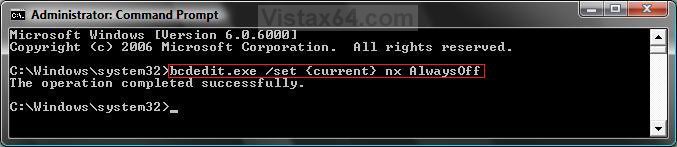
disabled_cmd.jpg
4. To Verify the Status of DEP -
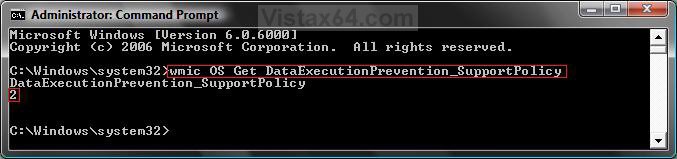
A) In the command prompt, type in bold below and press Enter. (See screenshot below table)
wmic OS Get DataExecutionPrevention_SupportPolicy
B) You will get a number (see table below) that will tell you the status of DEP.

C) Close command prompt when done.
NOTE
  2 is the default setting.

Number Description Status
0 AlwaysOff DEP is disabled for all processes. (Step 3 above)
1 AlwaysOn DEP is enabled for all processes. (Note under step 2)
2 OptIn DEP is enabled for only Windows system components and services have DEP applied. Default setting. (Step 2 above)
3 OptOut DEP is enabled for all processes. Administrators can manually create a list of specific applications which do not have DEP applied. (How to Turn DEP On or Off for a Program)


verify_dep.jpg


OPTION TWO:
Enable or Disable DEP in Internet Explorer 7
NOTE
  This will be for the 32 bit version of IE7. This is enabled by default in the 64 bit IE7 version. DEP is disabled by default in the 32 bit IE7. The .exe file for the 32 bit version of IE7 is located at:
  • For a 32 bit Vista version: C:\Program Files\Internet Explorer\iexplore.exe
  • For a 64 bit Vista version: C:\Program Files (x86)\Internet Explorer\iexplore.exe
WARNING
  Some Active X IE7 add-ons may not work with DEP on. It can cause them to crash and prevent the startup of IE7 by DEP closing it. If this happens to you, then see: How to Fix a Crashing Internet Explorer in Vista or disable DEP again.
1. Open the Start Menu.

2. Click on All Programs and right click on Internet Explorer, then click Run as administrator.
NOTE: If you cannot get IE7 to open using step 2, then click on All Programs and Accessories. Next, right click on Internet Explorer (No Add-ons) and click on Run as administrator instead.
WARNING: If you do not use Run as administrator, the Enable memory protection to help mitigate online attacks option will be grayed out in steps 5 and 6 below, and you will not be able to enable or disable it.

3. In IE7, click on Tools and Internet Options.

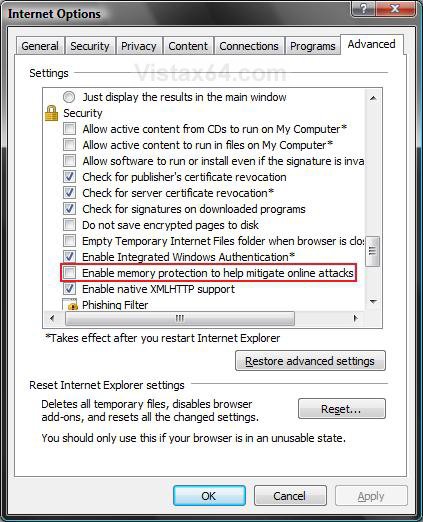
4. Click on the Advanced tab. (See screenshot below)

5. To Enable DEP for the 32 bit IE7 -
A) Under Security, check Enable memory protection to help mitigate online attacks.

B) Go to step 7.
6. To Disable DEP for the 32 bit IE7 -
A) Under Security, uncheck Enable memory protection to help mitigate online attacks.
7. Click on OK to apply.
ie7_dep.jpg
That's it,
Shawn

Published by
Brink's Avatar
Administrator

Join Date: Apr 2007
Location: Texas, USA
Posts: 25,801
Rep Power: 150
Brink has a reputation beyond reputeBrink has a reputation beyond reputeBrink has a reputation beyond reputeBrink has a reputation beyond reputeBrink has a reputation beyond reputeBrink has a reputation beyond reputeBrink has a reputation beyond reputeBrink has a reputation beyond reputeBrink has a reputation beyond reputeBrink has a reputation beyond reputeBrink has a reputation beyond repute

Tutorial Tools

Applies to
All Vista Versions
64 Bit & 32 Bit

Old 02-27-2008  
Bare Foot Kid
Technophile Wannabe


Join Date: Feb 2008
Vista 64-bit Ultimate Win7 64-bit Ultimate XP SP3 32-bit Pro


Re: DEP - Enable or Disable

Hi Brink. A few days ago I enabled Dep in IE7. No problems, I did have to deal with a couple ad-ons, no problems. IE7 runs fine now.

You'r Tutorials are great.

I ran SpyBot S&D today for the first time since DEP enable, it came up with this and I want to make sure it's the DEP value before I deal
with (or not) it!

Attachment 2981

When ever you have time for a reply. I thank you very much

Later


Last edited by Bare Foot Kid; 04-16-2008 at 10:50 PM..
My System SpecsSystem Spec
Old 02-27-2008  
Brink
Administrator


Join Date: Apr 2007
Vista x64 Ultimate SP2, Windows 7 (7600) x64


Re: DEP - Enable or Disable

Hi Bare Foot Kid,

From the location in the registry and the name value, I would say that it is most likely from the DEP being enabled for IE7. I would not worry about it.

Shawn
My System SpecsSystem Spec
Old 02-27-2008  
Bare Foot Kid
Technophile Wannabe


Join Date: Feb 2008
Vista 64-bit Ultimate Win7 64-bit Ultimate XP SP3 32-bit Pro


Re: DEP - Enable or Disable

You'r the man Shawn!

Thanks Ted
My System SpecsSystem Spec
Old 02-27-2008  
Brink
Administrator


Join Date: Apr 2007
Vista x64 Ultimate SP2, Windows 7 (7600) x64


Re: DEP - Enable or Disable

Your welcome Ted.

Sorry, I'm terrible at remembering names.

Shawn
My System SpecsSystem Spec
Old 02-29-2008  
Case
Member


Join Date: Feb 2008
Vista Home Premium 32bit


Re: DEP - Enable or Disable

Hi Shawn, I enabled the DEP feature on my computer and also IE7, but there is a certain web site I go to, that I trust, that when I try to run certain features on the web site, IE7 shuts it down everytime and says it has something to do with the DEP. Is there a way I can turn DEP off for certain web sites ,I trust, similar to how you can Turn it DEP off for certain programs on the computer? Also, sometimes when I restart my computer and try to get back on the vistx64 web site it won't connect, but it will to every other site. Is the web site down sometimes or is it something on my end? I was going to ask you another question about my fans speeding up from time to time, but I think I figured that one out on my own LOL. I had my computer enclosed and I think it was getting to hot.

Thanks as always,

Casey
My System SpecsSystem Spec
Old 02-29-2008  
Brink
Administrator


Join Date: Apr 2007
Vista x64 Ultimate SP2, Windows 7 (7600) x64


Re: DEP - Enable or Disable

Hi Casey,

There is not a DEP exclusion for websites, just for IE7 itself.

If you trust the website, you can see if adding it as Always Allow on the per site list for cookies will help. Repeat for the Pop-up blocker Settings section below to.

Cookies

Shawn
My System SpecsSystem Spec
Old 02-29-2008  
Case
Member


Join Date: Feb 2008
Vista Home Premium 32bit


Re: DEP - Enable or Disable

Shawn, your help is so valuable. i may get the hang of this after all lol. I disabled DEP for IE7, so its working just fine. I'm not sure what I did , but now when I go to like a web site such as TD Ameritrade, when I log on instead of staying on that same page, it opens up a new window. It wasn't doing that before. Here is another message I am getting.

'Internet explorer needs to open up a new window to display this webpage.'

'For your computers security, websites that are in different security zones must open in different window.'

I am not sure what I changed but it wasn't doing that before. Can you help?

Thanks,

Casey
My System SpecsSystem Spec
Old 02-29-2008  
Brink
Administrator


Join Date: Apr 2007
Vista x64 Ultimate SP2, Windows 7 (7600) x64


Re: DEP - Enable or Disable

Casey,

If you are changing from a unsecured website (http://) to a secured one (https://), then this is normal.

Check in the Internet Options, under the Security tab, to see if you have the Default level button grayed out for each of the 4 zones. If not, press the Default level button to set the default settings for that zone.

Hope this helps,
Shawn
My System SpecsSystem Spec
Old 02-29-2008  
Case
Member


Join Date: Feb 2008
Vista Home Premium 32bit


Re: DEP - Enable or Disable

Well I figured it out Shawn. The Internet/Protected Mode was off. I turned it on and for some reason that fixed the issues. When I log on it opens in the same page instead of pulling up a whole new internet explorer page. Also, the tabs are working again without telling me that a particular site needs to open in a different web site. Hey Shawn, should 'Navigate subframes accross different domains' be enabled or disabled?

You da' man!,

Casey

Last edited by Case; 02-29-2008 at 04:16 PM.. Reason: forgot, another question lol
My System SpecsSystem Spec
Comment

Tutorial Tools


Similar Threads
Tutorial Category
Index - Enable or Disable Tutorials
Taskbar Always On Top - Enable or Disable Tutorials
Regedit - Enable or Disable Tutorials
Hibernation - Enable or Disable Tutorials
UAC: Is there a GPO option to disable/enable UAC? Vista security


Vista Forums is an independent web site and has not been authorized,
sponsored, or otherwise approved by Microsoft Corporation.
"Windows Vista", the Start Orb, and related materials are trademarks of Microsoft Corp.
© Designer Media Ltd
Tutorial powered by GARS 2.1.8m ©2005-2006

1 2 3 4 5 6 7 8 9 10 11 12 13 14 15 16 17 18 19 20 21 22 23 24 25 26 27 28 29 30 31 32 33 34 35 36 37 38 39 40 41 42 43 44 45 46