
How to Add or Remove "Hidden Files and Folders" from Folder Options in Vista and Windows 7
 Information
This will show you how to Add or Remove the Hidden Files and Folders options in Folder Options for all user account on the computer.
 Note
NoteThe Hidden Files and Folders option is added to Folder Options by default.
EXAMPLE: Hidden Files and Folders Option Added and Removed
NOTE: You will need to close and reopen Folder Options to see the changes made below.
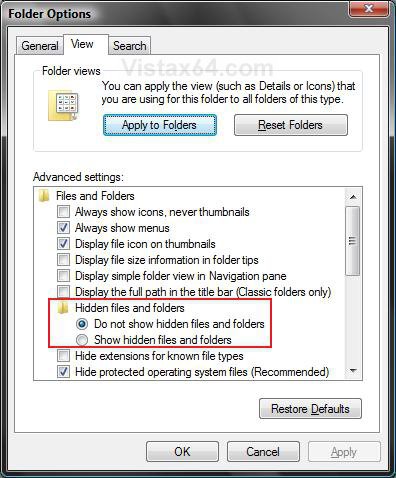
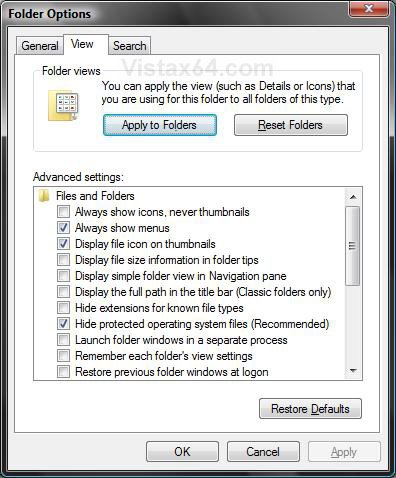
 OPTION ONE
1. To Add "Hidden Files and Folders" to Folder Options
NOTE: This reg download containd the entire contents of the Hidden key, including the NOHIDDEN and SHOWALL subkeys, for a full restore of the Hidden files and folders option.
WARNING: If you have get a black square(s) instead of the check box next to Hidden files and folders, then use Radio instead of Group in the OPTION TWO (step 6) below to not have the black square.
A) Click on the download button below to download the file below.
Add_Hidden_Files_Folder.reg

B) Go to step 3.
2. To Remove "Hidden Files and Folders" from Folder Options
A) Click on the download button below to download the file below.
Remove_Hidden_Files_Folder.reg
3. Click on Save, and save the .reg file to the Desktop.
4. Right click on the downloaded .reg file and click on Merge.
5. Click on Run, Continue (UAC-Vista) or Yes (UAC-Windows 7), Yes, and then OK when prompted.
6. When done, you can delete the downloaded .reg file if you like.
7. Close and reopen Folder Options to see the change.
OPTION TWO NOTE: For a full restore of the Hidden files and folders option that includes the entire contents of the Hidden key with the NOHIDDEN and SHOWALL subkeys, see Option One.
1. Open the Start Menu.
2. In the white line (Start Search) area, type regedit and press Enter.
3. If prompted by UAC, then click on Continue (Vista) or Yes (Windows 7)
4. In regedit, navigate to the location below. (See screenshot below step 5)
Code:
HKEY_LOCAL_MACHINE\SOFTWARE\Microsoft\Windows\CurrentVersion\explorer\Advanced\Folder\Hidden
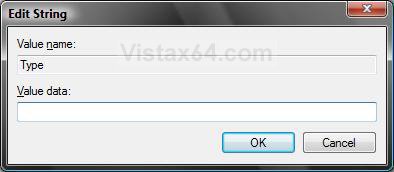
5. In the right pane, right click on Type and click on Modify.
NOTE: If Type is not there, then right click on a empty area of the right pane and click on New and String Value, then type Type and press Enter.
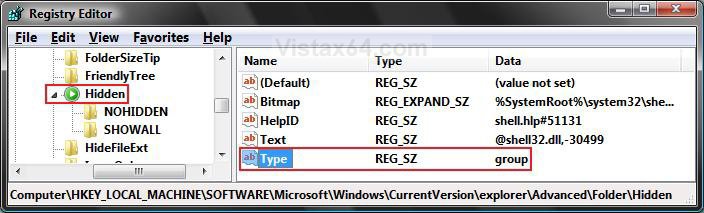
6. To Add "Hidden Files and Folders" to Folder Options
A) Type group and click on OK. (See screenshot below)
WARNING: If you get or have a black square(s) instead of the check box for the Hidden files and folders option, then type Radio instead and click on OK.
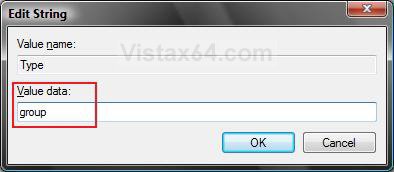
7. To Remove "Hidden Files and Folders" from Folder Options
A) Clear group and leave the field empty. (See screenshot below)
B) Click on OK.
8. Close regedit.
9. Close and reopen Folder Options to see the change.
That's it,Shawn
Attachments
Last edited:


 The problem persisted since months, so a system restore was not applicable. Again, when I changed "Type"to "radio" the option was completely gone. Just the same as if "Type" is set blank.
 ) too weird.