Windows Vista Forums
Vista Forums Home Join Vista Forums Windows 7 Forum Vista Tutorials Tags

Welcome to Windows Vista Forums. Our forum is dedicated to helping you find solutions with any problems, errors or issues you are experiencing with Windows Vista. The Vista forum also covers news and updates and has an extensive Vista tutorial section that covers a wide range of tips and tricks.

Go Back   Vista Forums > Vista Forums > Tutorials

Vista Tutorial - Hidden Files and Folders Option - Add or Remove

Comment
 
LinkBack Tutorial Tools Display Modes
<!-- google_ad_section_start -->Hidden Files and Folders Option - Add or Remove<!-- google_ad_section_end -->
Hidden Files and Folders Option - Add or Remove
How to Add or Remove the Hidden Files and Folders Option in Vista
Published by Brink
01-14-2008

How to Add or Remove the Hidden Files and Folders Option in Vista
Information
  This will show you how to Add or Remove the show Hidden Files and Folders option in Folder Options for all user account on the computer.
NOTE
  The Hidden Files and Folders option is added to Folder Options by default.
RELATED LINKS:
EXAMPLE: Hidden Files and Folders Option Added and Removed
NOTE: You will need to close and reopen Folder Options to see the changes made below.
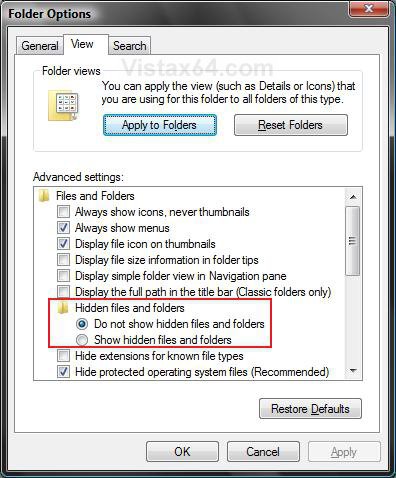
add.jpgremove.jpg


OPTION ONE:
Through a Download
1. To Add Hidden Files and Folders Option -
NOTE: This reg download containd the entire contents of the Hidden key, including the NOHIDDEN and SHOWALL subkeys, for a full restore of the Hidden files and folders option.
WARNING: If you have get a black square(s) instead of the check box next to Hidden files and folders, then use Radio instead of Group in the OPTION TWO (step 6) below to not have the black square.
A) Click on the download button below to download the
Add_Hidden_Files_Folder.reg file.
B) Go to step 3.


2. To Remove Hidden Files and Folders Option -
A) Click on the download button below to download the
Remove_Hidden_Files_Folder.reg file.


3. Click on Save, and save the .reg file to the Desktop.
4. Right click on the .reg file (on Desktop) and click on Merge.
5. Click on the Run button in the Security Warning pop-up.
6. Click on Continue (UAC), Yes, and then OK when prompted.
7. When done, you can delete the .reg file (on Desktop).
8. Close and reopen Folder Options.


OPTION TWO:
The Manual Way
NOTE: For a full restore of the Hidden files and folders option that includes the entire contents of the Hidden key with the NOHIDDEN and SHOWALL subkeys, see Option One.
1. Open the Start Menu.
2. In the white line (Start Search) area, type regedit and press Enter.
3. Click the Continue button in the UAC prompt.
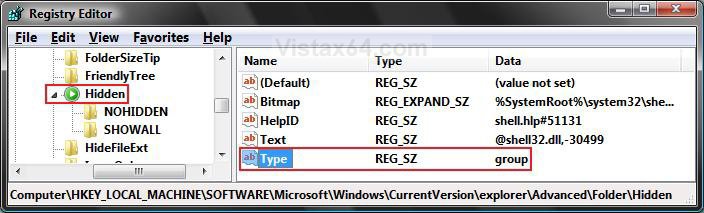
4. In regedit, go to: (See screenshot below step 5)
HKEY_LOCAL_MACHINE\SOFTWARE\Microsoft\Windows\CurrentVersion\explorer\Advanced\Folder\Hidden

5. In the right pane, right click on Type and click on Modify.
NOTE: If Type is not there, then right click on a empty area of the right pane and click on New and String Value, then type Type and press Enter.


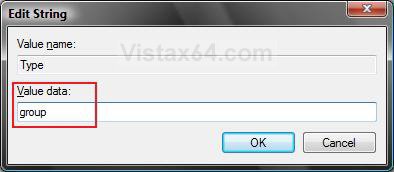
6. To Add Hidden Files and Folders Option -
A) Type group and click on OK. (See screenshot below)
WARNING: If you get or have a black square(s) instead of the check box for the Hidden files and folders option, then type Radio instead and click on OK.
Name:  Modify2.jpg
Views: 3545
Size:  27.9 KB

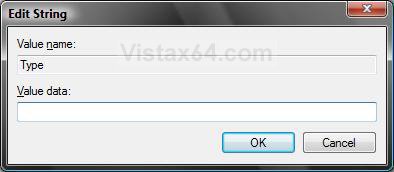
7. To Remove Hidden Files and Folders Option -
A) Clear group and leave the field empty. (See screenshot below)
B) Click on OK.
Name:  Modify1.jpg
Views: 3530
Size:  25.5 KB

8. Close regedit.
9. Close and reopen Folder Options.
That's it,
Shawn
Published by
Brink's Avatar
Administrator

Join Date: Apr 2007
Location: Texas, USA
Posts: 23,756
Rep Power: 150
Brink has a reputation beyond reputeBrink has a reputation beyond reputeBrink has a reputation beyond reputeBrink has a reputation beyond reputeBrink has a reputation beyond reputeBrink has a reputation beyond reputeBrink has a reputation beyond reputeBrink has a reputation beyond reputeBrink has a reputation beyond reputeBrink has a reputation beyond reputeBrink has a reputation beyond repute

Tutorial Tools
Show Printable Version Show Printable Version
Email this Page Email this Page

Applies to
All Vista Versions
64 Bit & 32 Bit

Page copy protected against web site content infringement by Copyscape

Old 07-01-2008  
Herpes
Newbie


Join Date: Jul 2008
Vista home
 
Rep Power: 8
Herpes is on a distinguished road
  Herpes is offline

Re: Hidden Files and Folders Option - Add or Remove

i did all the steps but still not working... and i made sure that the registery key is there but with still not working
My System SpecsSystem Spec
Old 07-01-2008  
Brink's Avatar
Brink
Administrator


Join Date: Apr 2007
Vista x64 Ultimate SP2
Texas, USA
 
Rep Power: 150
Brink has a reputation beyond reputeBrink has a reputation beyond reputeBrink has a reputation beyond reputeBrink has a reputation beyond reputeBrink has a reputation beyond reputeBrink has a reputation beyond reputeBrink has a reputation beyond reputeBrink has a reputation beyond reputeBrink has a reputation beyond reputeBrink has a reputation beyond reputeBrink has a reputation beyond repute
  Brink is offline

Re: Hidden Files and Folders Option - Add or Remove

Hi Herpes,

Welcome to Vista Forums.

Was there anything that you installed or changed that you remember before this happened?

Since the above did not help, then you might do a System Restore using a restore point dated before this problem. This tutorial will show you how to if needed.

System Restore - How to

Hope this helps,
Shawn
My System SpecsSystem Spec
Old 07-26-2008  
al firdauz
Newbie


Join Date: Jul 2008
Vista Ultimate 32 bit
 
Rep Power: 11
al firdauz has a spectacular aura aboutal firdauz has a spectacular aura aboutal firdauz has a spectacular aura about
  al firdauz is offline

Re: Hidden Files and Folders Option - Add or Remove

There was a missing key and cause that things happen. By using the manual method, follow the step above until step 4, then click to SHOWALL.

(if you compare between SHOWALL and NOHIDDEN right pane, SHOWALL had missing CheckedValue key)

You can create that key by right click on the right pane(on SHOWALL right pane) > New > select DWORD (32-bit) value, then rename it as CheckedValue, then modify the value data to "1" (right click then choose modify).

Close regedit.

Check whether your Show hidden files is there or not.

Give your comment ok....
My System SpecsSystem Spec
Old 08-13-2008  
dopolina
Newbie


Join Date: Aug 2008
Vista Home Premium 32bit
 
Rep Power: 7
dopolina is on a distinguished road
  dopolina is offline

Re: Hidden Files and Folders Option - Add or Remove

HELLOOO im new!! i came across this site looking for help on this topic, all the information is very helpfull and it work, except now i have 2 dark squares infront of the options to hidde and unhidde and it's not allowing me to select either one of the, i have some important information on a couple of hidden folders that i need for finals and im desperate, thankssss
My System SpecsSystem Spec
Old 08-13-2008  
Brink's Avatar
Brink
Administrator


Join Date: Apr 2007
Vista x64 Ultimate SP2
Texas, USA
 
Rep Power: 150
Brink has a reputation beyond reputeBrink has a reputation beyond reputeBrink has a reputation beyond reputeBrink has a reputation beyond reputeBrink has a reputation beyond reputeBrink has a reputation beyond reputeBrink has a reputation beyond reputeBrink has a reputation beyond reputeBrink has a reputation beyond reputeBrink has a reputation beyond reputeBrink has a reputation beyond repute
  Brink is offline

Re: Hidden Files and Folders Option - Add or Remove

Hi Dopolina, and welcome to Vista Forums.

Can you post a screenshot of this to help narrow down the possibilities?

Do you know the name and full path of the hidden file? If so, post it back, and I will post back a command that you can use the command prompt to manually unhide that file.

Thank you,
Shawn
My System SpecsSystem Spec
Old 08-17-2008  
al firdauz
Newbie


Join Date: Jul 2008
Vista Ultimate 32 bit
 
Rep Power: 11
al firdauz has a spectacular aura aboutal firdauz has a spectacular aura aboutal firdauz has a spectacular aura about
  al firdauz is offline

Re: Hidden Files and Folders Option - Add or Remove

those 2 dark squares happen if you try to change the value for Type key.. don't change it to group and don't leave it blank. Just set it as radio because radio was a default setting.
My System SpecsSystem Spec
Old 08-17-2008  
Brink's Avatar
Brink
Administrator


Join Date: Apr 2007
Vista x64 Ultimate SP2
Texas, USA
 
Rep Power: 150
Brink has a reputation beyond reputeBrink has a reputation beyond reputeBrink has a reputation beyond reputeBrink has a reputation beyond reputeBrink has a reputation beyond reputeBrink has a reputation beyond reputeBrink has a reputation beyond reputeBrink has a reputation beyond reputeBrink has a reputation beyond reputeBrink has a reputation beyond reputeBrink has a reputation beyond repute
  Brink is offline

Re: Hidden Files and Folders Option - Add or Remove

Hi Al Firdauz,

Strange, I have group as the default value for Type, not radio. Anyone else?

Thank you,
Shawn
My System SpecsSystem Spec
Old 08-17-2008  
al firdauz
Newbie


Join Date: Jul 2008
Vista Ultimate 32 bit
 
Rep Power: 11
al firdauz has a spectacular aura aboutal firdauz has a spectacular aura aboutal firdauz has a spectacular aura about
  al firdauz is offline

Re: Hidden Files and Folders Option - Add or Remove

Did you have any problem with the options for "hidden files" and "show hidden files" at folder option? The dark squares did not appear? My default is radio. If I try to change it to group the selection for "Do not show hidden files and folders" become a dark square.
My System SpecsSystem Spec
Old 08-17-2008  
Brink's Avatar
Brink
Administrator


Join Date: Apr 2007
Vista x64 Ultimate SP2
Texas, USA
 
Rep Power: 150
Brink has a reputation beyond reputeBrink has a reputation beyond reputeBrink has a reputation beyond reputeBrink has a reputation beyond reputeBrink has a reputation beyond reputeBrink has a reputation beyond reputeBrink has a reputation beyond reputeBrink has a reputation beyond reputeBrink has a reputation beyond reputeBrink has a reputation beyond reputeBrink has a reputation beyond repute
  Brink is offline

Re: Hidden Files and Folders Option - Add or Remove

I did not have any problems with dark squares in Folder Options with it set as group. When it was set as blank, I just did not have the options in Folder Options.
My System SpecsSystem Spec
Comment

Tags
file & folder settings, hidden

Tutorial Tools
Display Modes


Similar Threads
Tutorial Tutorial Starter Category Comments Last Post
Hidden Files and Folders Brink Tutorials 8 11-12-2008 11:27 PM
Show hidden files-folder option FOLDER OPTION not active Vista file management 0 02-24-2008 06:43 AM
Viewing Hidden files and folders PAS Vista file management 35 02-16-2008 07:03 PM
Issue With Hidden Files & Folders Rahvasaadik Vista file management 5 02-02-2008 10:50 AM
Many Files and Folders Hidden From Search jim evans Vista General 8 12-31-2007 04:04 PM


Vista Forums is an independent web site and has not been authorized,
sponsored, or otherwise approved by Microsoft Corporation.
"Windows Vista", the Start Orb, and related materials are trademarks of Microsoft Corp.
© Designer Media Ltd
Tutorial powered by GARS 2.1.8m ©2005-2006