Windows Vista Forums
Vista Forums Home Join Vista Forums Windows 7 Forum Vista Tutorials Tags
Welcome to Windows Vista Forums. Our forum is dedicated to helping you find solutions with any problems, errors or issues you are experiencing with Windows Vista. The Vista forum also covers news and updates and has an extensive Windows Vista tutorial section that covers a wide range of tips and tricks.

Go Back   Vista Forums > Vista Forums > Tutorials

Vista Tutorial - Open With - Add Program

Comment
 

Open With - Add Program

How to Add a Program to Open With in Vista
Published by Brink
02-01-2008

How to Add a Program to Open With in Vista

Information
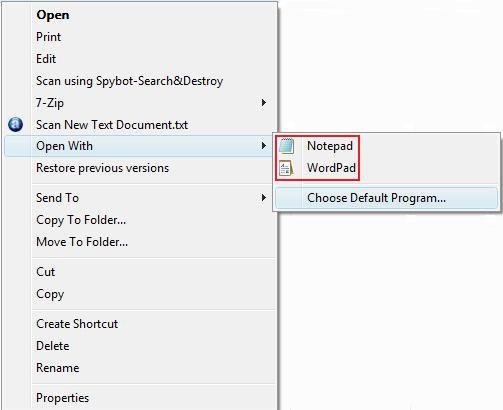
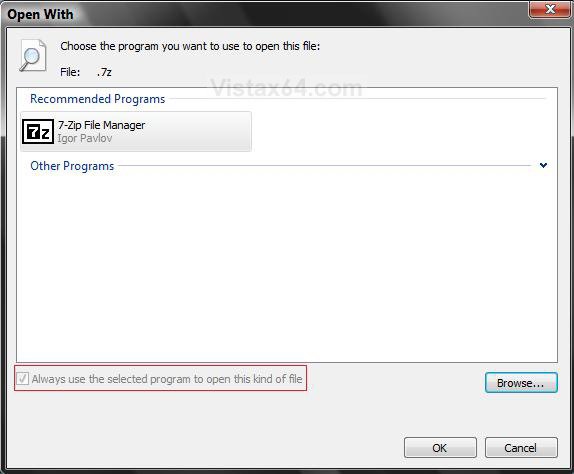
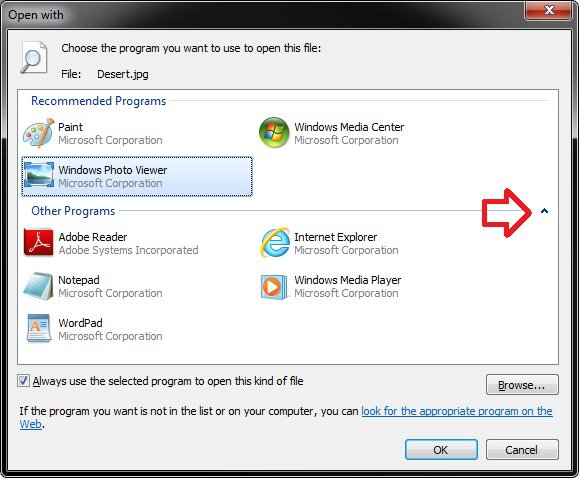
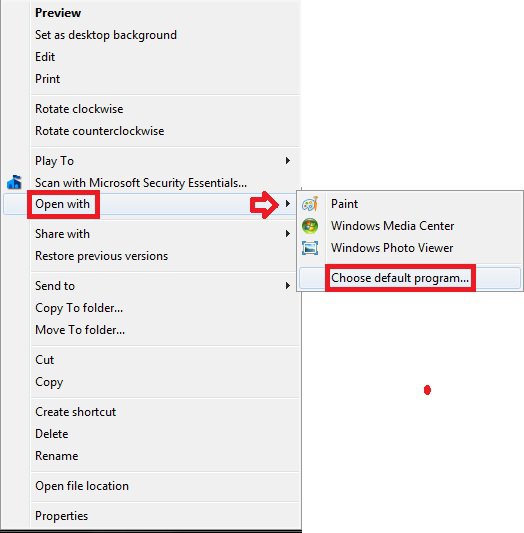
  When you right click on a file and click Open With, a list of registered programs are displayed in the Open With window to choose from. This will show you how to register a program so that it will be added to the Open With list.
RELATED LINKS: EXAMPLE: Open With Context Menu
context_menu.jpg
EXAMPLE: Open With window
open-20with.jpg

METHOD ONE:
Add to Open With Manually
NOTE
  This will not always register the program and add it the Open With window for next time.
1. See METHOD ONE here: How to Associate a Individual File Extension Type With a Program in Vista

METHOD TWO:
Add to Open With Using a Program
NOTE
  The program OpenWithAdd can be helpful in circumstances when you manually add a program and it does not get added to the Open With window. OpenWithAdd will register the program and add it to Open With a lot easier.
WRITTEN BY: Ramesh Srinivasan
1. Go to: http://windowsxp.mvps.org/openwithadd.htm

2. Click on the OpenWithAdd.zip download link at the link above to download the file.

3. Save it to your Desktop and extract the two files OpenWithAdd.exe and readme.txt.
NOTE: OpenWithAdd.exe is stand-alone exe file and does not need to be installed. You can move this file to where you want and create a shortcut for it.

4. Click on OpenWithAdd.exe to open the program.

5. Type in the full path of the exe file of the program you want to add to Open With, or click the browse (...) button. (See screenshot below)
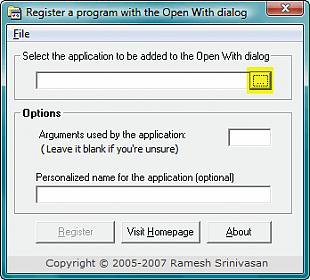
Name:  ow1.jpg
Views: 8079
Size:  22.5 KB
6. If you clicked browse (...), then navigate to the exe file of the program you want to add to Open With. (See screenshot below)
A) Click on Select.
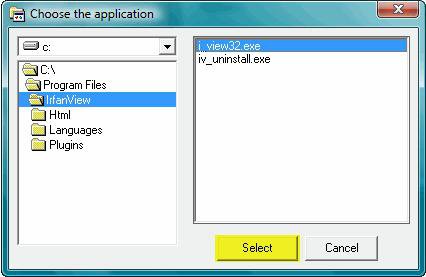
select.jpg
7. Click on Register. (See screenshot below)
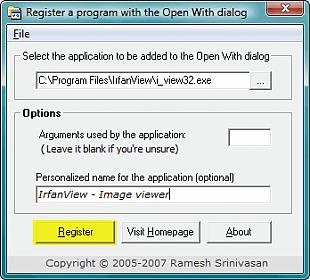
Name:  ow3.jpg
Views: 8085
Size:  24.5 KB
8. It is now added. (See screenshot below)
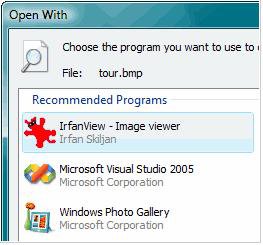
Name:  Open_With_After.jpg
Views: 8084
Size:  15.7 KB
That's it,
Shawn

Published by
Brink's Avatar
Administrator

Join Date: Apr 2007
Location: Texas, USA
Posts: 25,812
Rep Power: 150
Brink has a reputation beyond reputeBrink has a reputation beyond reputeBrink has a reputation beyond reputeBrink has a reputation beyond reputeBrink has a reputation beyond reputeBrink has a reputation beyond reputeBrink has a reputation beyond reputeBrink has a reputation beyond reputeBrink has a reputation beyond reputeBrink has a reputation beyond reputeBrink has a reputation beyond repute

Tutorial Tools

Applies to
All Vista Versions
64 Bit & 32 Bit

Old 08-04-2009  
Wildflower
Newbie


Join Date: Aug 2009
Vista


Re: Open With - Add Program

You rock. I've been looking for a fix for this for weeks and yours is the easiest way. Others had me playing with the registry. thanks

My System SpecsSystem Spec
Old 08-04-2009  
Brink
Administrator


Join Date: Apr 2007
Vista x64 Ultimate SP2, Windows 7 (7600) x64


Re: Open With - Add Program

You're welcome Wildflower, and welcome to Vista Forums.

All credit belongs to Ramesh though for writing the program.
My System SpecsSystem Spec
Old 08-05-2009  
Wildflower
Newbie


Join Date: Aug 2009
Vista


Smile Re: Open With - Add Program

Thanks for the heads up, but I would have never found it if it wasn't for you.
My System SpecsSystem Spec
Old 08-05-2009  
whs
Master


Join Date: May 2008
Vista home premium 32bit


Re: Open With - Add Program

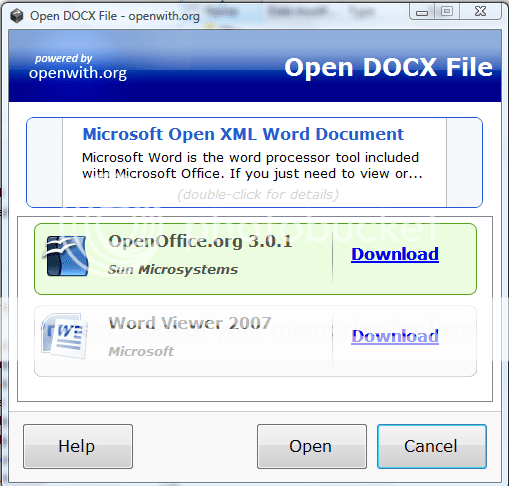
I use a similar facility from Free programs to open any file extension! - that works very well too. But it never hurts to have options. The nice feature I found with that one is that it will propose downloads for a suitable program in case you have none fitting on your system.
Update: This is an example of the window shown after I right click on a word file and go to "open with":

Click the image to open in full size.

Last edited by whs; 08-05-2009 at 02:54 PM.. Reason: typo
My System SpecsSystem Spec
Old 08-05-2009  
Wildflower
Newbie


Join Date: Aug 2009
Vista


Talking Re: Open With - Add Program

This "OpenWith" program looks pretty simple to use......right up my alley! Thanks! And I really appreciate the people who attach pictures to explain how to use programs. Really helps me.
My System SpecsSystem Spec
Comment

Tutorial Tools


Similar Threads
Tutorial Category
Startup Program does not Open Vista General
open program Vista file management
unable to open a program Vista installation & setup
Cannot open program Vista General
How do I open the program??? Vista mail


Vista Forums is an independent web site and has not been authorized,
sponsored, or otherwise approved by Microsoft Corporation.
"Windows Vista", the Start Orb, and related materials are trademarks of Microsoft Corp.
© Designer Media Ltd
Tutorial powered by GARS 2.1.8m ©2005-2006

1 2 3 4 5 6 7 8 9 10 11 12 13 14 15 16 17 18 19 20 21 22 23 24 25 26 27 28 29 30 31 32 33 34 35 36 37 38 39 40 41 42 43 44 45 46